What’s The Bug?
If you create a new page by clicking the + icon on a page widget you would expect that this newly created page is a page linked to the page of the widget.
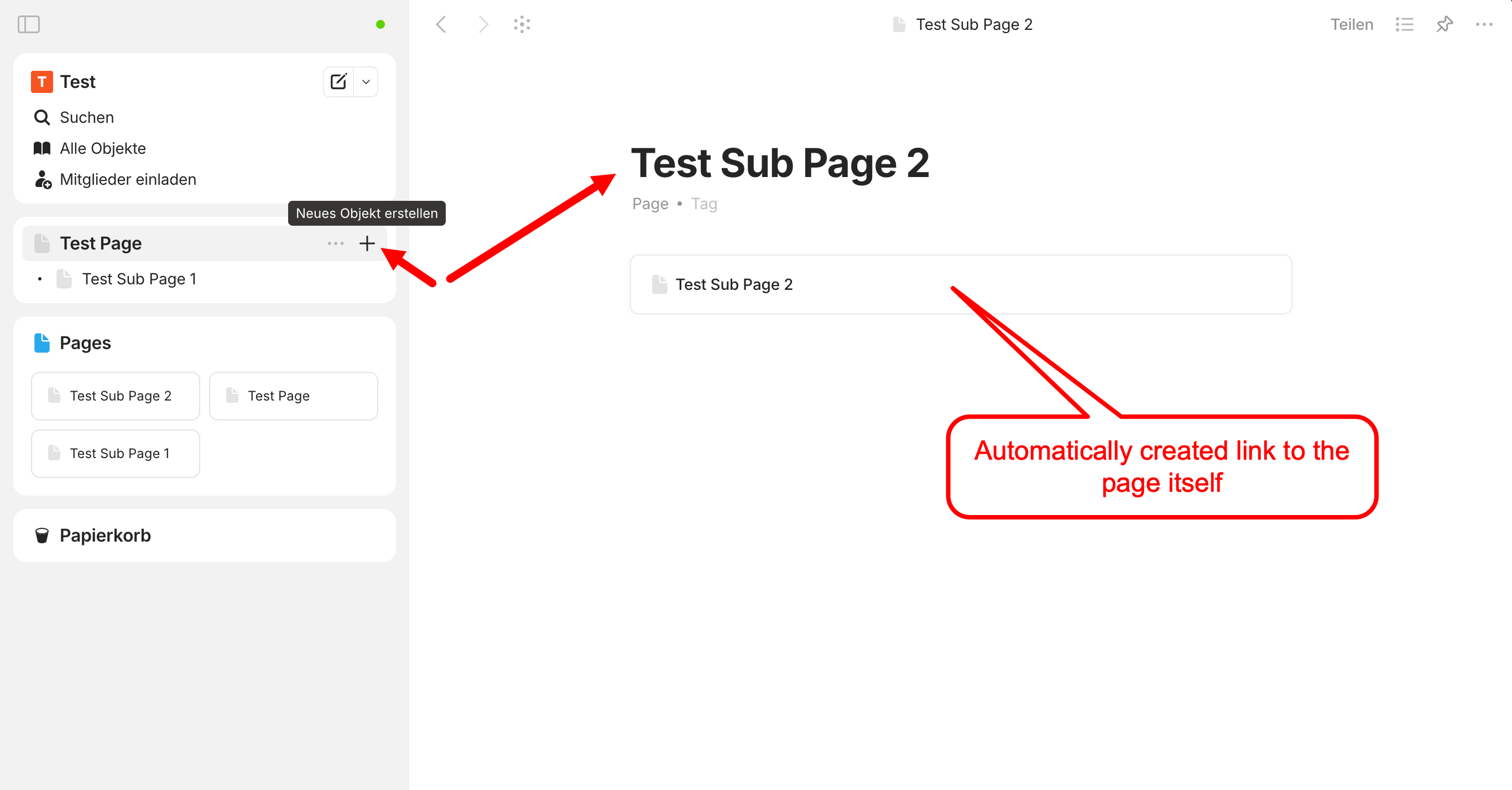
Instead that newly created page is not linked, but has a link pointing to itself that is automatically created.
How To Reproduce It
- Create a page
- Create a widget from that page
- On the widget, click the + icon (create new object)
- The new page is not linked to the page of the page widget as one would expect (1st issue).
- A new page is created with a link to itself as content (2nd issue)
Image or Video
The Expected Behavior
One would expect that a new page created by clicking on the + button of a page widget would be automatically linked the widget’s page (in the sense of a “sub page”) since it’s already possible to create a new page in three other ways (main menu, space, page list widget).
So, if it’s intentionally that new pages created via a page widget are not linked to the page of the widget, this is simply not intuitive.
As for the 2nd issue - this is an obvious bug, because it makes no sense to have a link on a page to the page linking to itself.
Additional Context
Both issues are also true for duplication of pages/linked pages from within a widget.
Device
iMac, MacBookPro
OS
Sonoma, Big Sur
Anytype Version
0.47.17-beta
Network Mode
AnySync
Technical Information
Will be provided on request.