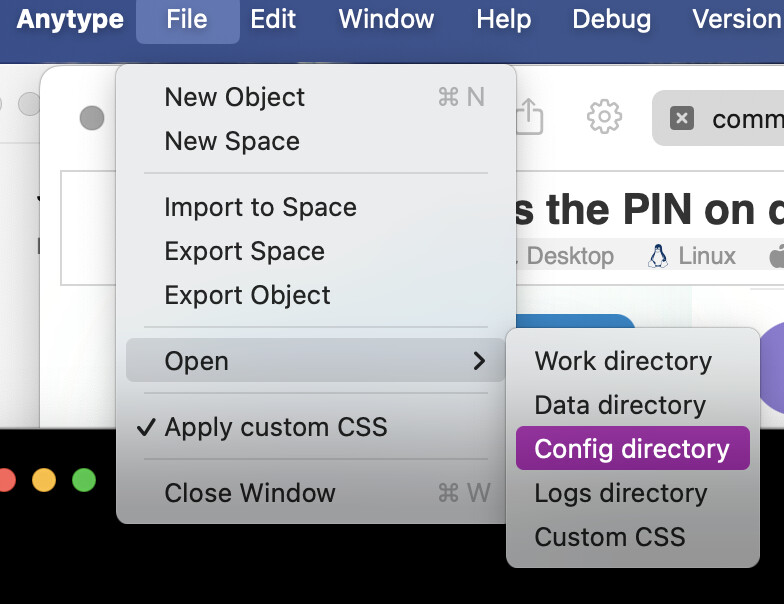
I can workaround the PIN when I edit the localStorage-.json file and remove the PIN from there.
So the PIN should be useful to protect Anytype’s content from other people who are able to launch Anytype, pass by my computer at a workspace or family members or whoever.
But Anytype can only get accessed and launched when the computer is unlocked anyway. Then the PIN comes in for the feel of having another layer of security. This just seems like handwaving though. As long as the computer is unlocked, someone can go into the finder / explorer / file manager, navigate to the user’s Anytype preferences and remove that pin, that is just a simple value and not protected at all.
The key on the other hand is protected via the OS keychain. So the user needs to actively unlock it to gain access to it. But as long as the user account is unlocked, Anytype cannot be protected anymore, regardless of the PIN. So the key is behind the keychain but the PIN is not and a user can remove it and export everything.
Sure the import wouldn’t work that well but that is another story.
This PIN provides basic security, preventing unauthorized access to your app if someone briefly gains access to your computer. We considered removing it to avoid confusion but kept it as some users find it helpful.
I find the PIN useful, although I know it’s not very secure.
Please don’t remove it @anton
When I sit in my study class and left my table for a minute, to tale a coffee from the machine, I’m happy with such a minimal protection against curious views from my colleagues.
They will surely not try to “hack in”. But if I share a Space with some of them, they are familiar with Anytype and someone could take the chance to “have a briefly look” into other Spaces if I’m out of the room for a moment.
There could (should!) be some more options to configure the time when this minimal security function kicks in and locks Anytype, but basically it’s a useful thing.
.
This, of course, is a bit too easy … :-/
– Thanks for signaling that!
I actually find this level of “light” security quite useful. Perhaps users could be made even more aware when creating their PIN codes that this does not offer definitive protection when accessing the OS file system. That said, I think the current warning is already quite clear.
Set a 6-digit PIN for your application screen when unattended. PIN adds a quick layer of privacy for your app. It prevents casual viewing but doesn’t enhance data encryption. Your primary data remains secure with your account Key. PIN protection is recommended when you step away from your device.
it says it doesn’t enhance data encryption, which is fine
But it should also point out that anyone who sees the PIN screen can work around that without much afford.
It is not a “quick layer” of security as there is a quick way to remove it entirely.
edit: you don’t even need to locate the folder yourself. in a locked state you can go to the config folder here
Yes, but…
If someone gains access to the configuration directory, then they definitely do not have good intentions, unless it is an emergency. And if the PIN is not technically really well secured, then that someone will certainly find a way to gain access anyway.
Either someone stops in front of a private area because the property is surrounded by a fence, which tells them that this is a private area, or they ignore this meaning and jump over the fence and enter the property intentionally without authorization.
Not having a fence at all, because it can be jumped over, is not good idea either, because then the area of privacy is not even clearly marked for everyone to see. On the other hand even a sturdy fence will only deter certain intruders with malicious intentions.
Currently, the PIN is a relatively low fence that just signals: You have no business here. And that seems to be the current intention of the Anytype team.
I think, if you want to make it technically effective in terms of security, then some effort would have to be made, presumably by means of encryption, but I know little about that.
The issue I think is that the user won’t have all this in mind. When I think of a PIN elsewhere (phone lock screen PIN, Microsoft Windows account PIN, a number based lock at a door), there is no way around that PIN but knowing it.
The message that the app signals to the user is false. Calling it a “quick layer” doesn’t give any clue to the actual weak implementation.
PIN additionally encrypts the key in the OS / device keychain
PIN never gets stored anywhere
after entering the PIN, Anytype gets the key from the keychain and decrypts it
This way not even a user passing by the computer could get the key from the keychain even if the OS account is compromised (over managed by the employer).