WHAT IS THE BUG
On Andoid 16, regions at close to the bottom of the screen get inaccessible when Android 3-button navigation is used on the device. This happens on multiple roll-up menues, that come up from the bottom of the screen. Other than expected, the Android 3-button section is displayed and it overlays the Anytype screen. Anytype buttons in that lower region can than not be accessed. Here is an example:
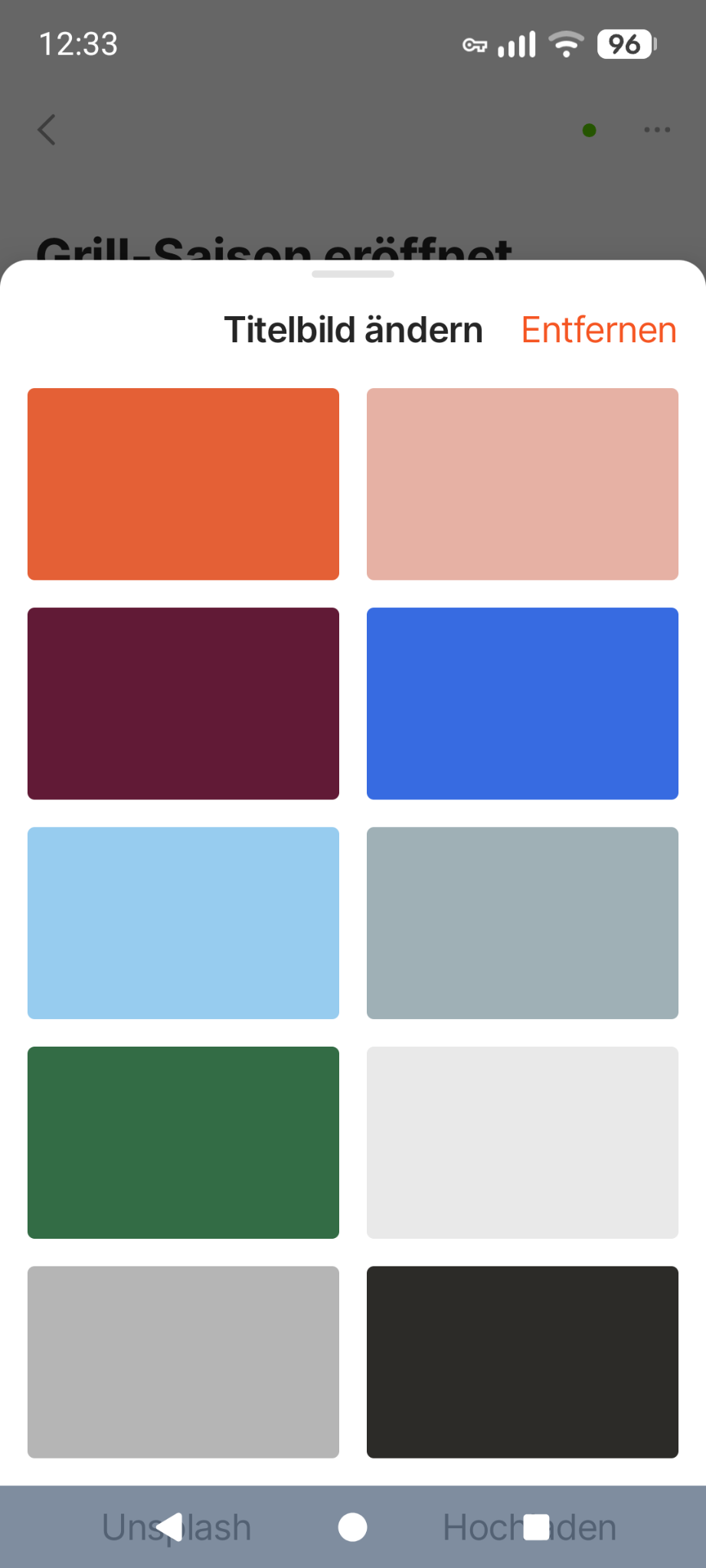
As you can see, the buttons “Unsplash” and “Hochladen” are obscured by the Android 3-button section and not accessible.
HOW TO REPRODUCE IT
-
Enable 3-button navigation in the device settings of an Android 16 device
-
Open Anytype
-
Open an object and e.g. select “Title photo”. Scroll down the menu to the buttons
THE EXPECTED BEHAVIOR
I’d expect, that the default Android 3-button section is not showing up in that context. Albeit, in others where this issue could show up, it might be intended to show the Android 3-button section. In any case, the Anytype app’s menu should react accordingly and ensure that everything is accessible.
ADDITIONAL CONTEXT
When Android 16 arrived, I observed this kind of issue in several apps. It required fixes in the apps.
TECHNICAL INFORMATION
Mobile:
Gerät: Pixel 7 Google
Android-Version: 36
App-Version: 0.45.12
Buildnummer: 4512
Bibliotheksversion: 0.49.0-rc08
Konto ID: A84oWMreswi477mdYazEbvM62U1ffVHVLsC4fNrug1eQQMUZ
Gerät ID: 12D3KooWP8gp1dGkx3m1Ty7sLMCx2soHJADJx12GRfdjYRy4SsxE
Analyse ID: Mbe2mEghu3qyFowMGMEo2Fv5kVBaZgSr6qCTdqkTVh4uQAhZ
Ethereum-Schlüssel ID: 0xfaa0fDC421e0D16113b18D1516f9d87ea4C3ac2e