What is the name for the scroll bars color?
::-webkit-scrollbar {
  width: 8px;
  height: 8px;
  background-color: transparent;
}
::-webkit-scrollbar-thumb {
  background-color: #0003;
}
Thank you!
Hmm, where should I add it? Using the following code, it didn’t change the color to reddish:
html.themeDark {
    ::-webkit-scrollbar-thumb {
        background-color: rgb(98, 0, 255);
    }
}
While adding this code made the scrollbar wider:
html.themeDark {
     ::-webkit-scrollbar {
          width: 12px;
          height: 8px;
          background-color: transparent;
    }
}
Please check if there is any other similar code below your code that covers this red.
If you are using my anytype mist theme, there is indeed such a code at the bottom
For CSS priority, !important is always the highest, followed by styles with more rules, if the rules are the same, the priority of the code below is higher.
Do you mean within my custom.css file, some code is overriding this property? If so, here is my complete css file code, everything on it works fine, even the 12px width, but the scrollbar background color doesn’t apply:
html.themeDark {
    --color-text-primary: #dcdcdc;
    --color-text-secondary: #8d8d8d;
    --color-text-tertiary: #505050;
    --color-text-inversion: #171717;
    --color-shape-primary: #555;
    --color-shape-secondary: #4E6085;
    --color-shape-tertiary: #2b2b2b;
    --color-shape-highlight-medium: rgba(238, 238, 238, 0.12);
    --color-shape-highlight-light: rgba(238, 238, 238, 0.06);
    --color-control-accent: #d4d4d4;
    --color-control-active: #9a9a9a;
    --color-control-inactive: #464646;
    --color-control-bg: #fff;
    --color-bg-primary: #1A202C;
    --color-bg-secondary: #232B38;
    --color-bg-tertiary: #464646;
    --color-bg-loader: rgba(0,0,0,0.7);
    --color-system-accent-50: #9f6b00;
    --color-system-accent-25: #f09c0e;
    --color-system-selection: rgba(24, 163, 241, 0.15);
    ::-webkit-scrollbar {
        width: 12px;
        height: 8px;
        background-color: transparent;
    }
    ::-webkit-scrollbar-thumb {
        background-color: rgb(241, 3, 3);
    }
}
It works fine on my side. But first of all, do you mean the background color of the scrollbar track or the color of the slider? If the former then you should modify ::-webkit-scrollbar

I want to change the thumb (slider) color not the background.
Using the following code:
html.themeDark {
    ::-webkit-scrollbar {
        width: 8px;
        height: 8px;
        background-color: rgb(0, 255, 98);
    }
    ::-webkit-scrollbar-thumb {
        background-color: rgb(255, 0, 0);
    }
}
Generates this:

And when I set the code to:
html.themeDark {
    ::-webkit-scrollbar {
        width: 8px;
        height: 8px;
        background-color: rgb(0, 0, 0);
    }
    ::-webkit-scrollbar-thumb {
        background-color: rgb(255, 0, 0);
    }
}
I get this:

Seems like that the only one working is the first bg-color while the second is ignored.
Even if I set both colors to black, the slider appears in light gray color.
Could you reproduce your entire code? Just this snippet works without any problems.
Here’s the whole custom.css file:
html.themeDark {
    --color-text-primary: #dcdcdc;
    --color-text-secondary: #8d8d8d;
    --color-text-tertiary: #505050;
    --color-text-inversion: #171717;
    --color-shape-primary: #555;
    --color-shape-secondary: #4E6085;
    --color-shape-tertiary: #2b2b2b;
    --color-shape-highlight-medium: rgba(238, 238, 238, 0.12);
    --color-shape-highlight-light: rgba(238, 238, 238, 0.06);
    --color-control-accent: #d4d4d4;
    --color-control-active: #9a9a9a;
    --color-control-inactive: #464646;
    --color-control-bg: #fff;
    --color-bg-primary: #1A202C;
    --color-bg-secondary: #232B38;
    --color-bg-tertiary: #464646;
    --color-bg-loader: rgba(0,0,0,0.7);
    --color-system-accent-50: #9f6b00;
    --color-system-accent-25: #f09c0e;
    --color-system-selection: rgba(24, 163, 241, 0.15);
    ::-webkit-scrollbar {
        width: 8px;
        height: 8px;
        background-color: rgb(0, 0, 0);
    }
    ::-webkit-scrollbar-thumb {
        background-color: rgb(255, 0, 0);
    }
}



I’ll test it on a Windows pc after I get off work
Okay, thank you, take your time.
It seems that an additional style was added for non-macOS packaging, causing the override in custom css to fail. Remember what I said earlier about priority? This is the second case, so we can use !important to force the override back.
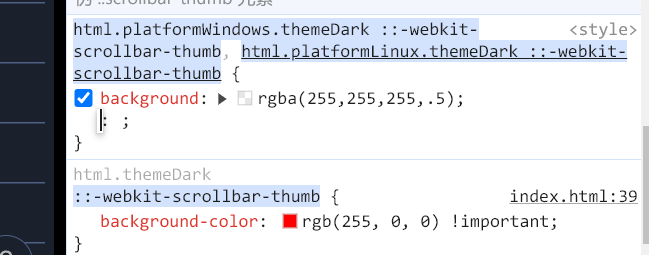
I see, now I get what you meant by using !important.
Thank you, @LavaC, this is brilliant.
thank you @LavaC
A plugin to modify such values would be great.
Obsidian has a smaller team, but through 2 main caveats they grow fast:
- Create web searchable spaces
- Create plugins to advance the experience of Obsidian
Thanks for a good post @LavaC . Is it possible to reduce the font size and change it only in the sidebar using custom css? If so, could you share the code?
Thanks.
#sidebar .inner .name {
  font-size:xxpx;
}