Templates that trigger the creation of other instances from another type

What do you need help with?

I need help in designing an approach for a weekly / bimonthly journal.

TLDR :

I want to integrate a Type (B) in the template of another Type (A) so that when I create a new instance of A, a few new instances B are consequently automatically created.
This doesn’t work. So I am looking for another way to answer my need.

The idea :

  • Each week, I create an entry in the journal. Each entry contains different elements :
    → weekly target
    → mental wellbeing
    → physical well being
    → pro life
    → family life

  • For each entry, I would write :
    → Projectively (what I want to achieve)
    → Retrospectively (did I manage what I wanted to do)

  • The journal would have weekly entries & bimonthly entries.
    The idea is to reflect on it, see evolutions, etc. So I need to easily compare elements over different entries so that, every 2 months :
    → I perform a helicopter review from a display of each element category from entries of the past 2 months.
    → I issue a personal learning & I set new objectives for the next 2 months period / my next mid-term target.

Additional Context

I would need elements to be accessible via queries (easy to set filters) so it doesn’t make sense to create properties (format text) inside the Type Journal.

So my ideas was to use Templates !

The Type Journal, with 2 templates :

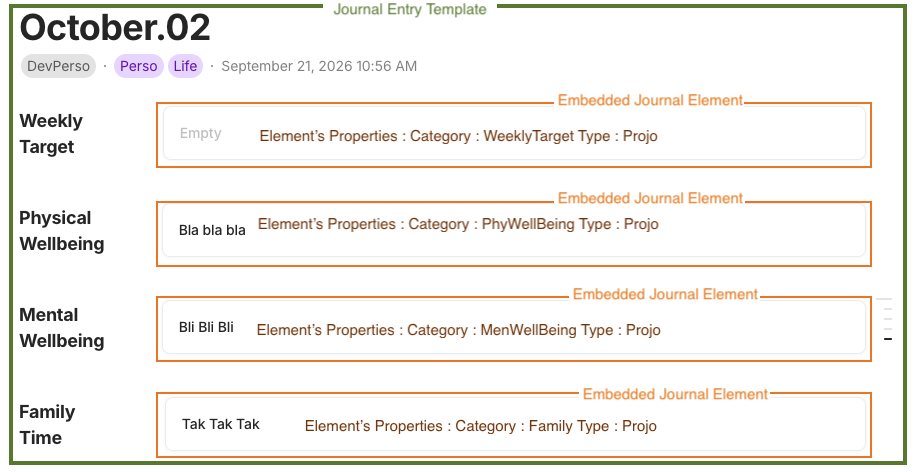
  • Weekly Entry / with links to elements (see image attached)
  • Bimonthly Entry / containing a query with the necessary filters

Besides, I would to design a Type Elements with 2 properties :

  • Journal Element Category : weekly target, mental wellbeing, physical well being, pro life, family life
  • Journal Element Type : projo, retro

The Type Journal would contain a template with pre-populated elements.
I created a new line, then turn [it] into object [element] with the prepopulated Journal Element Category & Journal Element Type

See attached image.

My issue (where the card castle collapses) :

Creating a new Entry of my Journal using the Weekly Entry template doesn’t trigger a batch of new Elements with the needed properties. Instead, it just calls for the elements that were already created from the template.

I end up needing to leave the templates with simple lines & every week, I have to manually turn them into object & for each, change the properties Category & Type. The purpose of Template loose its entire meaning

PS 1 : I would like not needing to rely on an AI just to execute that process manually every time I create a new instance of a journal entry.
PS 2 : I figure (and hope) that the structure of Anytwo would provide an entire other world of solutions that would help us making it without a sweat.

Image or Video
OS

Mac OS

Anytype Version

0.56.5

Network Mode

AnySynce / Peer to Peer

Technical Information

ID : A5mATdSwJtJp4bE23yoGdgZiaYsMiNtkhhVu2XhjEcq6sy2Q

Just so I’m clear, you’re asking for recurring objects to be created on a schedule (automation)?

We may not have done a good job explaining this, but the way AI works (if you choose to use it) in Anytwo is not the way you may think. Quick description:

  1. You ask the LLM of your choice, to schedule these recurring objects to be created on your schedule.
  2. The LLM will build a program that operates on the schedule.
  3. Each time it’s triggered, it is the program that is run, not the LLM re-doing the entire inference again. This is what enables Anytwo to perform more deterministic results since it’s not relying on an LLM’s inference every time to perform a task.
  4. If you want to adjust/change the actions performed, you ask the LLM and it will edit the program itself that gets re-run.

In other words, it’s custom code in your vault that does what you specify each time—the LLM just helps you to build it to your exact needs.

Hello Kaye !

No… that would actually be a workaround.

I want dynamic creation of an object through templates.
I will illustrate with a simpler example :

Illustration

I have 3 object types :

  • “Initiative” - layout Basic : to describe a project
  • “People” - layout Profile : to describe people working on a project
  • “InitiativeMember” - a Collection type : to list a certain gathering of people (around a specific initiative)

The initiative type has 2 templates :

  • Draft
  • Launched

The draft template is only a list of blocks with text information, maybe files.

The Launched template would hold an inline instance of the Collection InitiativeMember from which you can create by default a new instance of People : either we pick the people if they already exist or we create a new one.

Today, all you can do is create a Collection and add this Collection to the template.
Issue : everytime you create a new instance, it will call the same Collection again & again... So you end up with all people in the same collection.
The only alternative is to leave the template empty and each time you create a new instance, you need to create a new online collection, add it to the object & configure its display & filter options... again & again & again.

In practice

STEP 0 :

Content of my base :
Type Initiative : 0 element.
Type InitiativeMember : 0 element.
Type People : 0 element.

STEP 1 :

  • I create a new Initiative with the template “Launched” called Initiative#1.
    < It automatically creates a new instance of the Collection InitiativeMember. >
  • I add 2 members : Jay & Philip.

Content of my base :
Type Initiative (layout Basic) : 1 element

  • Initiative#1

Type InitiativeMember (Collection) : 1 element

  • InitiativeMember-1 | backlinked to Initiative#1

Type People (layout Profile) : 2 elements

  • Jay | backlinked to InitiativeMember-1
  • Philip | backlinked to InitiativeMember-1

STEP 2 :

  • I create another Initiative with the template “Launched” called Initiative#2.
    < It automatically creates a new instance of the Collection InitiativeMember. >
  • I add 2 members : Philip (who already exists) & Kate.

Content of my base :
Type Initiative (layout Basic) : 2 elements

  • Initiative#1
  • Initiative#2

Type InitiativeMember (Collection) : 2 elements

  • InitiativeMember-1 | backlinked to Initiative#1
  • InitiativeMember-2 | backlinked to Initiative#2

Type People (layout Profile) : 3 elements

  • Jay | backlinked to InitiativeMember-1
  • Philip | backlinked to InitiativeMember-1 & InitiativeMember-2
  • Kate | backlinked to InitiativeMember-2

STEP 3 :

  • I create another Initiative with the template “Launched” called Initiative#3.
    < It automatically creates a new instance of the Collection InitiativeMember. >
  • I add 1 member : Marc.

Content of my base :
Type Initiative (layout Basic) : 3 elements

  • Initiative#1
  • Initiative#2
  • Initiative#3

Type InitiativeMember (Collection) : 3 elements

  • InitiativeMember-1 | backlinked to Initiative#1
  • InitiativeMember-2 | backlinked to Initiative#2
  • InitiativeMember-3 | backlinked to Initiative#3

Type People (layout Profile) : 4 elements

  • Jay | backlinked to InitiativeMember-1
  • Philip | backlinked to InitiativeMember-1 & InitiativeMember-2
  • Kate | backlinked to InitiativeMember-2
  • Marc | backlinked to InitiativeMember-3

STEP 4 :

  • I create another Initiative with the template “Launched” called Initiative#4.
    < It automatically creates a new instance of the Collection InitiativeMember. >
  • I add 3 members : Jay, Philip & Marc.

Content of my base :
Type Initiative (layout Basic) : 4 elements

  • Initiative#1
  • Initiative#2
  • Initiative#3
  • Initiative#4

Type InitiativeMember (Collection) : 4 elements

  • InitiativeMember-1 | backlinked to Initiative#1
  • InitiativeMember-2 | backlinked to Initiative#2
  • InitiativeMember-3 | backlinked to Initiative#3
  • InitiativeMember-4 | backlinked to Initiative#4

Type People (layout Profile) : 4 elements

  • Jay | backlinked to InitiativeMember-1 & InitiativeMember-4
  • Philip | backlinked to InitiativeMember-1 & InitiativeMember-2 & InitiativeMember-4
  • Kate | backlinked to InitiativeMember-2
  • Marc | backlinked to InitiativeMember-3 & InitiativeMember-4

Note :

If I ever created a new object of the type Initiative, but with the template “Draft”, no new object of the type InitiativeMember would be created … since not in the template.

Hope this is clearer.