What’s The Bug?
SVG space profile images show as a broken image in Windows
How To Reproduce It
- On Mac, view your space profile
- Click the image to open the Upload modal
- Drag an SVG onto the modal (looks great on Mac!)
- View the space on Windows
Image or Video
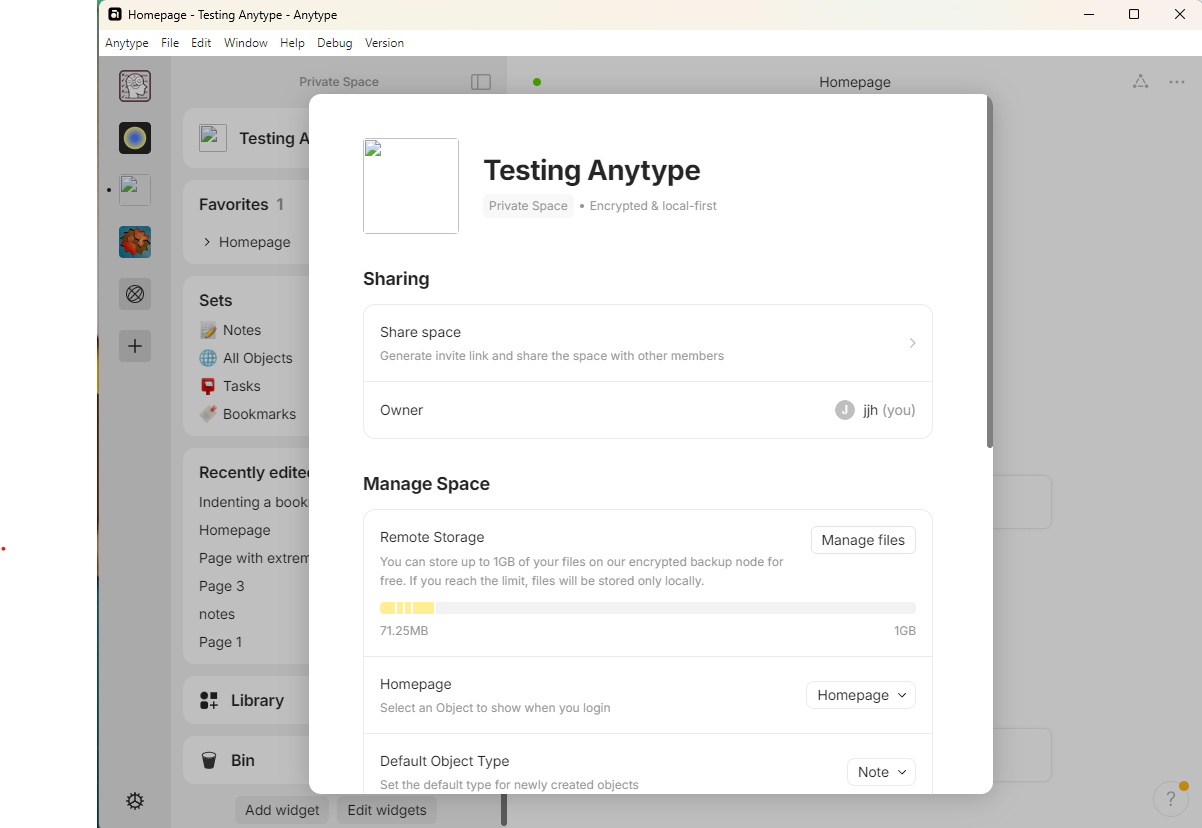
The Expected Behavior
I’d expect the profile image to be seen.
Additional Context
~~Might be the same bug: Shared space : broken image - #22 by lacno29 ~~
In researching this problem I noticed two things that makes me think that allowing SVGs at all was not intended:
- If I click “upload” instead of dragging the SVG, SVG files are grayed out.
- Oh.
Device
MacBook Pro, Windows 11 Desktop
OS
Sequoia 15.0.1, Windows 11
Anytype Version
0.42.38-beta
Network Mode
AnySync
Technical Information
OS version: darwin x64 15.0.1
App version: 0.42.38-beta
Build number: build on 2024-10-11 13:08:06 +0000 UTC at #1f6513697af29f7e061c0ac001376b99793bcbc3 (dirty)
Library version: v0.36.0-rc8
Anytype Identity: A7ePRwuwHmLb56NWRSenFGZtMsLwjQABNFUKApgRp9oNeJ8U
Analytics ID: 190136f4-744f-4076-9540-7991326e2a95
Device ID: 12D3KooWDaqeLe66yXjpqYNSxM9RnV1GjzQuL4gxy4bAcPkkJco1
