WHAT IS THE BUG
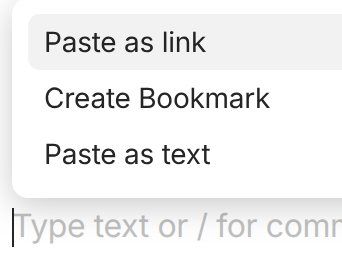
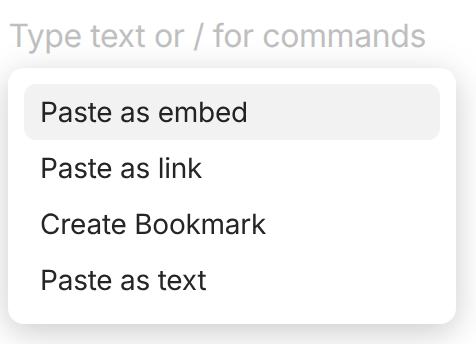
Normally when you paste a URL into the editor, a context menu appears with three options in which the first is: “Paste as link.” However, when pasting a URL that is supported by certain embeds, like a YouTube video, this sequence changes so that the first option becomes “Paste as embed,” which is inconsistent and causes a problem with workflow muscle-memory. Muscle-memory causes me to usually just hit “Enter” because I merely want to paste the text of the URL into AnyType like normal, not embed it.
THE EXPECTED BEHAVIOR
I would expect the sequence of options to remain consistent in the menu. If a new option appears because of the type of URL that I’m pasting then it should appear at the bottom of the menu so that it doesn’t mess up the expectation for the sequence of menu items or a user’s muscle-memory. That way the user can make a conscious decision to choose the new option (embed) if that is what is desired.
Normally, a person gets used to a reliable menu so if you’re working quickly and simply hit “enter” after pasting a URL, it simply pastes the URL into AnyType, which is normally all that I want.
If I want it to actually embed the content from the URL, which is not merely pasting it, then that is a special case and I should make that decision for that case.
ADDITIONAL CONTEXT
Note that not all of the AnyType embed options work this way. Most of the time if I past a URL to a page that is offered as an embed, AnyType does not even include that new option in the context menu. For example, try pasting a Google Map link. Although there is an embed for Google Maps, pasting one of those URLs continues to offer me the consistent three-option context menu, which is a more reliable behaviour.
TECHNICAL INFORMATION
OS version: linux x64 6.17.0-8-generic
App version: 0.53.1
Build number: build on 2025-12-19 12:23:54 +0000 UTC at #e63221baedd2e83396d1390bac9b46703e6b4157
Library version: v0.44.0-nightly.20251220.1
Anytype Identity: A8E7MBkEQwQRbJKuFAP3bKXS7iYTc9ff4s2XdXB2pWvWjHkc
Analytics ID: 2769203f-17e0-483e-bb8b-8ee886a1117f
Device ID: 12D3KooWEqR7P4wJ6ZWpLHxJ6r4Vk1QAxto6TiBTArFGnetVcA8o
Ethereum Address: 0x262B8C7eD542Bb6c5F0d1D1332f440b73CB820c5
I can understand wanting the flexibility. In my opinion though, I would find it very awkward to custom sort menus. I really don’t like having to mess with how an application works, I much prefer it to support what I am doing and keep itself in the background. I imagine there are a variety of ways to accomplish something convenient for both use-cases but without breaking the application’s consistency.
For example, AnyType has already established a preference in the settings, which lets a user change the “Link to object style.” There could be a similar setting that let’s a user choose whether or not to automatically embed links.
Or there could be a distinct sort of shortcut dedicated to embedding things.
I don’t know what is best, but I’m sure there is some creative way not to break consistency.
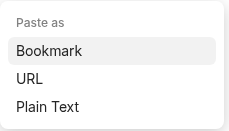
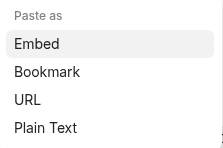
Hello, I’ve been trying the latest beta releases (right now on 0.53.45-beta). I noticed that previously this issue had been fixed and the sequence of menu options made consistent but now it seems like it got undone in the beta. Additionally, the former menu options that appear when [CTRL-V] pasting a URL into AnyType seem to have a new sequence.
For example now the regular paste sequence of menu items is:
When pasting any other text or image for example, AnyType behaves as commonly expected, it just pastes the thing directly in. This seems to be a clear, default behaviour.
I would like to suggest that the CTRL-V / Paste functionality work consistently.
Default paste behaviour is to paste whatever the thing is, so I believe that should be the primary option in all cases. It enables muscle memory and reduces friction for the user to accomplish a task. In the new beta state I have to stop every time and question whether I also want to create a bookmark (which is an additional activity) than rapidly pasting some information. If something is plain text for example, it just gets pasted, there aren’t other options that AnyType tries to propose to me.
When AnyType recognizes that there could be other options than merely pasting, it should offer those after the default paste behaviour in the menu. For example, pasting a URL should provide this sequence:
URL
Plain text
Bookmark
Pasting an embeddable link could then offer this consistent sequence:
URL (because it is still ultimately, a URL)
Plain text
Bookmark
Embed
I suppose a slight exception would be when pasting a URL on top of existing selected text, where it already adds the URL as a link to that text without asking at all (and leaves the text in place). [edited because I initially got the numbering mixed up and hadn’t explained my proposed logic well]
Dear Filip,
instead of this, could you please check with the design team if they could make the menu entries movable per drag & drop?
This way, every user could arrange (sort) the entries as he likes.
A menu that has entries that can be arranged manually would satisfy everyone. – Never again discussions and requests because of the entry’s sequence.
@owlyph@Code-Jack Hey, we’ve decided to implement a dynamic menu that remembers the last option used, rather than changing the order of the options. I hope you’re still happy with that.
But nope, I don’t like the idea.
It prevents the user from “fire & forget”. We would always be forced to look at the different options before we could “fire”. That’s an absolutely unnecessary new kind of friction.
The team should better remove frictions, instead of implementing more of them.
For example:
When I paste a web link, I use (similar often) either “paste as link” or “paste as text” (for a good reason). But I paste YouTube-links mostly "as “embed”. And I NEVER use “create Bookmark”.
With fixed menu entry positions, I know blindly how often I need to hit the arrow down key before “giving fire” with the enter key.
But it would be nice to have the option to manually arrange the sequence. – This makes the workflow also resistent against changings caused by additional option entries in future versions. We could always arrange it in such a way that our familiar workflow stays as we like it.
And to be honest, I can’t imagine a reason why the design team could have a problem with this obviously best solution?
No user would be forced to configure anything the UI. But everyone who wants it, could do it in an eye-blink even if he’s half asleep.
This kind of flexibility removes friction!
I beg you to bring my arguments again to the design team.
It sounded like a pretty cool solution at first because it would naturally follow what the user tends to do but as I played it out, I wonder if there is a risk that that means the menu option might end up bouncing around irregularly and make it actually more difficult to remember a natural sequence of events?