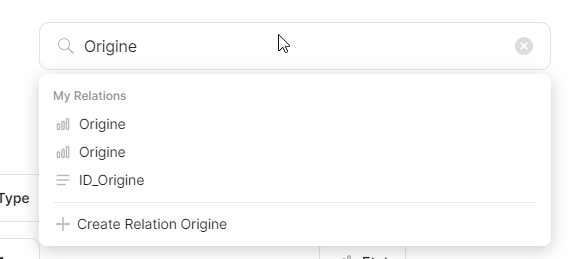
WHAT IS THE BUG
Library-> Relations → search
It doesn’t filter relation, you can only directly open or create. Bug or FR?
Why it’s a problem
I want to delete a “Origin” relation because I’ve two relation with the same name.
And I have a long list of relations.
If I search them, I can only open them or create.
And if I open one of them, I can’t delete them : this option is only is the Relations global list that I can’t filter.
(Should I open another FR?)
It seems to me that it used to work like that but I’m not sure.
If not, I can open 2 FR
You can’t delete Origin, it’s system, it’s used for defining where did object come from, import, clipboard, etc. and filtering or making a set for example.
Sorry @Razor, translating my example didn’t help .
It’s “Origine” :
I want to find it and delete but the Relations list is long (and not sorted by name), not easy to find something.
So I want to filter… but I can’t.
The “search or create” field only display a menu with the result, we can only open or create.
And I I open my relation : no way, no button, no option to delete it.
Upvoted.
The experience when deleting a relation is terrible. You can’t search for it to delete, you have to scroll down. Custom relations are not ordered alphabetically, so you are lost in a sea of relations.
And if you enter into it too see it it’s used, and then go back, you are back at the top of the list. So the scrolling begins anew.

 .
.