WHAT IS THE BUG
Detail what the bug does or prevents from doing:
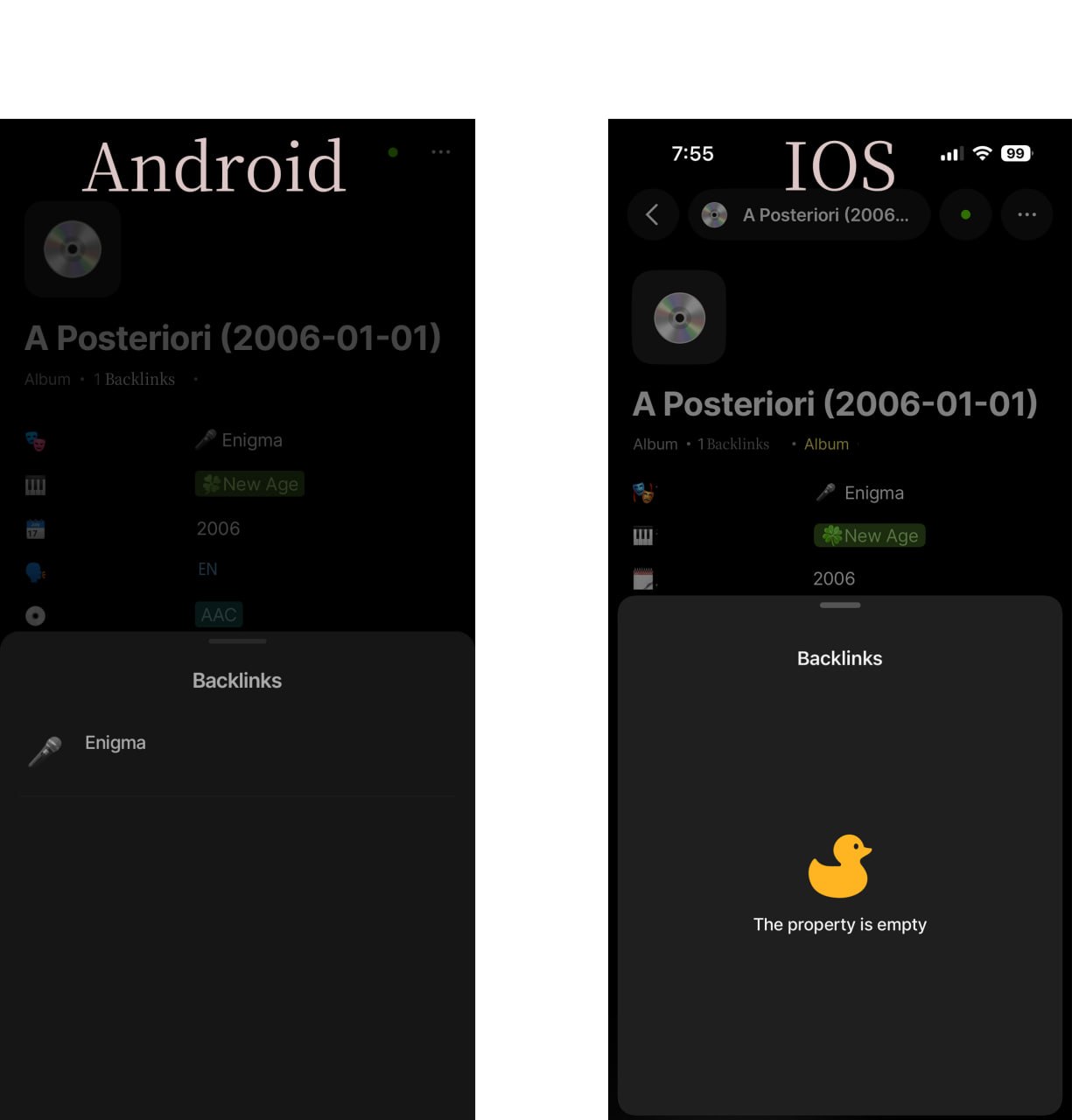
On iOS, the Backlinks property of a note appears empty even though backlinks exist and are displayed correctly on Android.
The same note, space, and synced data are used on both devices. Android correctly shows the backlink entry, while iOS displays “The property is empty” in the Backlinks section.
This prevents users from viewing existing backlinks on iOS and creates inconsistent behavior across platforms.
HOW TO REPRODUCE IT
Outline the steps needed to reproduce the behavior in sequence:
-
Create or open a note that is referenced by another note.
-
Ensure the note has at least one valid backlink.
-
Open the note in the Android version of Anytype.
-
Scroll down to the Backlinks property.
-
Verify that the backlink is displayed correctly.
-
Open the same note in the iOS version of Anytype using the same synced space/account.
-
Scroll down to the Backlinks property.
See an error:
The Backlinks section shows “The property is empty” instead of displaying the existing backlink(s).
 I was able to provide a screen-shot of the bug, here it is:
(Attached screenshot showing Android displaying 1 backlink while iOS shows an empty Backlinks property.)
THE EXPECTED BEHAVIOR
Describe what you expected to happen:
The iOS version should display the same backlinks as the Android version for the same note.
Backlinks should be synchronized and rendered consistently across platforms.
ADDITIONAL CONTEXT
-
The issue occurs on the same note and in the same synced Anytype space.
-
Android correctly reports 1 backlink and displays the linked note.
-
iOS also indicates that the note has backlinks (the header shows “1 Backlinks”), but the Backlinks property panel is empty and displays “The property is empty”.
-
This suggests the backlink count may be synced correctly, but the backlink list is not being rendered or loaded properly on iOS.
TECHNICAL INFORMATION
Provide your setup info:
Android
-
Anytype Version:0.47.3
-
Android Version:android 11
-
Device Model:Google Pixel 8
iOS
-
Anytype Version:0.47.0
-
iOS Version:26.2
-
Device Model:iphone 15