Is there a way to attach a “Set” to a contact template and have it be able to pick up the contact once it’s populated?
If I understand you correctly, this is how it works:
type “/link” in the template. Then select the Set.
Save the template.
If you later create an object (page etc.) that uses this template, then the Set is linked in it.
Here is what I see so not following. Zight Recording 2024-01-07 ...
As I wrote: type “/link”.
After typing these five characters, you can choose what you want (your Set).
Ok not giving me what I want. If Im going about this the right way, somehow I need the “Set” or “Collection” to know which client Im on and give me the related set of sessions. So I don’t know how to go about linking each session so it shows up as a collection or set, not sure, when I click on clients name to go to the main record. Give this a second to upload: Zight Recording 2024-01-07 ...
quitting for the day will look again later tomorrow sometime. thanks for your interest.
I think I now understand what you want to achieve.
You want two things:
- You want to manage all your customers in one database.
- Assuming Elon Musk is one of your customers, you want to be able to view every conversation with him after you have called up his data record, i.e. all phone calls, all coaching sessions, all invoices, all cash payments.
To be honest, Anytype is not yet particularly good at this.
If you only have a relatively small number of customers (e.g. 20), then I can see a convenient way.
But if you have 100 or even more customers, then you will have to make compromises because Anytype still has all sorts of weaknesses.
Of course you can create a Collection in which you manage all your customers, no matter how many there are.
But managing the entire conversation for each of these customers becomes quite cumbersome.
One possible way would be to create an Object for each conversation (phone call, invoice, etc.) and manage these Objects in a separate Set (one Set per customer), which is then integrated (linked) into the Human Object.
The disadvantage is that with 500 customers you would then have 500 sets. And each set would contain many more objects.
This is not a particularly elegant way and the Graph would literally overflow
Another way would be to create a tag for each customer that is identical to the name of the respective customer.
However, this also becomes cumbersome in practice if you have a large number of customers, as the tag list then becomes extremely long and difficult to maintain.
You also have to bear in mind that there are always cases where a customer changes their name. E.g. because of marriage.
There is another way, but it’s not very good either:
You could create an additional page for each customer (Human Object), which you link to the Human Object.
You could then write down every conversation in the Page.
However, this has two disadvantages:
Firstly, the capabilities of a database are not available to you in such an administration.
Secondly, it can still happen that you write invoices, which would have to be linked as additional objects.
All of this is possible, but in my opinion it requires too much work for it to be practical.
I have the same problem myself and I have not yet found a solution for all the practical requirements that I would be happy with.
Anytype is still at too early a stage for such requirements (although they are present in every small company).
But I have never seen feature requests in this direction.
Probably because most users just need note management. Anytype can do that pretty well now.
If the app later wants to develop more in the direction of operational use (e.g. in offices), then a lot more needs to happen.
And unfortunately, that’s complicated stuff.
At the moment, the basic functions still need to mature a little further before something like this can be considered.
But as already mentioned: there are ways to depict something like this, just no really good practical options.
Also, what’s really annoying about using the app in the office, is this behavior:
If you write an invoice or something like that, the date in the printout will allways be “Today”! 
That’s a real dealbreaker for any use in office!
Wow thanks for such a detailed response. If I only have one “session” tag I want to track what is the best way to go about it? Do I use a “Page” with a form on it and use as a template? If so, then how do I create a list of those pages? Sets? Collections? That is where Im getting hung up. If I can’t do this yet based on your answer above then I will stop and stick with Tana. Thanks again.
Each customer books only one session?
Then it’s simple: you could make a Template for such a session which contains all informations about it:
Some Relations for the customer’s name; the Date of the session; the prize …
Then save this Template.
Create a new Collection for the Object Type.
From there create the new Pages for the sessions, based on the Template you created. The Pages will automatically be linked to the Collection and are visible there.
I can’t believe that your use case is really that simple, but as I understand it, that would be the procedure.
But keep in mind:
When you print your form on the same day as the session happens, on the paper will always appear the word “Today” instead of the real date!
“Date of the session: Today”
- I really hope, the Team finally fixes this incredible goofy behavior!
No. a Client will have many session. But I would use the same template for each session.
So I created a “Page” template. How do I trigger that page to open when a session is about to happen? I tried the /link suggestion but I could not see a way to connect the page (maybe I missed that) Here is a video describing the workflow exactly: Zight Recording 2024-01-08 ...
Here we have the first little problem: many sessions for a client.
You can do it with a Page per session, yes. But you must fill the customers name and address each time.
Why?
Because what Antytype calls “Relations” aren’t relations (at the moment). The’re attributes.
- Anytype is not a relational database at the moment.
Off course, you can link your Page to a Human Object (the customer), but there’s no way that more than it’s title/name flows into the Page for the session.
For that reason: if your form needs the customer’s address, you must type it in each Page for each session.
(Give me some time to answer your other post.)
I suggest to do it from a Collection.
You can setup a Collection this way, that whenever you click on “New” on the right top, it creates a new Page (for your session) which afterwards is linked to the Collection.
You try to do it from a Page, but that’s not what I recommend.
See the Collection as your basis.
You can link the Collection to the dashboard or whatever you want, if you like it.
But keep in mind, that the best was to manage all your sessions (or to create a new one) is to do it from the Collection.
Here you see one of my Collections and the way to choose the beloved Template:
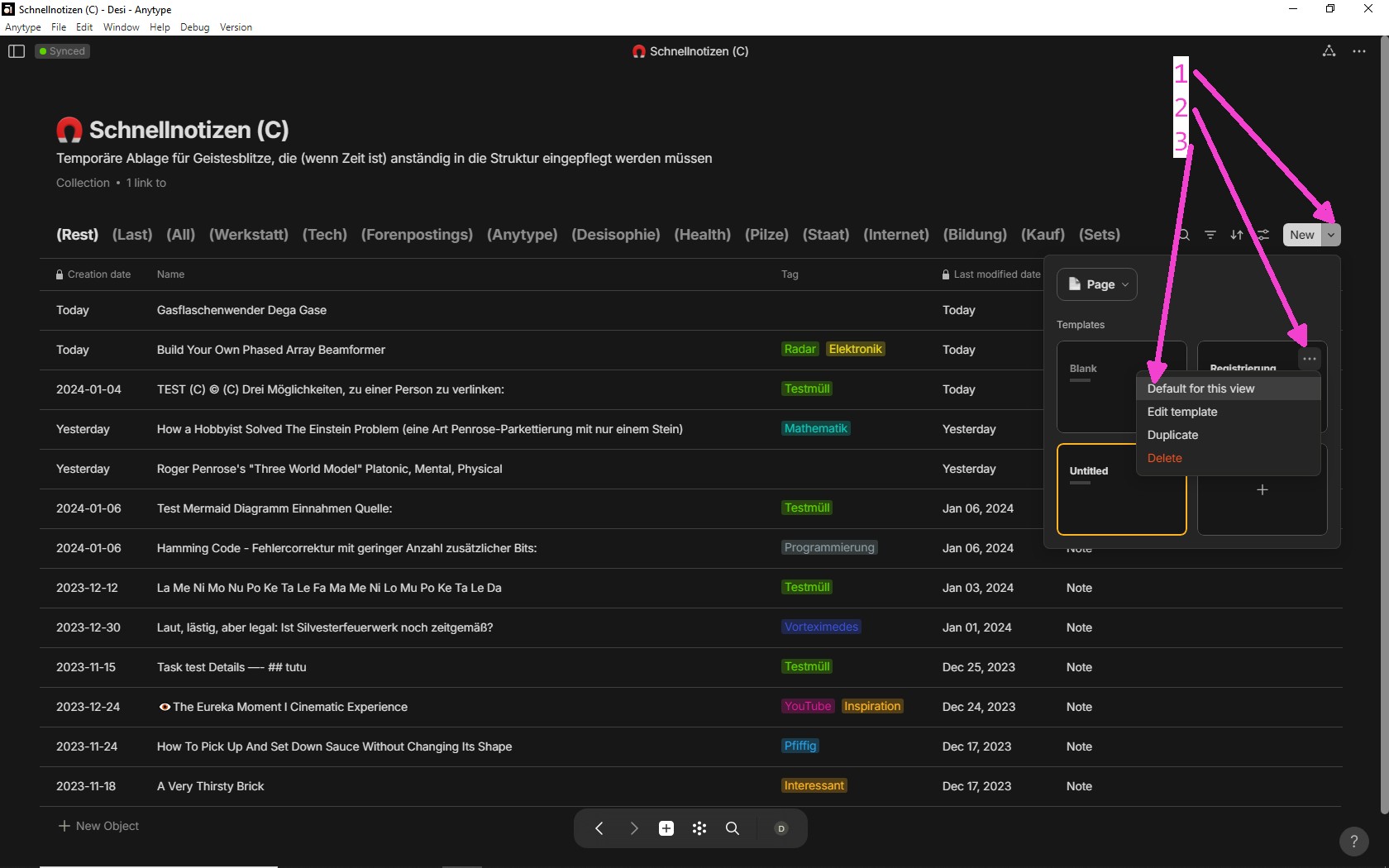
After doing these three steps you see in the pic, you’re ready to go!
For creating a new session, just click on the button “New” (left from the first arrow in the pic).
After that, the new Page should be visible in the Collection.
If not, then it’s a thing with the filtering …
You can apply filters for each views in a Collection or Set.
ok this gives me my next steps. I sure appreciate your attention and explanations. I think I am going to stick with Tana for a while longer. Very easy to do what I want but the look is not as elegant as AnType report pages. Cheers!
While it is not smart enough to detect the client yet… at least you can query or decide filter once for each master object or set view.
You might also want to try ‘/inline set’ or ‘/inline collection’.
Anytype team is thinking of updating set and collection. If you have any thoughts in mind, let them know.
Inline Sets or Collections wouldn’t solve the demand in a practical way.
There would be the ugly flaw that each inline S/C is based on a “real” one outside.
That would mean that you’d need 500 of such Set/Collections the if you have 500 customers. Not nice for the graph. Also a lot of work to make them.
Off course one could built it all on only one outside S/C. But then would there be the need to configure each Page with an inline S/C so that it only shows the relevant documents that are linked to the page.
A much better help would be this:
Let every object that has links be an “instant Collection”!
The request shows the same datas as the flow.
But in a much more useful way.
In my opinion, you don’t need 500, you only need one set.
Because inline sets based on the same set will look like they have different views.
When they are created, they seem to “clone” the views of the base set.
So probably the best solution for now is to create a base set with a ‘filtering by Links from’ view and a ‘filtering by Links to’ view, put it in the template as an inline set (or if you don’t care about the name, you can put an inline set of the ‘All objects’ set in the template and make two views of it), and then whenever you create an object using the template, just put the current object in the Links to/from filter of the two views.
If he only uses the ‘Linked Contacts’ relation, I would recommend filtering by ‘Linked Contacts’ instead.
I think what we need now is a placeholder.
Welcome @Neuru!
It’s a smart idea to set the filter on “Links from” and “Links to” and integrate it in a Template!
Really smart.
I’ve to test it. Maybe it works.
But the way seems for me to be much too advanced for a “normal” user.
Almost nobody would come up with such a complicated solution themselves.
Clearly better for “normal” humans would be the way in my linked Feature Request.
But must say it again: your suggestion is smart!