When you select a text fragment with the mouse, it happens often unwanted that the auto-scroll kicks in.
That adds more friction then without that behavior.
– Please prevent that.
In the video I try to select the word “Parallelogramm-Mechanismus” (yes, we German “Krauts” have long words )
HOW COULD IT BE DONE?
Activate the auto-scroll only when the user moves the mouse downwards (for example 20 pixels deeper, or one text line), or when the mouse already touches the bottom of the screen.
This would also prevent the unwanted scrolling.
At the moment, the scrolling kicks in long before the mouse reaches the bottom.
Yes, it kicks even in when the user moves the mouse horizontally (with pressed left button).
And even more: it kicks even in if the user tries to move the mouse a bit up to prevent the unwanted scrolling. → not good.
thank you for reporting this because i’ve been too lazy to do so in the past months.
it doesn’t need to be prevented, just adjusted back. I drag and drop a lot of blocks to order notes and in the past it was fine, it started scrolling when reaching the bottom or the top
Now it’s so much acceleration in so little time and for so little space
Unfortunately, the result is very unsatisfactory! 0.53.3-alpha here. I was about to write a bug report because the automatic scrolling behavior has deteriorated so much. Previously, you could move blocks in an elegant and pleasant way because the start and the speed of automatic scrolling could be easily controlled with the mouse. Now it’s a guessing game as to when the scrolling will start - which in most cases results in a jerky start to the scrolling and overshooting the target. Very unpleasant.
When I move images within a page now, I select the image block with the mouse in my right hand while using my left hand to use the scroll wheel of the mouse to position the block on the page to drop it. That’s my practice now.
That can’t be the point. I don’t understand that feature request at all – the previous behavior was totally desirable. Even when selecting larger sections of text at the bottom area of the page, you want automatic scrolling, not just when moving blocks. Maybe the scrolling should just start with a slight delay, but simply reducing the reaction space for the trigger is really not a good idea. This space is needed to be able to control the speed of the scrolling. It’s like an accelerator pedal. If the space is reduced, this ability is severely limited.
Vertical movements with the mouse pointer during selection should trigger scrolling, horizontal movements should not, of course.
Perhaps the curve of the start-up of the automatic scrolling can be changed (is it currently linear?) – i.e., a slow, smooth start-up of automatic scrolling.
Guys, you work with your editor yourselves—don’t you notice the deterioration yourselves?
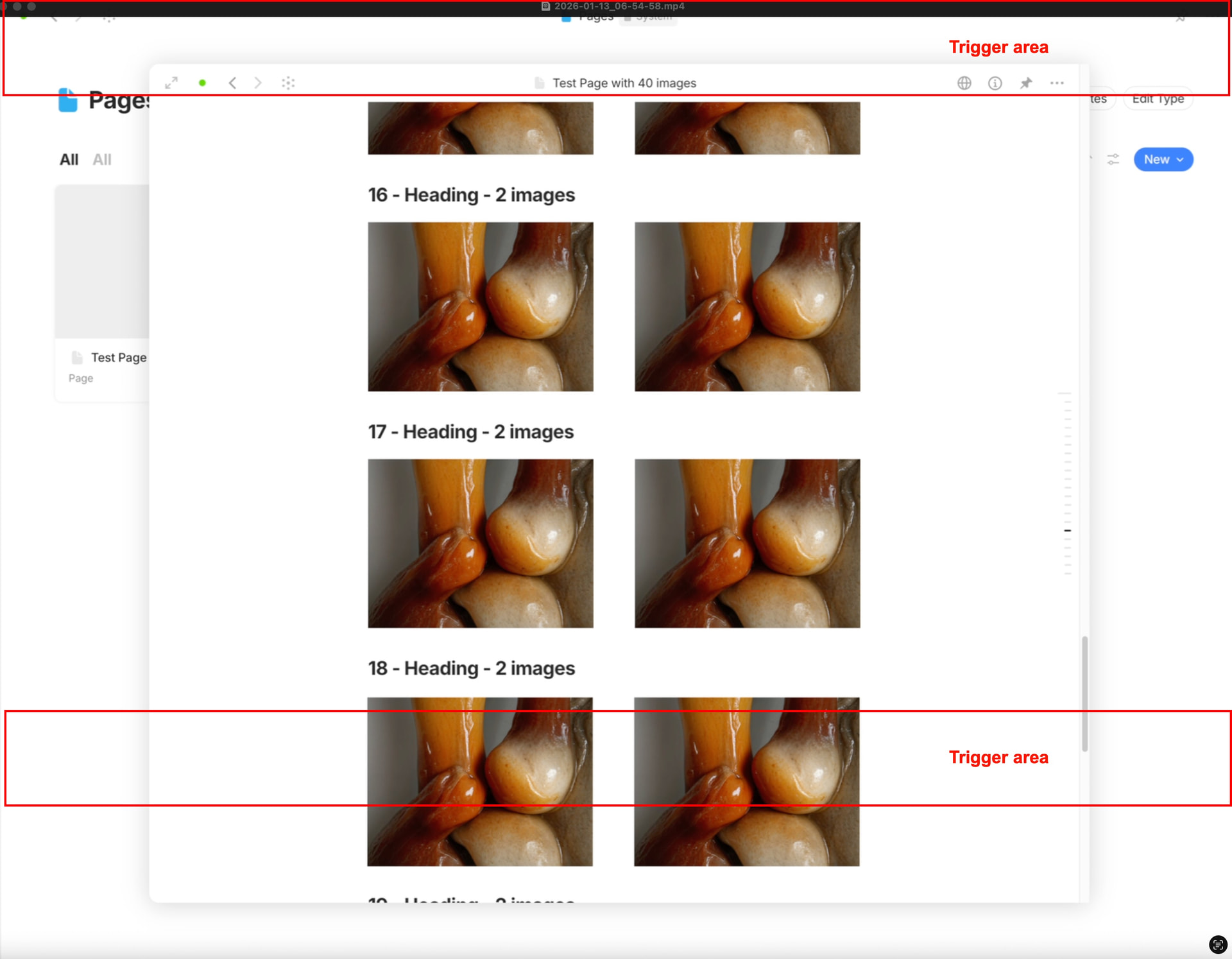
The example shows that automatic scrolling does not work satisfactorily, especially when moving a block downwards. Apparently, the trigger area has been shifted slightly upwards due to the reduction in size, because the mouse cursor at the bottom of the window currently has no effect at all.
It appears as if the size of the trigger area has been reduced from its lower area rather than from its upper area.
By the way, this sketch only applies to pages in modal view. In full page view, the trigger areas are correctly positioned at the top and bottom edges of the window, but are currently much too small.
As I said, I always found the previous way of how the automatic scrolling worked very pleasant.
What you describe is how I’ve always felt about the old behavior: unexpected “overshooting the target. Very unpleasant”.
It is definitely not expected by me that if I want to select a part of a text line, that suddenly the auto-scroll kicks in and overshoots.
But I can tell you how you can improve your workflow:
If you want to select a big area that goes further then the visible area on the screen, then do this:
Click on the start position, to set the cursor there.
(The exact position inside the Block doesn’t matter, the cursor must simply be inside your start Block.)
Now scroll down. so that you see your end Block.
Press and hold Shift and do again a click, this time inside of the end Block with the mouse.
→ As result is now everything in the area between the first and second click (first and last Block) selected.
Now you can either move the whole selection with the gripper, or (if you want to move it far away) you could use Cut and later Paste.
In my opinion is drag and drop only useful for moving Blocks over short distances.
But if you want to move a selection over big distances, better use Cut and Paste after doing the selection with start- and end point.
Yes, thank you, what you describe works well, but since I mainly move image blocks and when rearranging images on a page, drag & drop is simply much faster and more effective than select & cut & paste for me.
What I have described in my comment:
a bug in the lower reactive area for automatic scrolling in a modal window, which does not start at the lower edge of the screen, but around 200px above the lower edge (on a 27” screen),
reducing the size of the two reactive areas from 100px to 20px significantly impairs usability when moving blocks on pages in full page view via drag & drop.
Yes, drag & drop works quicker if done inside of the visible area, without scrolling involved.
But if scrolling is involved (no matter if automatically, or manually) then I personally prefer cut & Paste.
Btw. a tipp: If you still prefer drag & drop also over larger distances, then I suggest to zoom out, so that you see more and the necessity for scrolling no longer applies.
Nevertheless, although I still use v0.53.1 (that doesn’t have Razor’s fix), I believe that your complains about the new behavior is valid.
@Razor
Although I still couldn’t test it jet, I believe that @VisualNotes complaints about the new behavior is valid.
So, without ever having tested it, I have a suggestion:
Restore the auto scroll behavior.
But implement one change: during a selection process, the autoscroll should only start if the user moves the mouse clearly down and out of the actual line, so that it hovers at least over the line below.
That behavior would prevent the autoscrolling to kick in unexpected, if the user simply wants to select only a part of a line.
Only if his mouse movement points clearly down and really “smells” like “he wants to scroll down” should the auto scroll (slowly) start (and increase in speed if he moves the mouse deeper).
I believe this would fulfill VisualNotes’ and my own needs, as well as nearly every other user’s.
 )
)