What’s The Bug?
When exporting to PDF, if you choose a size other than Letter, then the PDF will have formatting issues, with the tops and bottoms not aligning correctly. This is most obvious when using dark mode, as the portions are white.
How To Reproduce It
- Go to a document spanning multiple pages
- Click the three dots in the corner, click Export
- Export PDF with page size not set to Letter (A3, A4, etc)
Image or Video
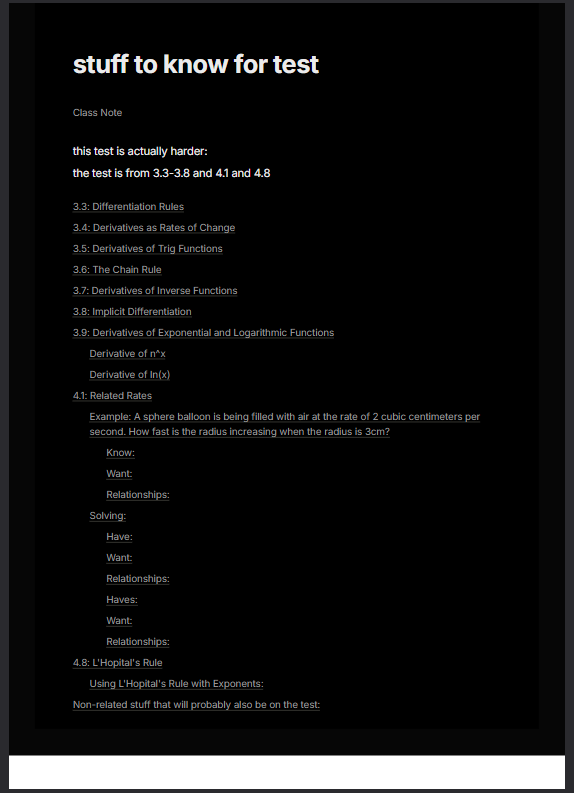
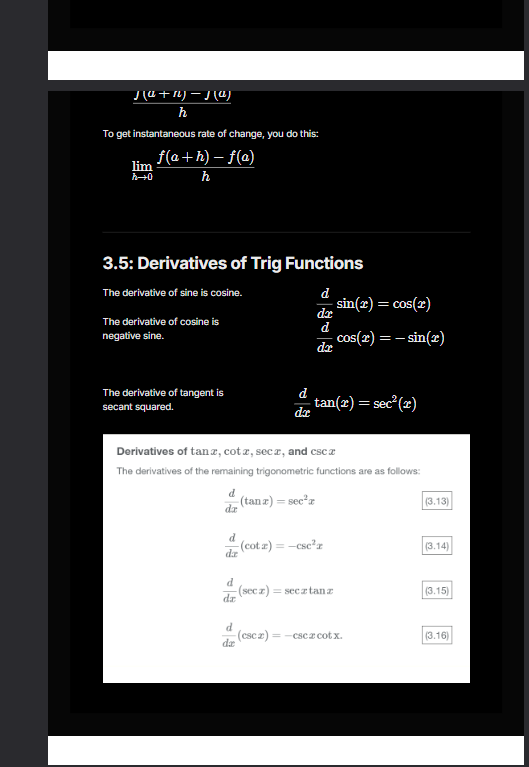
The Expected Behavior
The PDF formats correctly without spacing errors.
Additional Context
I was using this to export math documents that used LaTeX, so that could be a factor as to why this occurs.
Device
Microsoft Surface Laptop Studio
OS
Windows 11 24H2
Anytype Version
v0.43.1
Network Mode
Anysync
Technical Information
OS version: win32 x64 10.0.26100
App version: 0.43.1
Build number: build on 2024-10-24 15:39:45 +0000 UTC at #13f78eee798bc655c87d8aa98a4d50fa42fe1140 (dirty)
Library version: v0.36.4
Anytype Identity: A9dHVmBuSdEVZKWqXhMpb6YXv7HZhEsXgcRFvUjoshDj3Rox
Analytics ID: A7zjoHfSTCPeKoVvb1qMd4HtuVaQbnFniQprRr9FscEWva8h
Device ID: 12D3KooWBUsTXJavSUTUe9aPLacQEQyWWiwfh72TEfV7LdpSNwkm