Ok.
Here
Here’s what comes closest in Evernote :

In Evernote, it is used as a secondary navigation bar: the main menu bar lists favorites, notebooks, tags, etc. When you select an item containing several notes (i.e., a tag or notebook, where the notebook is equivalent to a collection in Anytype), a second bar lists the notes.
You can display them in different formats, including “extract” format. In this format, you can choose to display images, text (truncated but longer than in Anytype) from the note, tags, etc.
There are also sorting and filtering options, just like in an Anytype list.
There are also map views (in this menu or when viewing a set of notes), with more content but still truncated.
Here’s what comes closest in Notion :
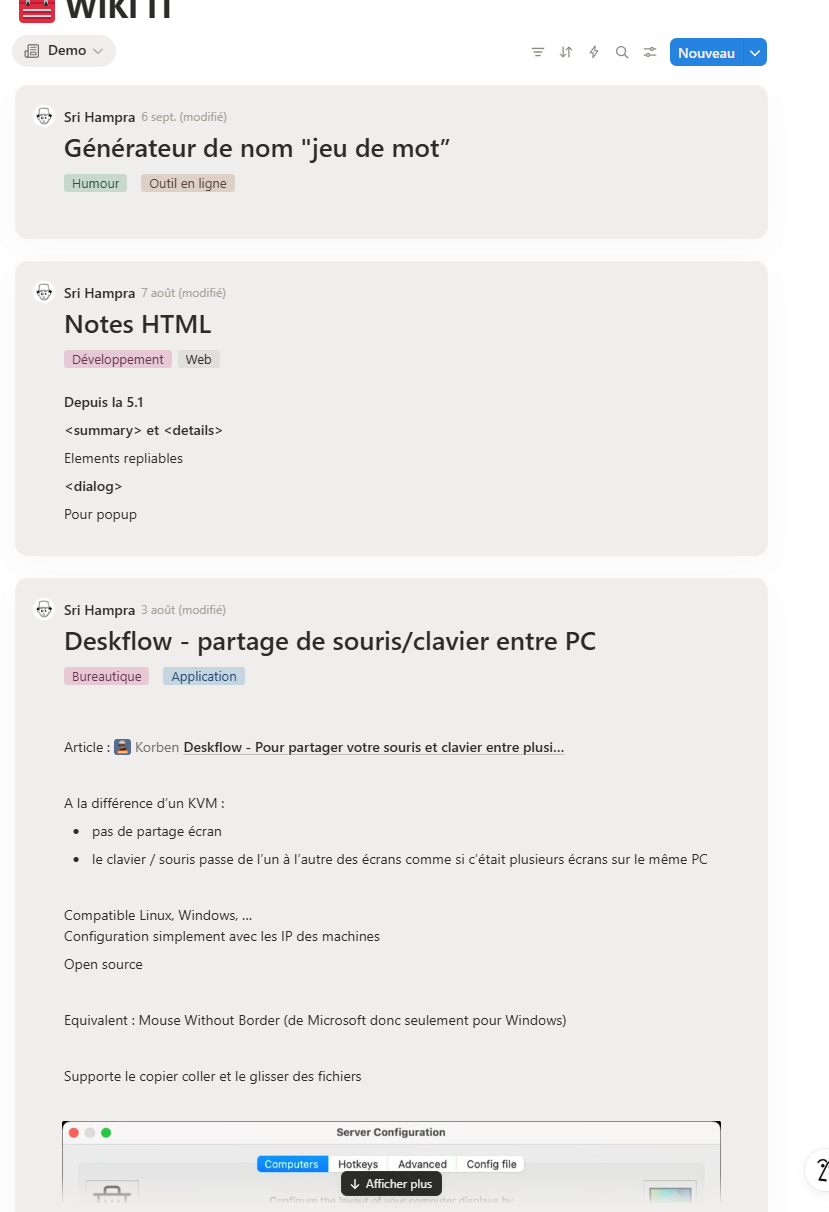
In Notion, the databases offer a “News Feed” view that displays pages and their content in a single column.
The content displayed is quite long (with a button to see more when it exceeds the column width).
For the rest, you’ll find the usual options: sorting, filtering, properties to display, etc.
With a little extra that I like: conditional coloring that adds a background color based on a property (here, I’ve set everything to gray, but I could set this week’s articles to red, for example). It is already used by bloggers because web sharing works very well.
As for map display, there is no content (except for retrieving the image, which is already better than Anytype).