What’s The Bug?
when I export from Notion and import into Anytype, I’m getting errors with the dates.
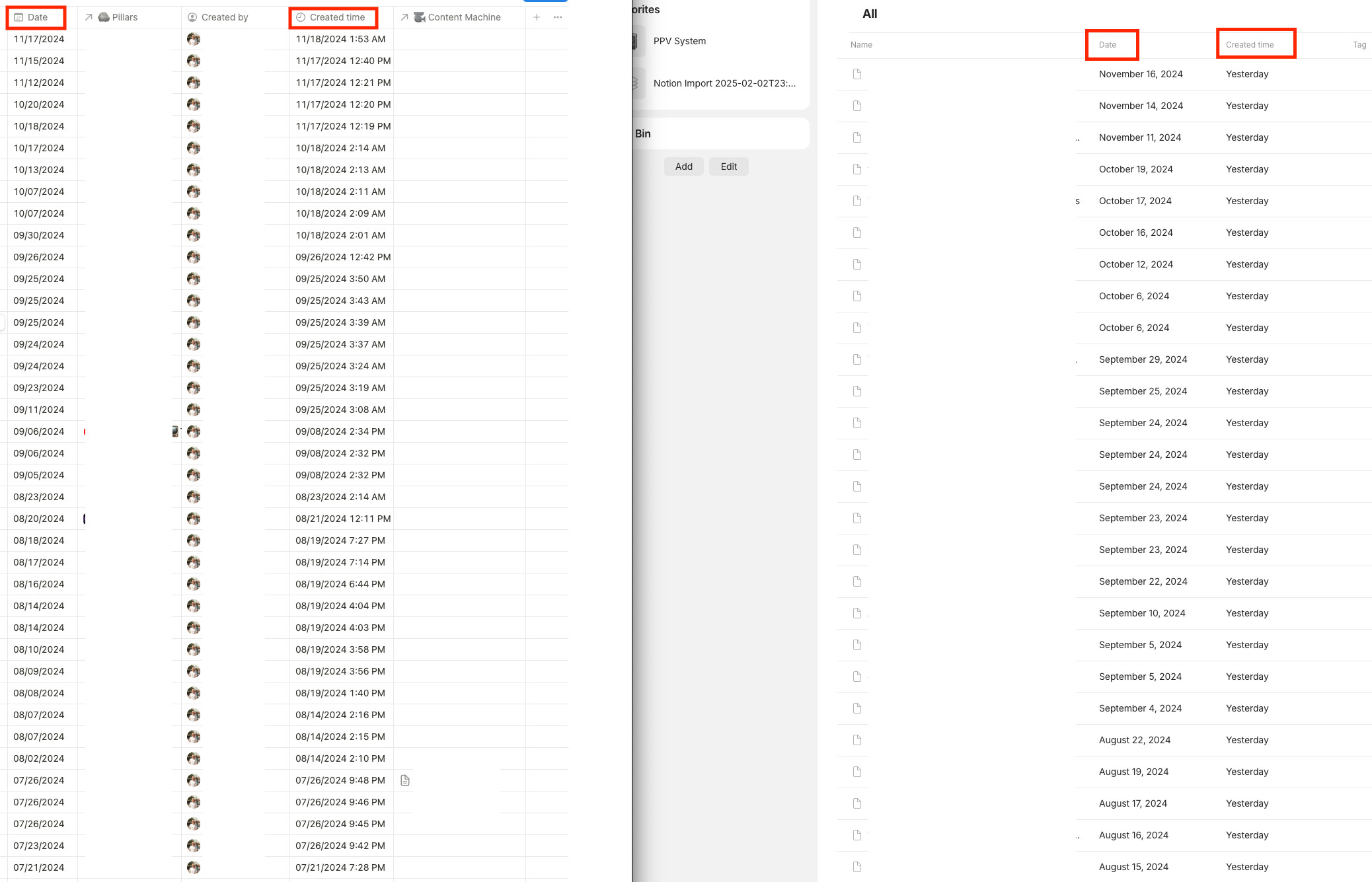
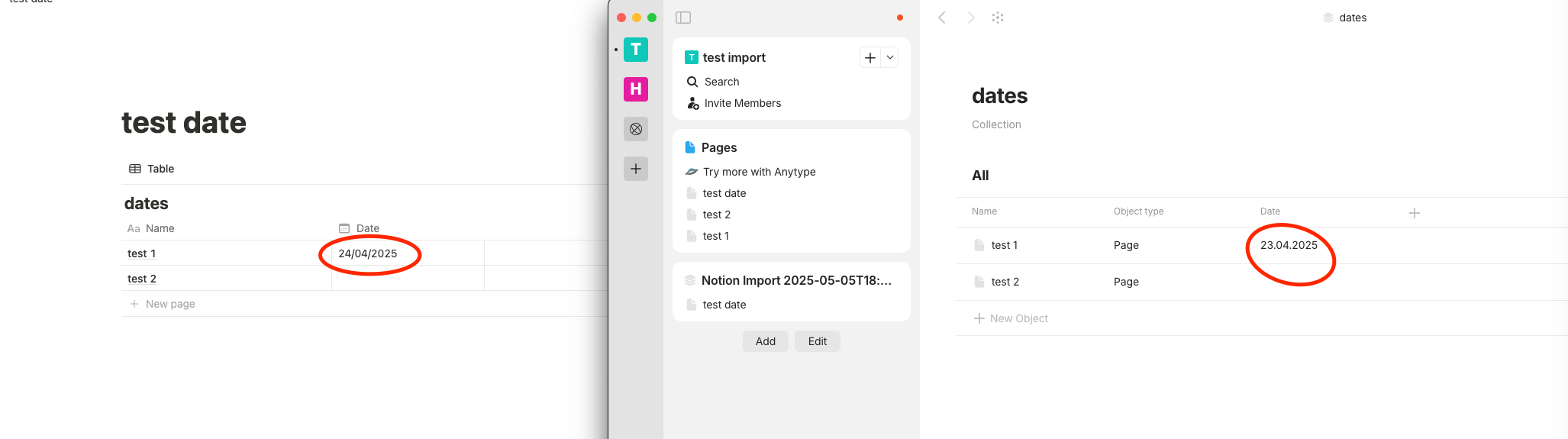
The date I put in my Notion database is one day off when it gets imported into Anytype as you can see in the screenshot.
this is a big hindrance to me because I wanted to switch over Anytype but this is just not going to work unless the date issue is fixed. there’s no way I can get around it. my only option is to wait for the import in Anytype to get fixed.
I have tried importing many times and still get the same results. I have tried different notion databases and they all have the same error
How To Reproduce It
create a notion database with custom dates - where you can choose the dates.
import to anytype
Image or Video
The Expected Behavior
the dates should be the same for the chosen dates I have picked and for the original creation dates.
Device
Mac Studio 2023 64GB M2 Max
OS
Sequoia 15.1.1
Anytype Version
0.44.15-beta
Network Mode
Anysynce
Technical Information
A7xMWRky3decsxMfEag4afuUqcQbAFVHisCfFEZ262xQon9b
This report has been added to our issue tracker and received by the Development Team.
correction:
Looks like the original creation date is correct for me. I believe I got confused because I copied my Notion space to another account and then imported that into Anytype. when comparing the 2 screen shots side by side, I was using the Notions space I copied from, and not the one I imported.
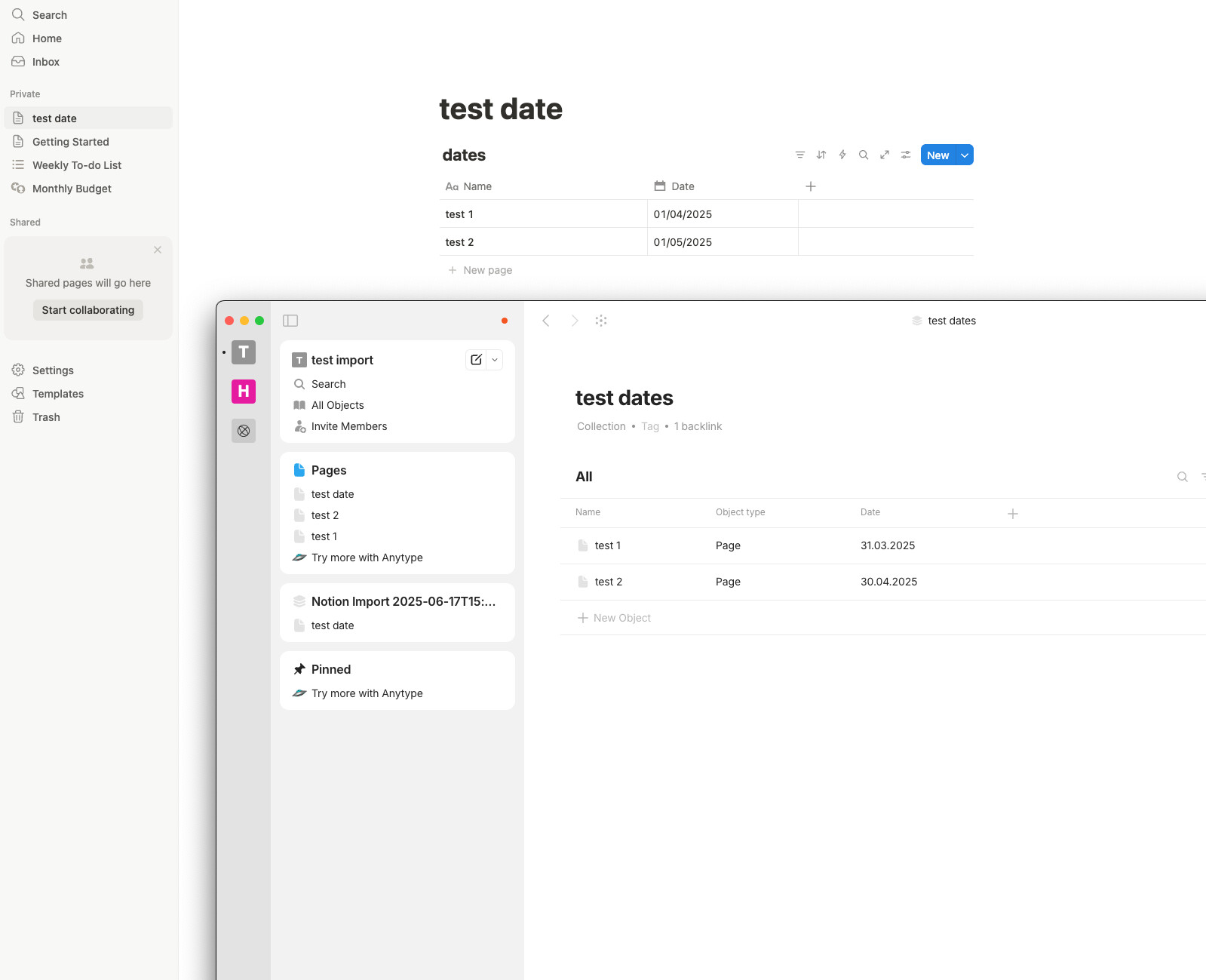
Now, the set “date”, is still not working correctly though.
FYI - the set “Date” is still one day off as of Anytype update 0.45.3
I do hope this is a easy fix. I really want to import my Notion to Anytype so I can just use Anytype and not both.
Could you please check what timezone you have in your notion account and anytype? Are they the same?
Yes, I checked the time zone to make sure it was the same, and it was the same time zone.
I am not sure where you would change the time zone on Anytype, though I did not see where that was at.?
The original creation date is good. It only seems to be the “Set Date” that is one day off.
I tried the import again in update 0.45.32-beta, but still get the same results.
I tried the import again in update 0.46.3-pre-release, but still get the same results.
Here is another thought…
Would it have something to do with where I am in the USA and Aytpe servers in Europe?
again in update 0.46.4 - same thing.
This looks like its looking at 2 different time zones because technically Europe is almost one day ahead of the USA.
Hey guys. just checking in with the team again. hope yall are doing well.
again in update 0.47.1 - same thing.
This looks like its looking at 2 different time zones because technically Europe is almost one day ahead of the USA.
Great News! I think i figure it out but need someone to fix this real quick!
I encountered a consistent issue where dates imported from Notion to Anytype are one day behind. After testing, I found the root cause: Notion exports date-only fields (e.g., “2025-08-09”) without time, which Anytype parses as 00:00 UTC. In my EDT (GMT-4:00) timezone, this shifts the date back by one day due to the negative offset.
Steps I Took:
- Confirmed the issue with the latest Anytype version, importing a Notion database with set dates.
- Noticed dates like “August 9, 2025” in Notion appeared as “August 8, 2025” in Anytype.
- Switched my Mac’s timezone to UTC and re-imported; dates aligned correctly.
- Reverted to EDT; the offset returned.
- Added 12:00 p.m. to Notion dates manually and re-imported without changing timezone; dates imported correctly.
Problem:
The offset occurs because Anytype interprets Notion’s naive date strings as UTC midnight, then adjusts to the local timezone (EDT), causing a one-day lag. This doesn’t happen in UTC or with a time set.
Suggested Fix:
- Modify the Notion importer in anyproto/anytype-heart (e.g., pkg/import/notion/property.go) to parse date-only strings as local 00:00 instead of UTC, using time.ParseInLocation(layout, str, time.Local) in Go.
- Alternatively, add an option during import to specify a default time (e.g., 12:00 p.m.) for date-only fields to avoid the shift.
i tested the import again in Anytype version 0.50.3 and it still does the same thing with the date & time.
Would there be anything on Notions side of things I could change to fix this error?