I am missing “hierarchy back button”. Sometimes you want to go back to previous, sometimes you want to go back a folder. Windows File Explorer calls this Up to.
HOW COULD IT BE DONE?
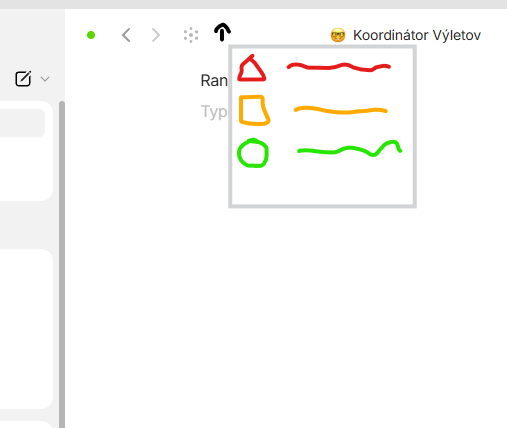
Next to the arrows Left and Right would be arrow up. When clicked, it will open the object that is linking to the opened object (in flow view, it is the one on the left). If there are multiple links, a dropdown opens of the objects that link to it and you can choose.
Maybe additionally, you could set a default one so that while there are multiple links, it will use the selected one to go up by one and not give you the menu. However, this might be too complex and advanced.
Let’s say I navigated from somewhere to a role, then went into a project and used the back button to go to the role and clicked the same project again later on. Now, if I just want to go up by one from the Role (to the company) I can’t use the back button. I will have to search or click on the pinned base and open the company.
RECOMMENDED ALTERNATIVES
Currently I have to go from the BASE (as a pinned object)
OR
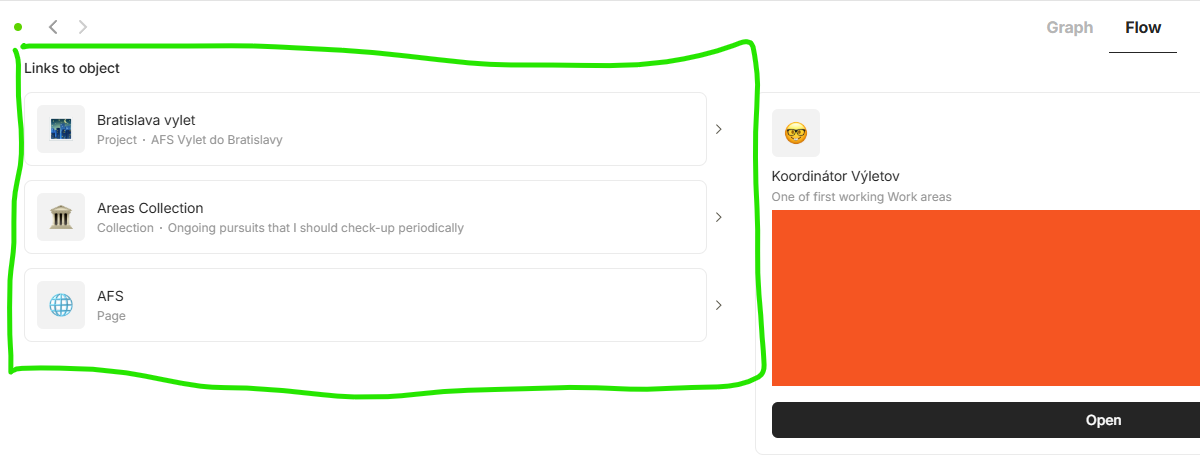
I open graph view - then flow - then click on the left on the object.
ADDITIONAL CONTEXT
I might just add, this seems like a very simple and basic feature that shouldn’t cost a lot of dev time as there is the Link property and background done.
In a nutshell, it is a button that brings you directly to the menu of objects on the left in Flow view.
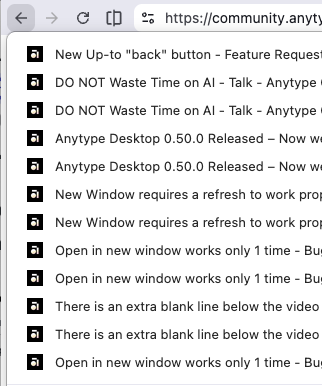
I’m not sure what you mean by that but I would support having a back functionality like we have it in browsers, so you can go back multiple objects, or via right click / hold click open a context menu with the previous objects like:
What @Bellwar means (If I understand corret) is to go 1 instance up to the parent object.
Imagine a file explorer where you go deeper into the file/folder structure. There you have the possibility to go back or “up” which means go to the parent structure of the current structure.
In AnyType, if you have many nested items like ParentPage → Childpages1 → Childpage2 etc. it would be great to have a way to always navigate to the parent Object.
Searching for Childpage2 and open it, then pressing the back button will most of the cases not cause to navigate to Childpage1 - this is where the “up” button comes to play.
But what is the upper level if multiple objects link to it?
The upper level then must be in context of the previous objects. And then a simple back button would suffice.
Why not implementing something like an “up” button and an “down” button next to “back” and “foward”.
When pressing the “up” button you navigate directly to it’s parent object if there is only 1, but getting a popup with all parent object when there are multiple.
The same would apply to the down button but for child objects of course.
You can of course go to graph → flow, but this one would be quicker to navigate especially when there is only 1 parent object.
Guys, I believe you are overthinking it. As I said in the original post. If there are more than one link, it gives you a small menu with a list of all of them and you click the one you want.
If any of the developers want to put extra time into it, I would make it so that you can (if you want) select one of the links as the main parent and you would not get the menu in that instance. But this can be harder on the backend to implement.
I understand the problem that Anytype doesn’t have to be under a strict hierarchy. But it can and with this simple menu (if there are multiple links) solve both problems and the whole thing is an extremely small task for the programming team in my opinion.
Also, as @Ronsox mentioned, maybe a good time to think about moving the flow there with this up down arrows. Because going graph → flow and click object is a long way to do it every time. But that is a whole new conversation outside of this request.
I think Flow already addresses this request, as you acknowledged @Bellwar. Rather than introducing a new navigation paradigm which is not really native to the object/graph philosophy, I think Flow needs to be redesigned to be more accessible. While currently getting into Graph/Flow view will be considered a new page in your navigation history, it should either be a popup window, or an alternative view of the current page and user would be able to toggle between them.
My preferred way:
turn graph into alternative view (or view in sidebar that could be expanded to full screen)
turn current “Graph” button into “Flow” button. Clicking it would show popup with much more simplified view, similar to the extended back button in web browser like @krst shared.
For flow pane incorporation, I find the current search pane>object>shift+enter the best way, despite its issues with Esc. It would be nice if we get flow pane back on mobile, like in v.0.36.0 (I sincerely don’t need quick delete on mobile )..
 )..
)..