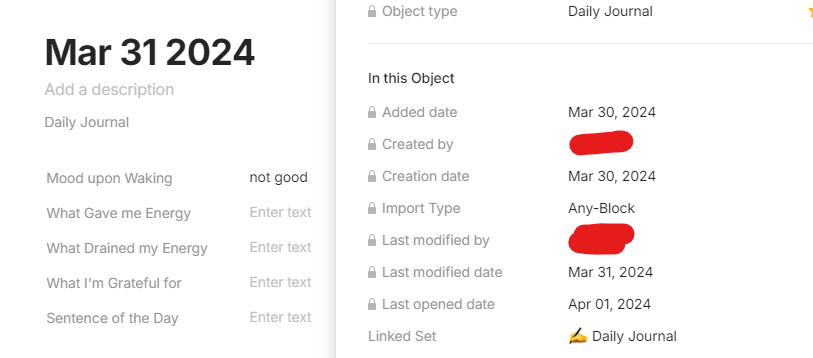
New objects have "Date created" and "Added Date" based on template creation date

What’s The Bug?

New objects have “Date created” and “Added Date” based on template creation date.

How To Reproduce It

  1. Create new object
  2. Click the Relations icon
  3. See the properties in question

Image or Video

The Expected Behavior

Created Date and Date Added should reflect the date of the object creation, not the template.

Device

Microsoft Surface Laptop Studio

OS

Windows 11 Professional

Anytype Version

0.39.0

Technical Information

OS version: win32 x64 10.0.22631
App version: 0.39.0
Build number: build on 2024-03-05 15:37:42 +0000 UTC at #a7986fffadcc2031b1eb3372265db5dda05f4c6d (dirty)
Library version: v0.32.1
Anytype Identity: A71mxyYd31SnMUmFAHbfA9sq14SutNWrcAw77C4z2b3ka9mX
Analytics ID: ffa103b9-0120-4648-9837-a1fc58643d12
Device ID: 12D3KooWCzZK4CJjhNN8sG8ssECqvG8XS17m1dHQPHbujXPvCFH7

This report has been added to our issue tracker and received by the Development Team.

Is it fixed? I met the same bug on windows 11, v0.39.0

We really should have this feature implemented in Anytype for being able to fix the resulting sorting problems manually:

I was shocked when I found out 10 minutes ago that over half of the objects I had created maintained the creation date of the template. I noticed this when I tried to sort them by creation date and find out most of them sorted randomly.

I’m currently using version 0.39 and I’m unsure if this is just a bug that can be fixed to display the real creation date, or if the original creation date has been permanently erased. in this case this will be really important A new “Sort Date” Relation that (if not empty) overpowers the Creation Date in the sort function

But it will be unfortunate if the real creation date has been overwritten by the template creation date.

Thank you all for the feedback. The issue has been updated and is ready to dev

Also experiencing the issue on iOS.

What’s The Bug?

When you have created a page template, and you set it as default. Then it locks the created date, so that when you create new documents they automatically get the created date from when the template was made, and not when the new document was made.

How To Reproduce It

  1. Create a page template.
  2. Set it as standard.
  3. Create a new document.
  4. New document gets the “created date” from when the template was made and not the document.

The Expected Behavior

You should be able to create templates, and when creating new documents/pages using that template it will override the “Created date” instead of using the date that was used when the template was made.

Device

Macbook Air M1, Ipad Pro M2, Iphone 14

OS

iOS 17.14.1

Anytype Version

v0.40.8

Technical Information

N/A. Should happen for everyone following the steps above.

@Filip
I also have this issue on my end. Using custom object types, create a new object file without changing the creation time.
Operating system version: win32 x64 10.0.19045
Application version: 0.40.8
Build version: build on 2024-04-25 13:28:54+0000 UTC at # 4ec64b016e2be3a5229dc865452c066f653e209c (dirty)
Library version: v0.33.2

Any progress?
I met the same bug on windows 11, v0.40.9

I recently encountered an issue where my journal entries just being created weren’t displayed under the current month view. My version is 0.40.29-beta.
However, I found a temporary solution. If you use the shortcut (CMD+N) to create a new object, then change the type and choose a template, the creation date will be correct.

@badate Yes, it’s possible this is a bug related to old templates. It’s currently under review by our middle-ware and Q/A Teams.

This issue seems to be a duplicate: Daily journal: Creation date is wrong

This issue has been fixed by the Development Team and will be implemented in an upcoming release.

Hi. Thanks for working on this. Can you share what release this fix will be in and if it is available yet or not? Currently using 0.41.1 on macos and still seeing this issue with Tasks.
It will be available in the next major release (0.42.0). You can switch to the pre-release version if you can’t wait until the public release.