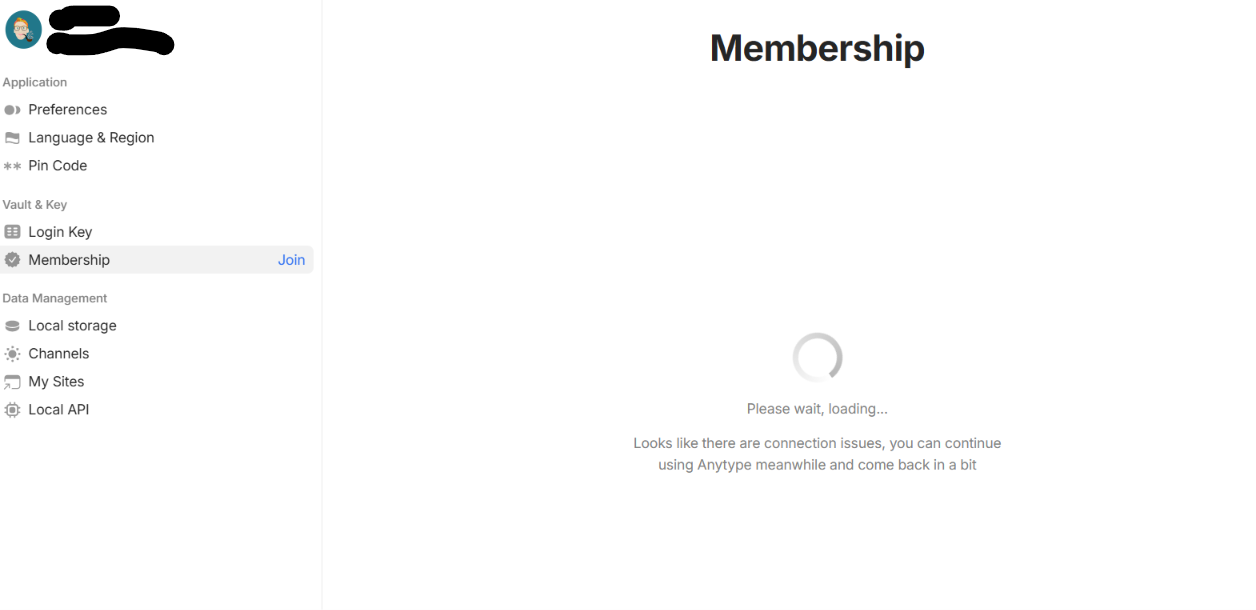
The membership page on my vault doesn’t load. Instead I keep getting an endless spinning wheel with a please wait, loading.
HOW TO REPRODUCE IT
Go to Anytype menu > Settings > Vault.
Click on the membership tab.
ᅟSee an error of spinning wheel with text “Please wait, loading… Looks like there are connection issues, you can continue using Anytype meanwhile and come back in a bit.”
ᅟI was able to provide a screen-shot of the bug, here it is:
Thanks for reporting! There is no regression, and payments nodes work normally. There is a problem of stale connections on Windows user-side, probably after a computer sleep. We will investigate this more. In the meantime, you can restart the app, it should help.
Can I ask you to send me Debug - Export log? It will help to investigate the problem. It doesn’t contain the actual data of your objects. You can send it to [email protected] or here in DM.
Thanks,
Export log wasn’t providing me with a “save as” dialog box, but export report was so I attached that in the email I just sent to support. Let me know if there’s anything further needed.
Having the same issue and thought it was just me. Bought a membership on Sep 25th to help support development for AnyTwo. I’ve been unable to activate the membership as the page doesn’t load on my mobile app or laptop. Tried different networks as well without any luck.
In my case, restarting the app or even reinstalling did not fix the issue. On mobile, I just get an “unknown error” when inputting the membership code. On my laptop, it won’t even reach the membership page. Instead, it will continually show that it’s trying to load.
EDIT: Just to be specific, my mobile is Android and my laptop is a MacBook Air M5. Both have the latest Anytype and OS versions installed.
Ok, that’s very strange. Regardless, I’ll send you a DM where you can share your AnytypeID and email, I’ll make sure your account gets activated. Sorry about this bug.