What’s The Bug?
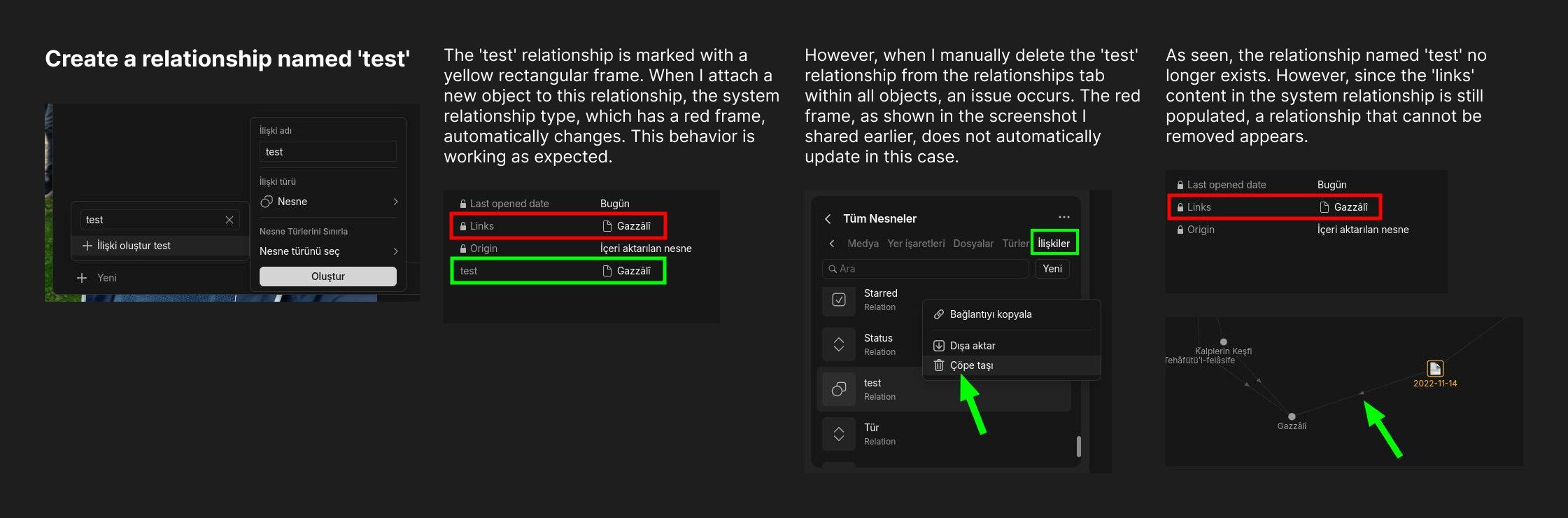
When the relationship named ‘test’ is manually deleted from the relationships tab, an issue occurs where the corresponding system relationship (specifically ‘links’) still contains data. As a result, this leads to the appearance of a relationship that cannot be removed, despite the ‘test’ relationship no longer existing. This causes the system relationship to remain in an incorrect state, not automatically updating or clearing as expected.
How To Reproduce It
Steps to
-
Open the Application: Launch the relevant
-
Create a “Test” Relationship and Set the Relationship Type to “Object”: Create a new “Test” relationship and set the relationship type to "
-
Attach a New Object: Attach a new object to the ‘Test’ relationship and observe that the system relationship type links is automatically
-
Manually Delete the “Test” Relationship: Manually delete the ‘Test’ relationship from the relationships
-
Observe that the Relationship is Removed, but Still Present Under System Relationships in ‘Links’: You will see that the relationship is deleted, but the ‘links’ content under system relationships will still exist, showing an unresolved relationship.
Image or Video
The Expected Behavior
Expected Behavior:
When the “Test” relationship is deleted manually, the corresponding system relationship (such as ‘links’) should automatically update and remove any remaining content. The system should reflect the changes correctly, with no unresolved relationships remaining under the system relationships section.
Device
Desktop
OS
Arch Linux
Anytype Version
v0.43.15-alpha
Network Mode
Local-only
Technical Information
İS sürümü: linux x64 6.11.8-arch1-2
Uygulama sürümü: 0.43.15-alpha
Derleme numarası: build on 2024-11-11 20:29:56 +0000 UTC at #524908ecfd519553eca8692131b5808b2f07ae2b (dirty)
Kütüphane sürümü: v0.37.0-alpha04
Anytype kimliği: A9AY5nmtDeK2pipLpJ6BUcYs2svRJF55CQHKeWcvU8TZ9gCD
Analytics kimliği: baeb1c20-6d9b-4637-8b47-6c8a2c5a4ba7
Cihaz kimliği: 12D3KooWNy2tvGef9QtfTET3vARpDkk54Es23nVgjdqJo9maBM1D