This feature would be so helpful, I am coming from Tana and this is the only feature I really miss. I am studying and have mostly long doncuments. It is a bit of a pain to break this down in for example many pages.
The way some thread participants here refer to this feature is already implemented in the desktop version. The headings are displayed hierarchically and allow navigation within a document.
Such feature is, unfortunately, not available on mobile (Android).
WHAT DO YOU RECOMMEND?
Many of the alternatives to Anytype have “collapsing headers” or “Toggling headers” which makes it easier to have a nice looking note/page but still have it containing much more information.
HOW COULD IT BE DONE?
Look at the competition how they have implemented it, I’m unsure how to describe it better.
REAL WORLD USE CASES
Toggling headers would enable toggling elements to be part of the index of a page for example.
RECOMMENDED ALTERNATIVES
I don’t really see an alternative. The current toggling function is not really the same thing. It’s just half of the function.
Please implement toggle headings! This was a very important feature I used in Notion and it’s missing soooo bad. All my converted notes are chopped now. This is a must!
We’ve been waiting for this for five years already and I think we’ll wait a few more…
This is such an important feature, a game changer. Should be a top priority. I’ve visited this thread several times hoping to get at least an hint.
Hey Anytype team!
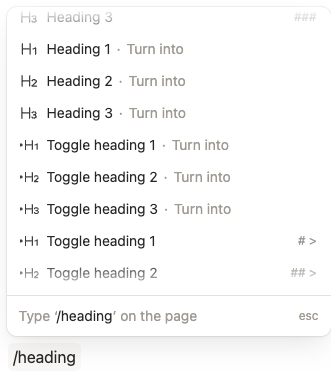
I think the way how Notion solves this issue is quite a good solution. They let the user choose between normal headings and toggle headings. Maybe this would be easier to implement. Because then it’s a new block and all the old headings will stay as they are and the user will have to manually switch to toggle headings. –> I would actually prefer it this way and not suddenly have everything toggleable automatically.
Clearly, chat is more important than toggling blocks.
Edit:
I am actually concerned how this would be implemented and whether it overlaps with collapsing section headers, which I’d rather have than collapsing every individual block.
 Me waiting to toggle headers.
Toggle headings are finally here!
Update:
We’re not planning to implement toggle as a feature of every block in the upcoming cycles.
We recently shipped toggle headings, which address most of the practical use cases from this request (especially navigating and organizing long documents) while requiring significantly less implementation complexity.
For now, universal block-level toggles are not on the near-term roadmap, but we’ll keep monitoring feedback and how people use toggle headings.
Makes sense.
The toggle headings do indeed address most of the practical use cases.
The Blocks in Anytype are very fine granulated, there’s no need to collapse them.
The situation would be different if a Block in Anytype would contain more then one string that ends with a line break. But that isn’t the case.
If someone needs more then one string in a single Block, he can use a container, like for example a Toggle (and this is already a Toggle!) or a highlighted Block, or a Callout.
In my opinion, it would make sense to be able to collapse such containers (Callout; Highlighted Block).
But for the normal one-line-Blocks, there’s IMHO really no need to collapse them.
Toggled checkboxes would be really nice, but other wise yeah, the other types aren’t so important IMHO.
I don’t want to reopen a topic that’s apparently just been discussed. But I solved a related topic in a better way and just created this FR for it: Right-mouse toggle in Block Menus.
This FR solves toggling very intuitively: simply with a right click on the current block menu. That’s currently an unused event.
One of the benefits is that with right click on this long vertical bar, we can collapse and expand any block from anywhere, instead of having to scroll all the way up to collapse the toggle.
Other benefits:
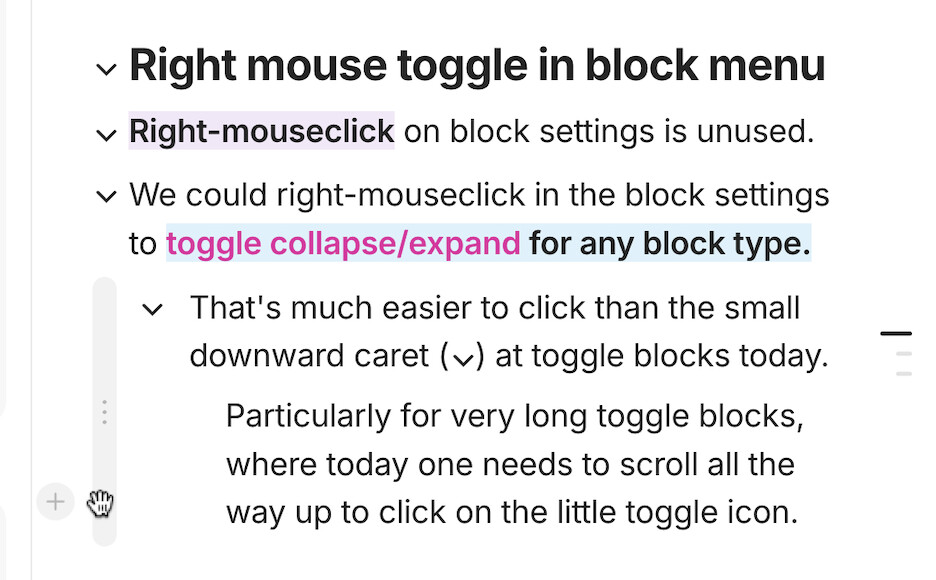
- If we can toggle collapse/expansion of blocks with a right click on the block’s menu, we can move the toggle caret outside of the text body, and thus have a more elegant appearance of H1, H2 H3 and possibly also bulleted and numbered and even callout, highlighted, and checkout block types.
- The old H1/H2/H3 headlines could not have indented sub-blocks, but the new toggled headlines can. That’s kind of duplicate and creates unnecessary UI complexity.
- The introduction of additional toggled H1/H2/H3 headlines feels a bit like a bolt-on to the beauty and consistency of AnyType’s previous block type architecture. Also by keyboard or by Markdown it’s very consistent to choose block types by ⌘1, ⌘2, ⌘3 resp. #, ##, ### and so on — the new block types don’t fit in here, and somehow duplicate it.
- Also indented bullets would deserve toggles, and even Highlights and Callouts. However, duplicating even more Block Types as toggled and untoggled types would feel awkward; not doing it feels unnecessarily limiting.
See more in this FR: Right-mouse toggle in Block Menus