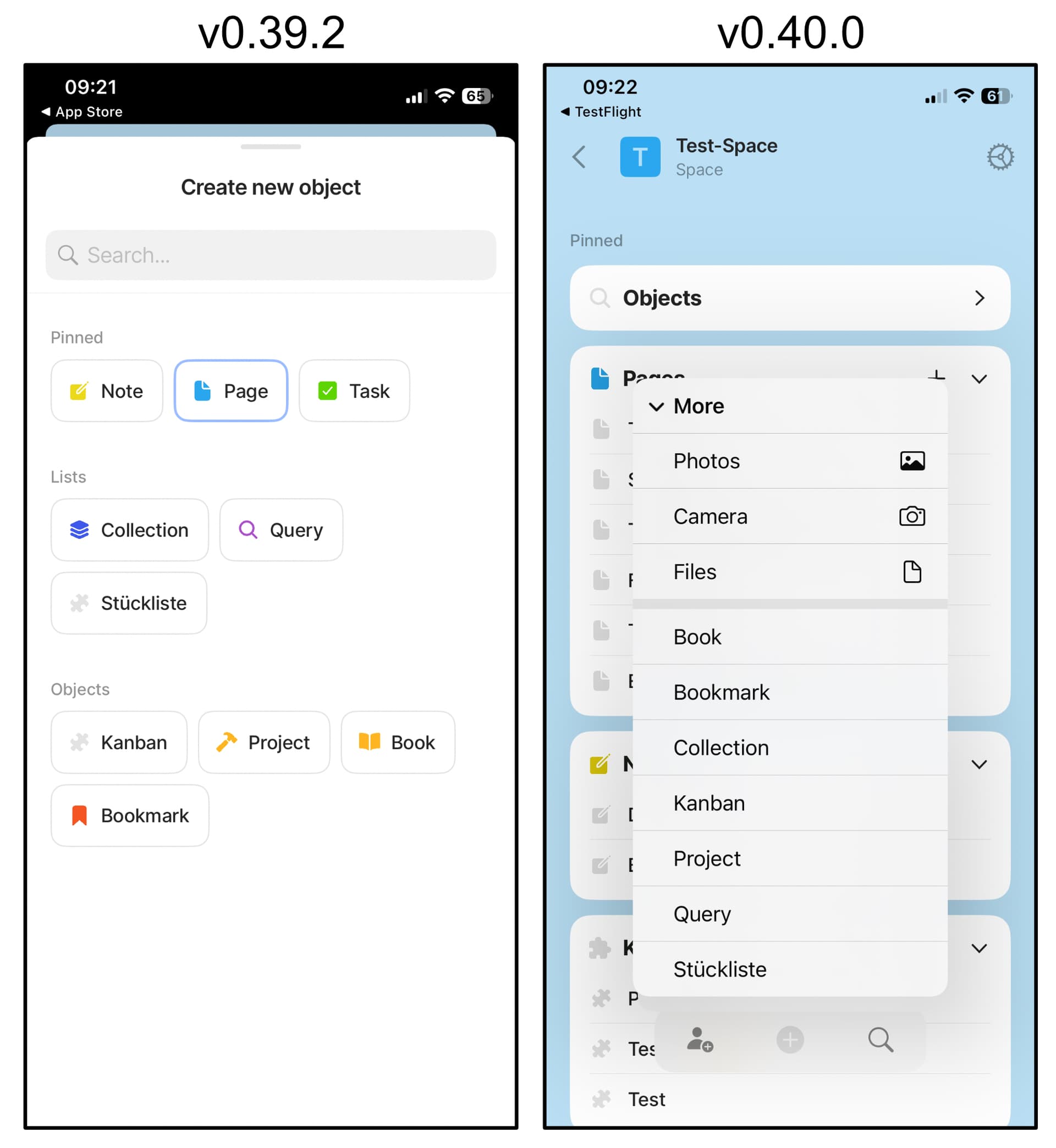
Thanks for the new iOS 0.40.0 release on Testflight. Seems to work very well so far.
One big change I noticed is the object creation menu. It now appears immediately after pressing + but it’s no longer possible to search for an object type. In some of my spaces I have more than 40 types and I would be very happy if you can bring back the possibility to search for a type there. In addition, it now looks quite boring without the type icons in my point of view. I’m absolutely preferring the old version, and also the option to pin my own types to the top… I’ve used this everyday.
I just wish i was able to select the object type when sharing something to Anytype on mobile. Instead of having to share exclusively to the default type.
When i’m browsing the web and click the ‘share’ button, or when i want to share a picture from my gallery, and select Anytype. It doesn’t allow me to select the type of object. It automatically selects the default type. In my case, a Note type. The older versions displayed buttons of existing object types, and allowed me to chose the most adequate one. Now i need to change it only after creating the object, and i have click the very small text on the object header, instead of the (decent sized) buttons.