Not having inline LaTeX support is a deal breaker for me. I love Anytype and wanted to switch to it from the likes of Notion and Obsidian but I can’t because of this issue. I hope they see how essential this is for students and prioritise it.
I believe that not only students need the inline LaTeX, people in CS area also need it. This is really a big obstacle for people who want to switch to Anytype.
I would like to bump this feature request, as I am finding the need for inline latex transition from a “it would be nice” to actually hindering my workflow. I am sure the team already has a gauge on how desired this feature is, just thought to add my 5 dollars (i.e. my 2 cents, adjusted by inflation).
 Hi Everyone
 My Question:
I also cast my vote for this feature. I have read thought most of the posts here, but I don’t understand exactly what you mean by:
[quote="Karthik, post:37, topic:2315“]
I indeed attempted to write articles that rely solely on LaTeX blocks. But it was impossible.
[/quote]
[quote="Den, post:58, topic:2315, full:true“]
I can’t migrate from Notion to AnyType because I have hundreds of inline equations there
[/quote]
[quote="dzlg, post:39, topic:2315“]
As some of our friends pointed out, this inline Latex support and the block one are used by researcher together and if one of them is missing then it’s a no go for us researchers.
[/quote]
[quote="jiywww, post:59, topic:2315“]
It is still very painful to handle texts with inline equations in Anytype, but at least it can be considered as a temporary solution (hopefully the dev team will release an update with inline latex soon).
[/quote]
[quote="megagummy, post:66, topic:2315“]
Not having inline LaTeX support is a deal breaker for me.
[/quote]
 My assumptions:
-
Bad Aesthetics & Obstruction of the Reading flow:
Is it the fact that the LaTeX block is not on one line with the text? -
Obstruction of the Work flow:
Or is it that you have to select each time in the menu when you need a LaTeX block? -
Missing connection between Equation and text:
Or is it what @jiywww says here:
[quote="jiywww, post:32, topic:2315“]
I cannot explain my equation in text mathematically (to me, most of variables in equations need be explained in text).
[/quote]
- Or something else?
 My request:
Could someone please explain this to me?
This way, others (e.g. outsiders) may better understand the meaning and importance of this feature. So hopefully it will get more attention.
Hi AnyChris,
Thank you very much for bring attentions to the inline latex function. It is one of the most essential for math note-taking.
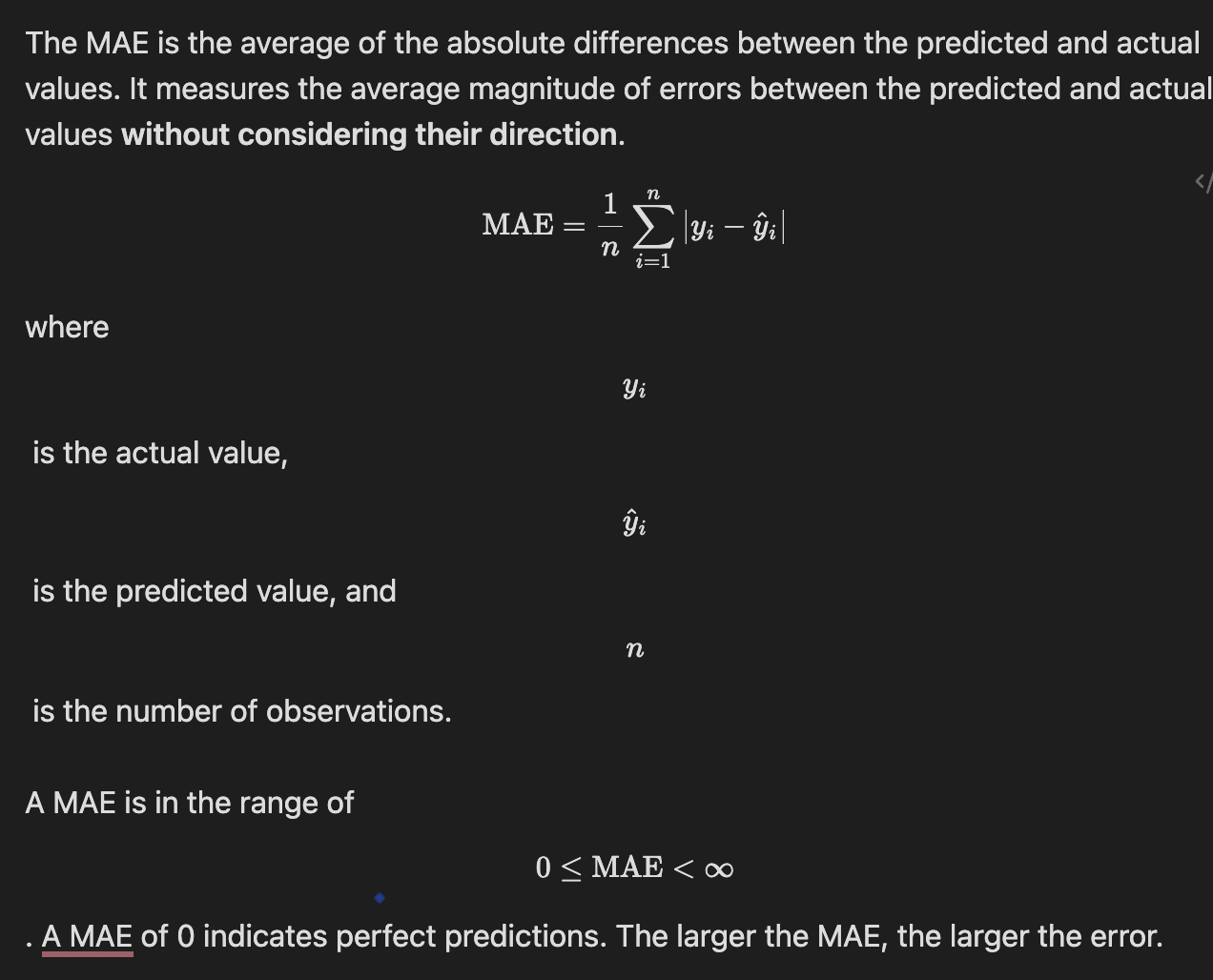
When we take notes with math equations, we need not only write down the equations, but also need to explain the components of the equations. Take a simple example as shown in the screenshot.

In the note shown in the screenshot, I tried to explain something called MAE.
- In most of standard markdown editors, we can wrap the formula with $$ (double dollar) to render the MAE equation, in which case the MAE equation will be displayed on a separate line. We also need to combine some text and equation components to explain the equation. It can be done by wrapping the equation component with $ (single dollar), in which case, the equation components will be showing in the same line of the text context (like the line below the MAE equation), which is what we called inline LaTeX.
- In Notion, we can create a equation block to write equation (showing in separate line), use $$ (double dollar) to wrap equation components for inline LaTeX (A bit different to standard Markdown editor, I personally do not like it, but at least they have such function).
- In AnyType, we also can use LaTeX block to write the equation of MAE. However, there is no way to write inline LaTex for equation explanation. Although I find we can include normal text in equations to achieve similar visual presentation, it is very complex, a lot of work.
What will the example look like without inline LaTeX?
The content will be extremely ugly and hard to read without inline LaTeX feature (as shown in the screenshot below).
Hope it makes sense to you. I am not sure do you see why is the inline LaTeX function essential for math note now, but trust me, it is something can not live without for someone who need to write math equation in their note (e.g., mathematical student/researcher, AI related student/researcher, physic student/researcher, and so on).
Please feel free to let me know if you need any further explanation. Thank you.
Hi @jiywww
 I understand:
Thank you for your detailed explanation with the help of the pictorial example. Thus it confirms all my assumptions. That makes it clear for me.
 For everyone who doesn’t understand the importance of this feature request:
We need this because the second image simply looks unstructured without inline LaTex. Without inline LaTex, the LaTex function itself does not help to write down, look up or learn the equations, which massively limits the use of this function.
I just stumbled upon this problem as well – and for me, writing math notes quite often, this feature for now lets me use two programs again. Anytype for non-math notes, and another one for those with math. Since as the screenshot above shows, egg, the single $y_k$ on one line is neither readable nor nicely editable. (Oh and I know Discourse forums where the $y_k$ I just wrote is even rendered in the forum  ).
).
Quick question: Will a shortcut be added to add (inline) LaTeX blocks quickly?
Similar to the ones used in Notion, where ⌘ + ⇧ + E was used to make a math block quickly.
Being able to type notes, specifically equations, in classes is more straightforward with one keyboard shortcut, rather than having to type /latex or /math to be able to access LaTeX blocks is a lot quicker.
(I haven’t been here in a while so pardon me if I’m not up to speed with all the new updates to Anytype)
Speaking of shortcuts, we need snippets. I’m from Obsidian and I can’t live without the Latex Suite plugin for one reason: snippets. It allows me to write mathematical expressions in LaTeX as quickly as someone talking. It’s indispensable for me, and it would be wonderful to see it come to Anytype. Until the simple inline Latex functionality arrives, I’ll leave this idea here… I don’t know if there’s a better place to talk about it, for the moment.
Regarding changing lines, isn’t that what you are doing in your example? To force a return, type \\
\\ does not work inside \text{}
This is how I’d do it, which is not exactly what you want:
\textrm{Mop the floor,}\\ \textrm{then take out the rubbish}\\ \color{blue} \textit{power factor} \div \textit{load factor}
I don’t know of any other way.
This is what I was doing as well. But it is not very handy to me. Thank you anyway.
A must-have feature indeed.
Obsidian has also a very nice plugin which uses Mathlive as an equation editor. Very, very handy.

+1 from Twitter user @Ragloo in Sept:
https://twitter.com/raglooo/status/1707051303132639252
Thanks @Charlotte for the feedback. It seems that the Anytpe community is growing a lot and very quickly. This feature could benefit many of its members. Thank you for listening to this request, it’s very nice of you. Have a nice day 
+1 vote for this feature! Lots of technical job people would greatly benefit from this feature 
+1, I have tried many notebooks before, Anytype is the best one, its design is simple and fascinating!
Any progress of this feature request?
In progress 