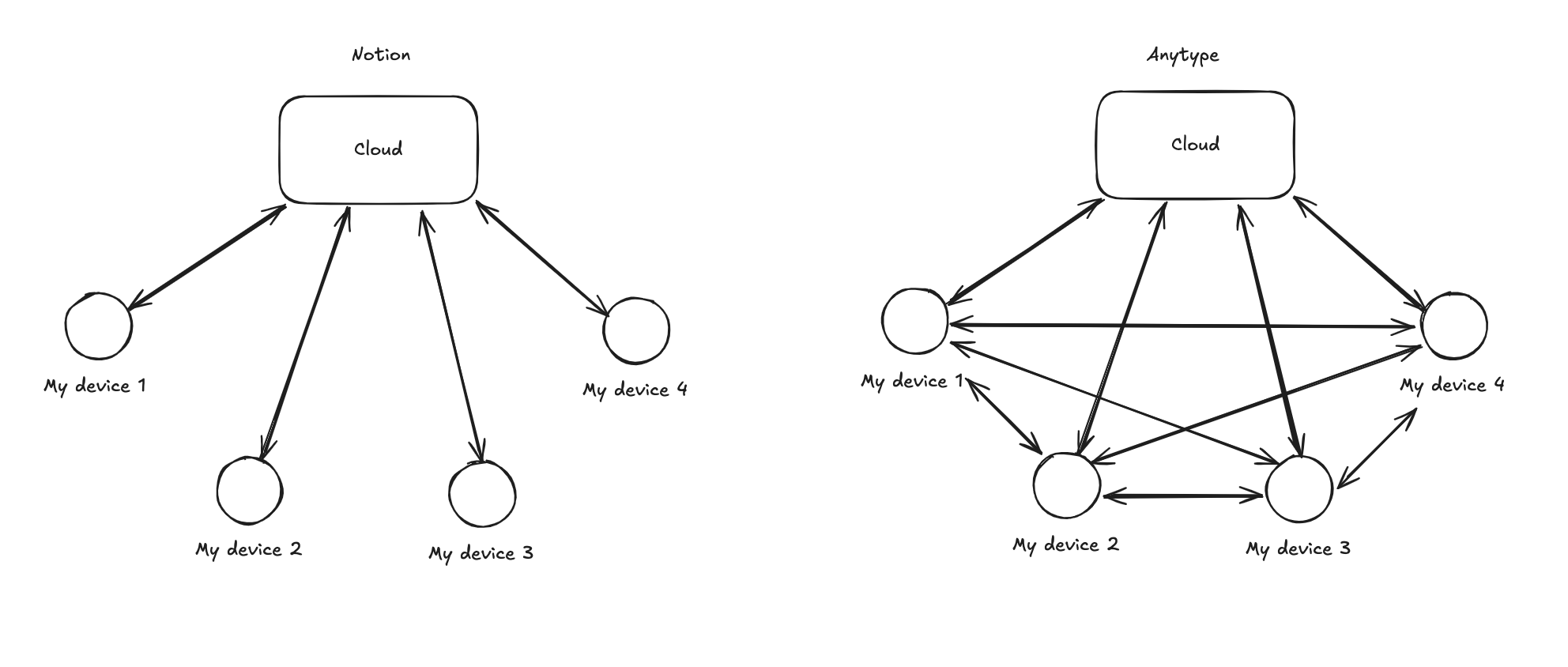
From what I understand, Anytype does not use cloud server to sync our notes. Instead they use a backup node (aka Anysync / Anytype Network / Network space, I think it’s good to decide on one terminology to use). I understand what cloud server syncing is like Notion, but I don’t understand what a node is… to me it works just like a cloud with syncing and there are no difference.
How is the backup node that Anytype use different from cloud sync? What are the benefits to the users compared to cloud sync? Is a copy of our (encrypted) data stored on this node just like how it would like Notion?
Am not talking about the encryption factor or the self hosted/P2P. Solely looking to understand what is a node here and how is it different from the cloud? I tried asking a large language model but it doesn’t do a good job explaining what a node in this instance is.
it is not different but they call it a node because you can sync your devices with multiple nodes. each of your devices also qualify as a node. your devices and their backup server can store and serve the data to other clients.
in a traditional server / client architecture your clients would only communicate with the server. with anytype many devices could in theory talk and sync with others directly. the backup node would be just one of them. it is indeed a centralized server (or cloud instance) but but just one sync target like other clients.
this is how I understand it and why they chose this term.
Local syncing: Your devices connect directly using Wi-Fi, without needing the internet.
Remote syncing: Your device connects to Anytype’s servers over the internet. Anytype stores your data on Amazon’s cloud (AWS), just as Notion does.
What really matters isn’t where your data is stored, but who holds the key to unlock it.
Even if data is encrypted, anyone with the key can decrypt it. If your data is stolen along with the key, the encryption becomes useless. Think of a stolen phone; without the passcode, it’s a brick. But if the thief also has your passcode (the key), they have full access to everything inside.
Notion holds the keys to your encrypted data. This means Notion could, in theory, view your data if they wanted to.
Anytype puts the key in your hands. Remember those 12 words you got when you created your vault? That is your master key.
While Notion also encrypts data, since they hold the keys, they could potentially access it. And even if a company promises they’ll never access your data, that’s just a promise or a performance – it’s not a technical guarantee.
What if an app itself has hidden code to steal your data? If it steals your data before it’s encrypted, then the encryption itself can’t protect you.
But with Anytype, the app’s source code is public. This means people all over the world can inspect it, making it much harder to hide malicious code.
That’s my understanding of how it all works. Honestly, I agree with you - there are way too many similar-sounding terms in this app…
this does not explain at all why Anytype uses the term node and not cloud or server when it comes to their backup “node”. is that just random AI generated text?
I’m sorry for the misunderstanding. That’s not what I meant. you’ve already provided the perfect technical explanation of nodes. I just wanted to clarify the fundamental and philosophical differences between Notion and Anytype, because that was the question I had about Anytype when I started using it. please forgive the unnatural phrasing due to translating.
A node is basically device or point within a network capable of creating, receiving, or transmitting data. So Anytype backup server is also technically a node (except it can’t create data like your devices).
I do see why it’s confusing, they are not calling it the cloud even though it is(?). Anton said this which sounds like they are not using the cloud even though they are using AWS: