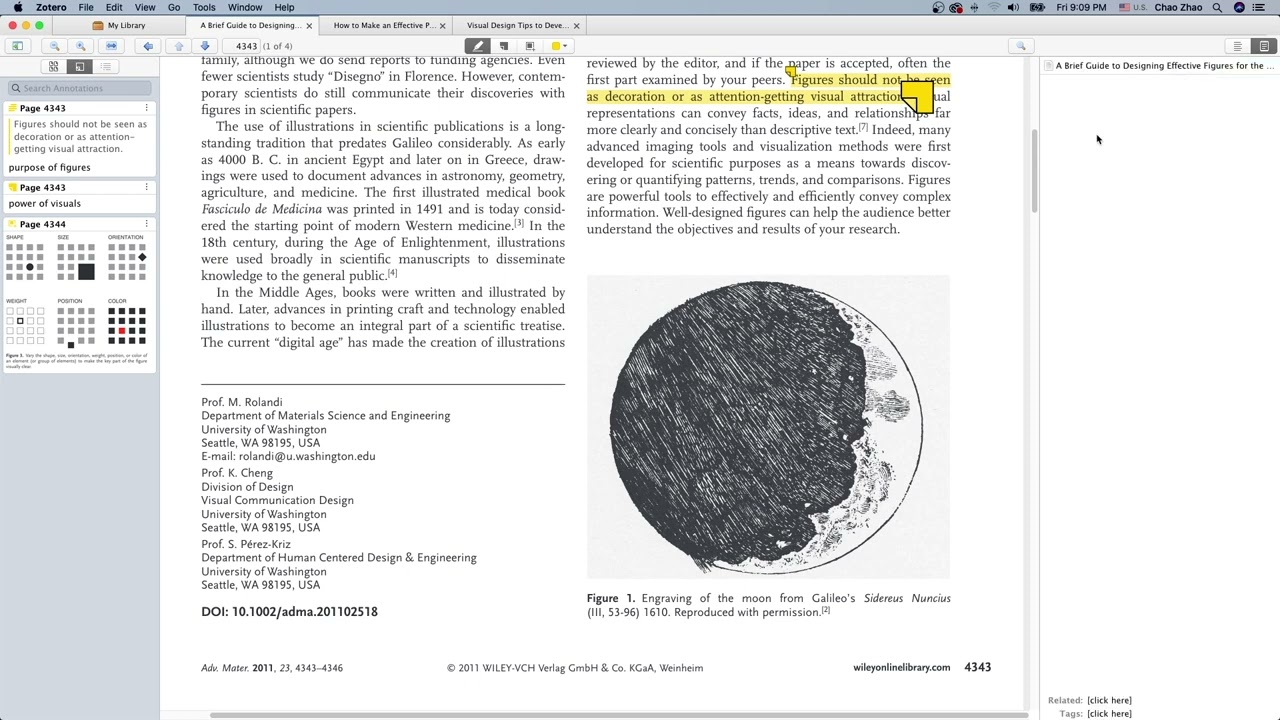
Logseq has this super cool and Utility feature, where PDF is opened within the app with a viewer built in it and annotations can be made in the viewer all without leaving the app (i.e No PDF is opened using something like adobe). And takes the annotation in outline area as a reference ( currently it a manual process it is super cool).
After annotation of pdf within Anytype, the annotations and notes should be available on a note separately, like Logseq does.
I think it is a must have (IMO) feature as much as Database feature to have a PKM.
Additional context
This was from Logseq. Check out Logseq (currently 0.3.2 ) if you want to experience it by yourself.
Give Thumbs up for this feature if you would like to have it in Anytype.
I think Zotero 6 has the nice way of annotations(should check if you haven’t) and also builtin PDF viewer (logseq has too). Select the highlight option and highlight. No need for pressing highlight option or pressing (Ctrl-H) keyboard shortcut. Also the extraction of annotations are even good. Would be awesome for those who study using PDF. Students and researchers would be mainly benefited.
I also use Logseq for my knowledge management at the moment but for projects, I would like to use Anytype. It would be nice if we can do some quick highlighting in PDFs. Currently, you need to download the PDF, annotate and then reupload.
As someone who uses a Sony Digital Paper almost daily, the ability to work with annotations like this would be quite useful, especially if handwriting became searchable like typed text.
I use logseq for 6 months and didn’t knew about that. Yesterday all day long i was searching tool for doing that and all i found is working not in the way i expected. But Logseq do with PDF what i need. Thank you topic starter for the hint.
Hello everyone Thanks for rising this up. We already have pdf markup in our product backlog, but to be honest we could start to work on this only after the public release
The main idea is Anytype is not really optimised for working with visual information like pdf and images for now. And we want address this request as a part of integral initiative “visual content as a first class citizen” to provide solid experience. It will take a lot of effort and we have more screaming tasks to do before public release
In the case of Evernote, they’ve generalized: PDFs are treated as images.
So both images and PDFs can be edited, with text, frames, arrows, etc. inserted.
So some thoughts.
Often it feels like my knowledge base consists of my thoughts and ideas interwoven with the annotations I have made.
Research Process for Pdfs:
For years, when working with pdfs my workflow would go something like this:
Download, Curate, Organize, Prioritize reading of Pdfs
Read, Annotate, take notes, record audio/video/screen captures on the pdf contents. Notes get tagged and put into categories, themes etc.
Extract & Process “notes” and “annotations”- organizing them based on the purpose of my reading so that I could later work with them. One of the best places to work with them was a mind map. I would use the mindmap to show the connections and relations between different pieces of information, ideas and themes. That mind map could be morphed into an outline, say if I needed to write a paper or report.
Inspiration (Seeing the process at work): Docear + Freeplane (Mind Map)
To see this process in action, you can take a look at this video on Docear (open source – sadly no longer maintained) program that streamlined the getting annotations into a mind map. Docear relied on an external pdf viewer/annotator and it required one that was compatible to work.
Zotero
Zotero 6 received a significant upgrade, adding a pdf viewer/annotator as well as upgrades to their note taking app. You can see how it can be used similarly here.
Zotero (open source) has long been an excellent tool for managing not only pdfs but any “resource” that one might want to track while doing research. Like Anytype, it is a powerful database, and it is interesting to see how people are adapting it to use in conjunction with “networked” thought applications like logseq etc.
Issue: Time spent Processing:
When dealing with pdfs the challenge is always in the “processing” of notes and annotations. One of the reasons why people like Logseq is that it allows you to do some of the processing/linking and thinking while reading/reviewing the pdf. That being said there is still a lot that is being done manually, that could be automated. It would be great if Anytype could pull data about the resource from Zotero, and feed it into a template, and that notes/annotations could inherit those attributes and relationships in its database. I would like to see a similar feature with the web capture tool.
Because it has been mentioned here are two links (one) (two) to Logseq showing how Pdf annotation works:
Thanks for adding my tweet. As a teacher, I have PDFs in Apple Notes because I can quickly refer to them, search using the OCR feature and add comments with my Apple Pencil. When I am at my Mac, I use the Preview feature to annotate. This is great when I am in the Apple ecosystem.
The problem is: I also use Linux and Windows, so Apple Notes isn’t the choice for me.
I would also like to edit the pdf inside ayy; underline, edit notes, set up links, e.g. In all cases we need to upload the doc to ayy, so, in the case that the pdf has a editable text, why not to copy and paste inside a page, and edit as you want?, it has a fantastic editor to do that.
Then, once finished, if you would like to export to pdf you can print as such.
Am I saying a nonsense?, which is the difference in comparison to zotero or other pdf editors?, thanks a lot.
I have tried pasting the text from several pdf documents into Anytype, and it looses the format, and footer’s references; so it is not useful.
I am using Zotero to edit the pdfs, it is efficient, easy to use and great for citations. Whereas you paste the text from Zotero, it adds the metadata about the content, page, e.a… Moreover, it has the option to sync with the browser. As someone has said in this thread, it could be a practical plugin for Ayy.
I wish I could write/read files directly from anytype. My use case would be, for example, writing the shift book directly from the Anytype user interface. My company uses Microsoft Excel for this purpose. I could enter the file link, but then I would have to open Excel separately every time. I imagine an overview page on which I can directly view the various information: email, todos, shift book, employee allocation, etc. and can also change the data directly in the files. I don’t have the option to open a file stream. Of course I could program my own user interface… Is the program code from the desktop application actually public? I couldn’t find this on Github, only for individual functions.
Of course, you could compile all the information directly in Anytype, but in a large company something like this is only possible against a lot of resistance, so I would think it would be good if you could not only link files, but also edit them directly using an inline script if necessary.
What programming language was the desktop application written in?
I would like to be involved in the further development before I start programming something of my own (I know C# and WPF). Especially since the general functionality of Anytype is very ingenious.
Please create an interface for such cases.
Allow you to participate in the desktop software itself.
Allow direct writing to other file types.
Allow you to create your own scripts like in the Obsidian software to make your own functions accessible via plugins.
 Thanks for rising this up. We already have pdf markup in our product backlog, but to be honest we could start to work on this only after the public release