Custom Sorting is not working Alphabetically or Numerically

What’s The Bug?

For some reason when I use the Object as a relation, the sorting in a Set doesn’t work. In the attached picture I have 3 separate Relations that are setup Objects as relations. When I try to sort them Ascending or Descending they don’t sort based on their names. Not the Key Result Link or the Action Link. I can’t figure out what order they are sorting themselves in. If i change it to ascending and descending it does not sort them by the first letter or number.

How To Reproduce It

  1. Create a set.
  2. Create a new relation and have the relation be an Object.
  3. add different object links in different objects
  4. Add numbers or letters at the beginning of the links
  5. Try sorting it in a set.

Image or Video

The Expected Behavior

I want everything to be able to sort in alphabetical or numerical order when there is an object as a Relation.

Additional Context

Every other type of relation seems to sort correctly. When I create objects as a relation it seems to be the only time it has issues.

Device

Puget Systems Intel(R) Core™ i9-9900K CPU @ 3.60GHz 3.60 GHz

OS

Windows 11 Pro

Anytype Version

0.44.0

Network Mode

AnySync

Technical Information

OS version: win32 x64 10.0.22631
App version: 0.44.0
Build number: build on 2024-12-16 16:53:50 +0000 UTC at #c04d64d52304c0fe8800032e74e49a7159abdbad (dirty)
Library version: v0.38.7
Anytype Identity: AB9VqdyCq8oiSiBAGptbWPiKqfbQMex5xNwkTVUnqywX2oJQ
Analytics ID: f0247694-6751-4409-976a-181c7627d94d
Device ID: 12D3KooWGfCjZ2sLmQeh3GZbQ69XQi33okZWB7XvADmA3ybnSPzE

If I got this right, you renamed the links to the object by prepending numbers, correct?
I wonder then if this bug is that it keeps sorting by the name it links TO, instead of the new NAME of the link you gave it.
If you could verify this, it would help the team with debugging

Happy New Year

The Original Objects are in the Name Column of the screenshot. If i sort by Name. The Letters and Numbers will work perfectly. The Numbers will be sorted in number order then by Letter Order.

But it seems the issue is only when I create a new Relation, Make that relation an Object Type, “Pick an Object Type” And try to sort by that newly created Relation.

In the screenshot Objective is an Object Type, Key Result is an Object Type, and an Action is an Object Type.

I want it to Sort By the
“Objective Link” Relation
Then the “Key Result Link” Relation
Then the “Action Link” Relation

But it wont. If you look in the Key Result Column,05 Key Result comes before 01 Key Result. Then 09 Key Result. Then 08 Key Result.

Then I want it to Sort By Action Link Column
But it wont. You can see the order is B. Action, A. Action, C. 5Action. If I switch those Letters to Numbers, There is no sort difference.

Thanks

This has been an ongoing issue. Supposedly perhaps, it is sorted according internal ID (hidden). There are currently two relations for this in Anytype: Anytype ID and old Anytype ID. This internal ID is rather meaningless, so we won’t feel it being sorted.

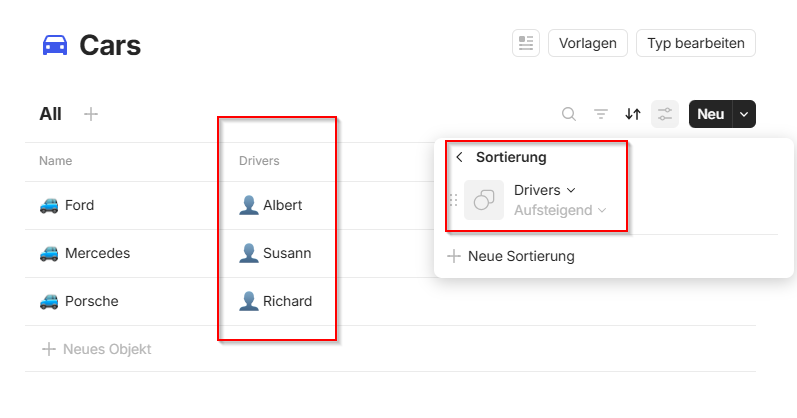
However, I don’t feel like this is the only reason behind this chaos in object-supported relation (even if I ignore the other sorting problems we have in v.0.43-0.44 e.g. The ascending and descending order sorts arent working properly with other sorts)

See a discussion here.

This report has been added to our issue tracker and received by the Development Team.

I am experiencing this too. What is the current status of fixing this bug?

This issue has been fixed by the Development Team and will be implemented in an upcoming release.

What’s The Bug?

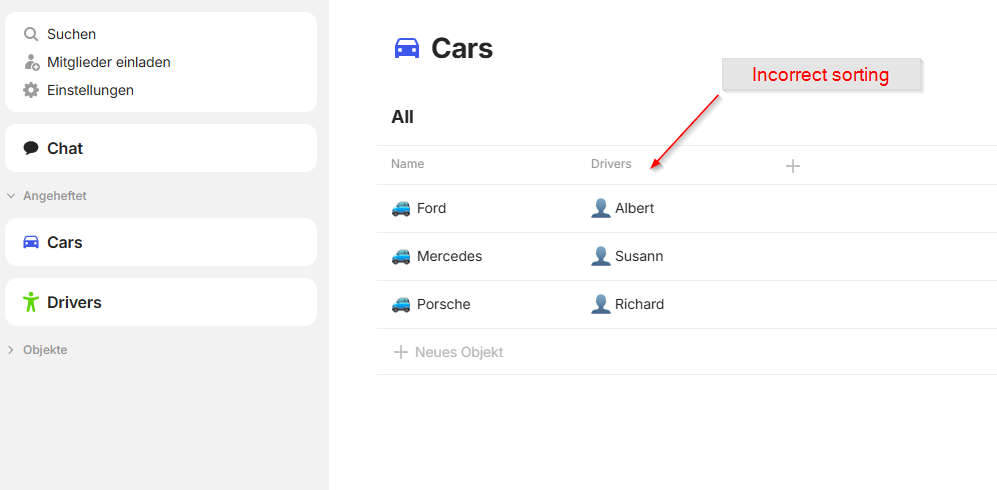
When adding a column from type Object and sort it, it will not sort correctly

How To Reproduce It

  1. create 2 different types (cars, drivers)
  2. add the types as property to each type (cars has the driver property, driver has the cars property)
  3. create some sample objects
  4. go to type cars and add a column from type Object drivers
  5. Sort the drivers

Image or Video

The Expected Behavior

The sorting of the drivers should be correct

Additional Context

Device

HP ZBook

OS

Windows 11

Anytype Version

0.50.3

Network Mode

AnySync

Technical Information

OS-Version: win32 x64 10.0.22631
App-Version: 0.50.3
Versionsnummer: build on 2025-10-02 15:00:10 +0000 UTC at #71a16e6365809e0d481506b3b2e8e4a2a37ea9f4
Bibliotheksversion: v0.44.1
Anytype-Identität: AAfTVnagmcbmHWrdPUBMVf6AHFxxuSEN6TqGU5Mxma5szm7q
Analytics-ID: MbLMixytgEa8v4ccL8KoakaZLU6EL5ePZjZWij1AWPY6G7Uo
Geräte-ID: 12D3KooWLCtDh8Az7SrZqWCjZmDSPEiUxCsaUrWGKoFu64WLgsG9
Ethereum-Adresse: 0xA9Fb1827DfE9b156F121dA88fA828e4C726e9B74

Could you please share how exactly do you think the sort should work in this case?

I would expect the sort order to be alphabetically.

Hi @Filip and thanks for the quick response.

In my opinion, it should be sorted alphabetically correctly.
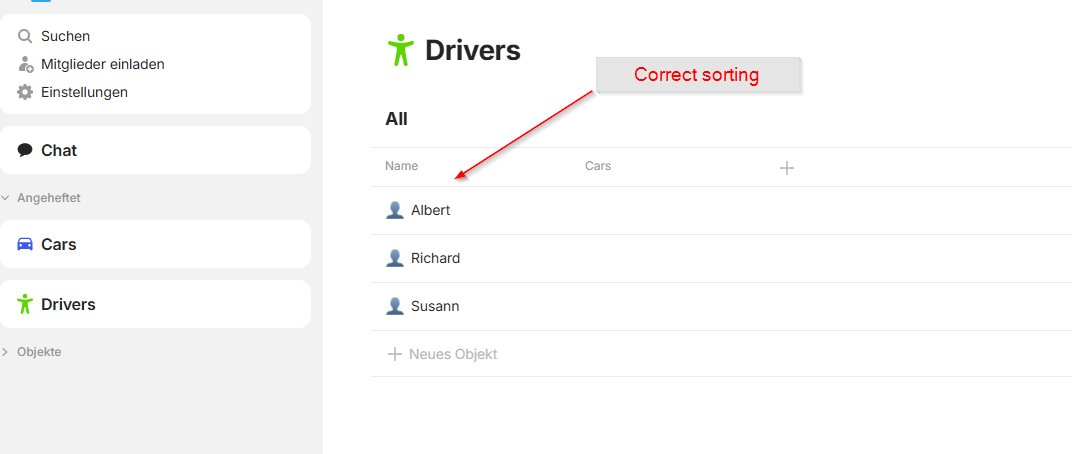
So Albert, Richard, Susann.

When I go directly to the type, the sorting is correct.

But when I use this type as column and sort it, it is incorrect

I hope this explanation makes it a bit more clear.

This feature is already in development and will be included in one of the upcoming releases.

I’m not sure if this is a feature.

The sorting function already exists, but it doesn’t work reliably (or I don’t understand the logic behind the sorting).

But thanks for the feedback. :hugs:
I’ll be happy if the bug is fixed in an upcoming update. :+1: