Reference to a similar post:
I have checked for similar posts but it has not occurred to me yet to check for the most recent ones to see if they are similar. Here is one that I have found after creating my bug report from 20.06.26: Import space from Any Block does not work
WHAT IS THE BUG
The Any-Block and Markdown imports (Both zipped) do not import my images at all and instead shows a spinner-loading-symbol for every image, but more on how it looks like down below. I imported files once from a 0.50.5 version from my old PC to my new laptop and then I imported the currently newest as of 24.06.26 of the 0.55.5.
Happened from a import of my-old-PC-Anytype-version that I updated to 0.55.5, as well. After that it happened once with a Protobuf file version import, as well.
When leaving an object open instead of the graph view, I also get this:

Important side notes:
Functionally bricked by not being able to copy images into my pages anymore from my clipboard, since these are stuck in the spinner-loading there, next to all the spinners of my imported images.
I cannot download images from inside Anytype either while this bug is going on.
HOW TO REPRODUCE IT
Import the Any-Block file, worth ca. 800MB with 1.8k images like mine onto a new PC or laptop.
If it makes a difference, try it out going from a Windows 10 PC to a new laptop Windows 11 like in my case.
If you need it, just ask me to transfer my files over to you. I am more than willing to do that.
THE EXPECTED BEHAVIOR
To finish the import with all images being loaded up everywhere, from the graph to the objects themselves.
And that has to happen without receving an “internal error”-message at the end of an import indicating that something must have gone wrong according to the Anytype programme like it did in my case every time.
ADDITIONAL CONTEXT
I guess the images are stuck in a loading screen and have not said yet that they cannot be shown at all or something except for some images, but I do not know, how long they will stay in loading for now. Sometimes, this “image is broken”-image-error-message disappears and returns to just the spinner symbol after switching back and forth from the graph to the object view.
If you want, I can provide my entire set of import files, so you do not have to create anything new and have to guess. I would just want this issue to end, as this is a functional brick to my Anytype eco system, since I cannot probably paste new images going forward.
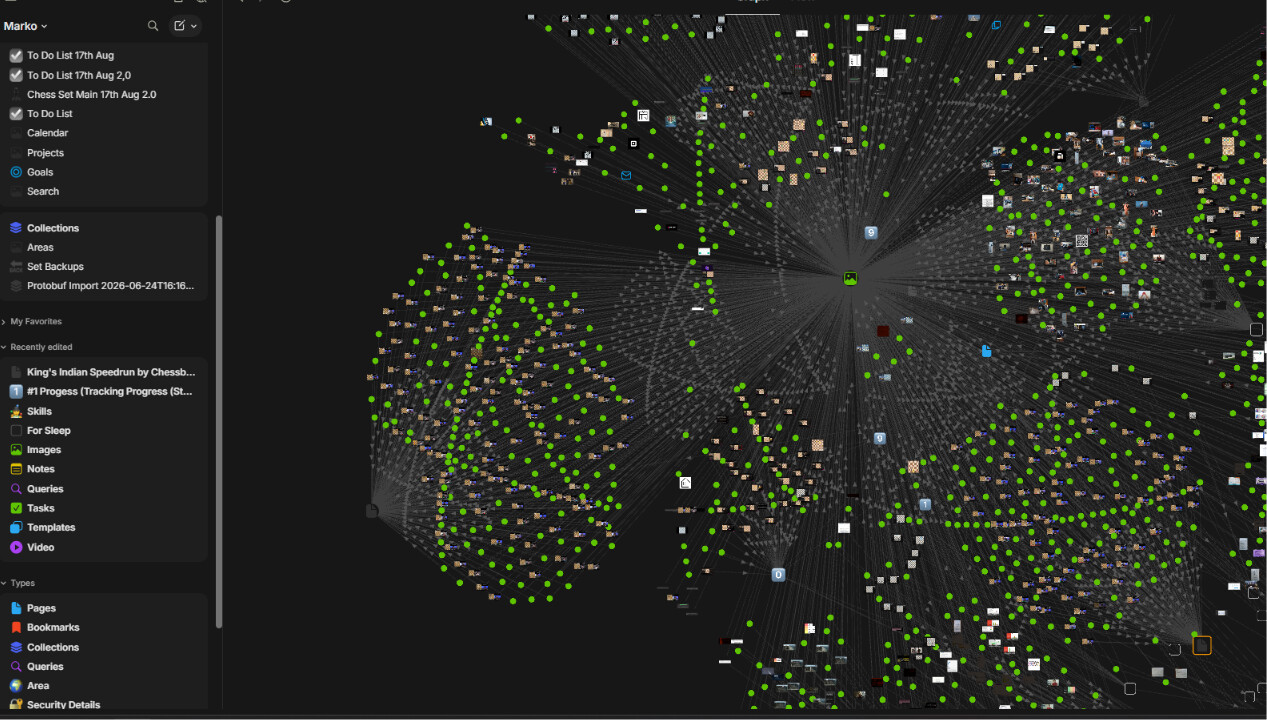
Here is how my graph looks sometimes, or in this case, when it does manage to load up the thumbnails:
TECHNICAL INFORMATION
Laptop Windows 11 0.55.5:
OS version: win32 x64 10.0.26100
App version: 0.55.5
Build number: build on 2026-06-02 16:45:57 +0000 UTC at #5e888f1b9b8590575ea81da218e95c472daf0fdf
Library version: v0.50.8
Anytype Identity: A94TM36UNnjTyse6kbdjMtrVvAAwdm9PiXPqGAsNRZDRDHVX
Analytics ID: McaGbp6xBwxfajW6c8yyaXus3Qs9uL3Gwn8yPi3YhcXR51a4
Device ID: 12D3KooWJJZKvWmi9xSjAwLhfMB3oUY9WNviG4CUytnAMrTjyu5T
Ethereum Address: 0xED58E84A0fA288ED4eA18b02BD4E63D48A9AcE59
Desktop Windows 10 0.55.5:
OS version: win32 x64 10.0.19045
App version: 0.55.5
Build number: build on 2026-06-02 16:45:57 +0000 UTC at #5e888f1b9b8590575ea81da218e95c472daf0fdf
Library version: v0.50.8
Anytype Identity: A9PQPvQpzhsrVyafe24nvET3bv22p7oqxD7hbPL7cNpMJHjS
Analytics ID: 2bbf91ec-c93f-4d06-bc06-d08333532669
Device ID: 12D3KooWQK63JqzVq9TbgwX7ZKiZqP5zwwLY956M46ERMKCmJWTk
Ethereum Address: 0xA9BDb06D615AF513F598F68753Ec36eB7454E4ee