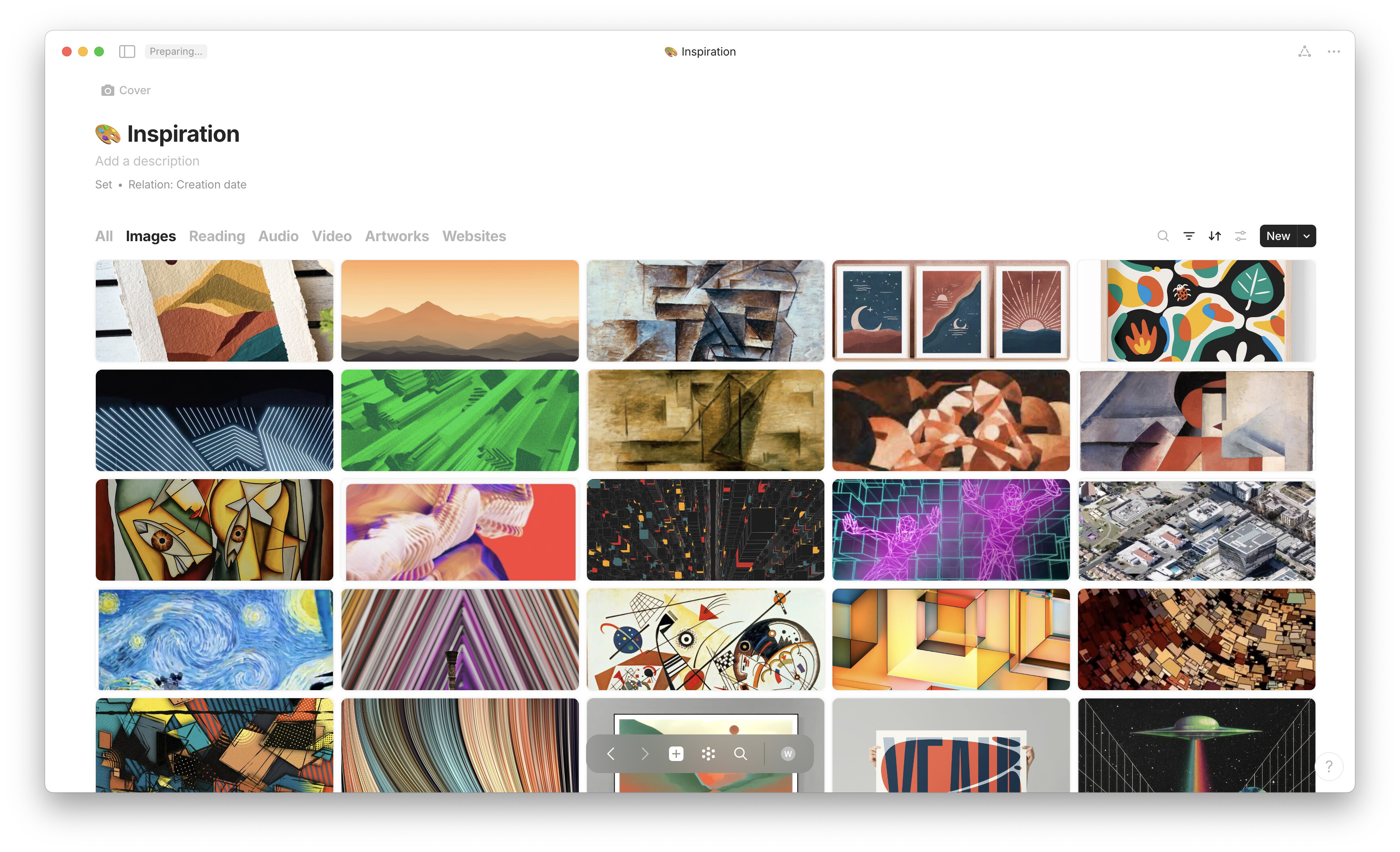
Clean Gallery view with custom CSS

Hi there!

As a designer/artist I want to be able to create moodboards and collect images without seeing the title of je object or image (just like in notion). This was a feature that I was still missing, but with custom css you’re able to achieve this. Below is a quick example of how you can achieve that.

result:

this view is a lot cleaner if you only want to see the images. I also adjusted the spacing between the blocks so that the images are closer together.

before:

custom css code:

add this code to your custom.css file and restart anytype.

.blocks .block.blockDataview .viewContent.viewGallery .card.withCover .itemContent>.inner {
    display: none;
}

.blocks .block.blockDataview .viewContent.viewGallery .row {
    grid-column-gap: 8px;
    padding: 0px 0px 8px 14px;
}

Now that is super clean! Nice work :smiley:

That is so neat! I wish they’d add that as a feature.

Am I right in understanding that this code works for the entire app’s Gallery View and not just for this specific collection?

Thanks! yeah would be great if they add this with a simple toggle for example. This works for all gallery views, including sets and collections and since the new update is also seems to work with all grid sizes

Hey!

Thank you so much for this. :slight_smile:

I haven’t been able to get this one to work though. I’m a CSS nooblet trying to prettify Anytype though :face_holding_back_tears: so there’s probably a silly mistake somewhere.

This is what this bit of the costum CSS looks like. Would someone be able to help please?

body {
    font-family: "Palatino", "霞鹜文楷", "jetBrainsMono";
}

.blocks .block.blockDataview .viewContent.viewGallery .card.withCover .itemContent>.inner {
    display: none;
}

.blocks .block.blockDataview .viewContent.viewGallery .row {
    grid-column-gap: 8px;
    padding: 0px 0px 8px 14px;
}

:root {
    --color-text-primary: #402810;
    --color-text-secondary:	#586e75;
    --color-text-tertiary: 	#839496;
    --color-shape-primary: 	#586e75;

Thank you kindly!

Edit: I got it to work after messing with dev mode. Leaving the fix here in case anyone runs into the same:

.blocks .block.blockDataview .viewContent.viewGallery .card.withCover .cardContent>.inner, .blocks .block.blockDataview .viewContent.viewBoard .card.withCover .cardContent>.inner {
    padding-top: 15px;
    display: none;
}

I was tinkering with this CSS and found a way to specifically target a specific set/collection. Figured I’d share it here in case someone could use it.

#editor-controls-idofyourpage ~ .block.blockDataview .viewContent.viewGallery .card.withCover .cardContent > .inner {
	display: none;
}

#editor-controls-idofyourpage ~ .block.blockDataview .viewContent.viewGallery .row {
	grid-column-gap: 8px;
    padding: 0px 0px 8px 14px;
}

You can find the id in the devtools by targeting the editor controls at the top (or ctrl+F "editor-controls-).

You can then replace “idofyourpage” with the one inside the devtools, so it’d look like this for example: #editor-controls-bafyreiab27psja5fetoznlbqq74zpstria6mrah373qas3hr6okp6cngzy

It won’t work on pages with inline collection/sets. There’s definitely a way to specifically target those but I personally don’t need it right now. Happy to figure it out if someone else needs it though.