Sounds so good! Can’t wait for the timeline view. What I still miss in the calendar view is the possibility to see the times for the assigned tasks on the individual days.
By the way, I also find it a bit cumbersome if one can only create and list appointments/tasks via sets and collections. This might be great if it allows you to create and filter many relations, but the disadvantage is that at some point it becomes more computationally intensive than it actually needs to be. Perhaps it would be possible to automatically remove all completed appointments and tasks from the calendars and place them in a separate “completed” category so that the computing power is available for all other existing and future tasks and appointments that have many relations?
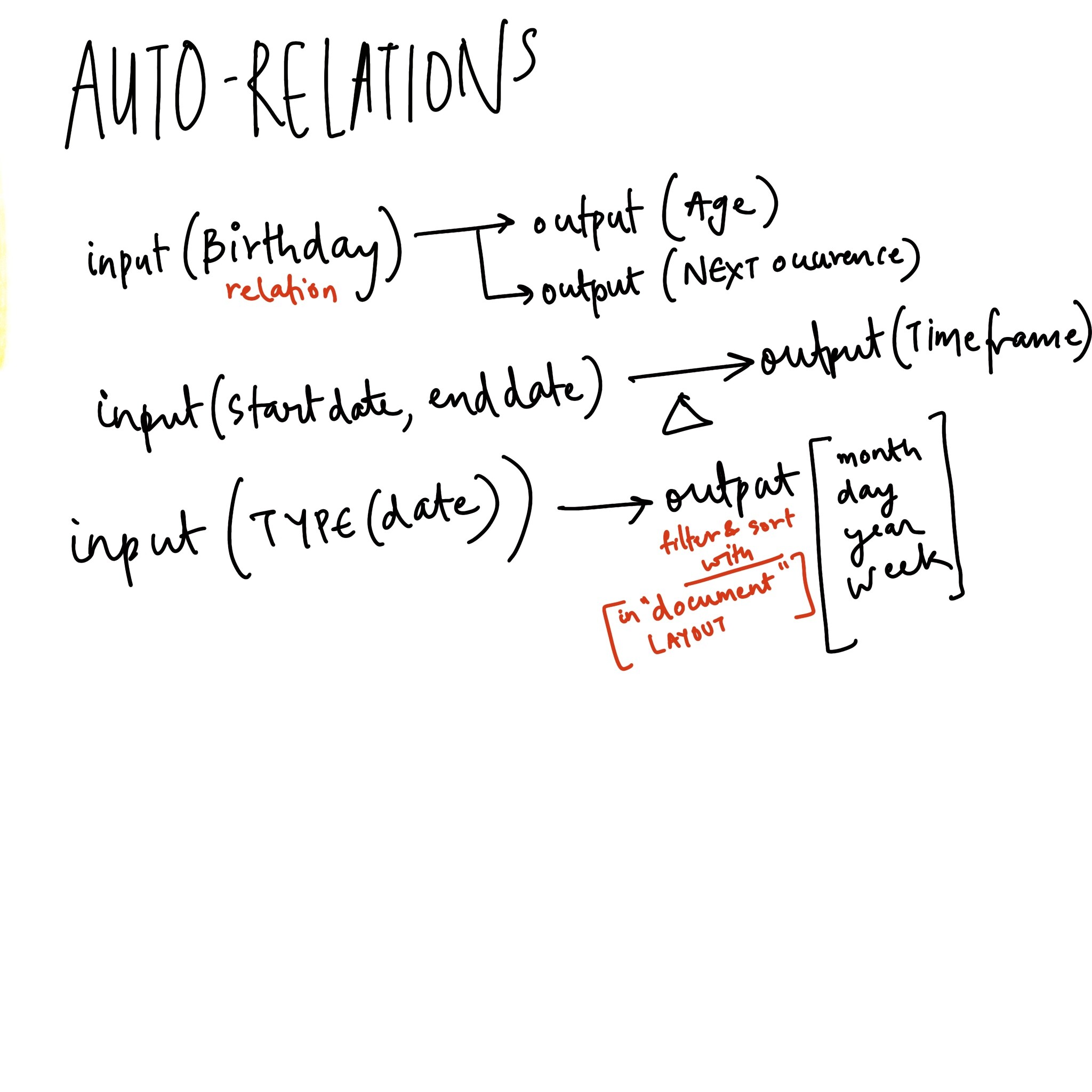
There are a few ideas that can be enablers to bootstrap different types of time-based layouts
1. **Auto-relations**
Might be a preliminary step to implementing the "Formula" relation in Notion. Many types of time-based relationships could be calculated from existing relationships. Time based would be the lowest hanging fruit.
This + timeline/proposed “Document” view could enable multiple types of time-based documents
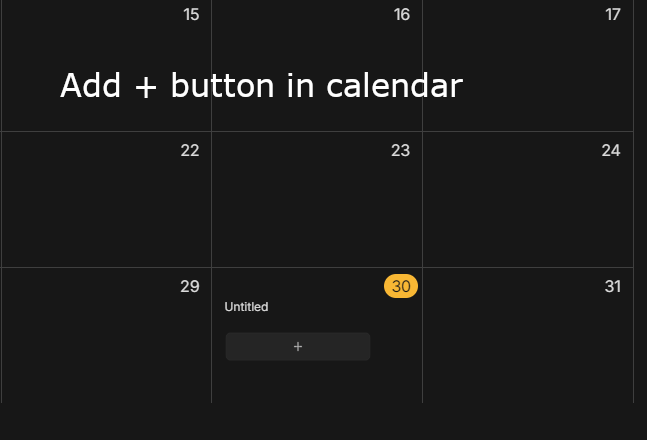
2. UI feature for consistency to Calendar view
Currently every layout in collections and sets have buttons to add notes natively in the layout except the calendar view
3. Ability to add one or two time-based relations to title for dynamic titles that have dates in them
Just wondering if there’s been any updates with the calendar, as I couldn’t find any details in the roadmaps. Really excited for when the calendar can become more robust! Hopefully we can start adding time to tasks in the nearer future?
If you do a calendar / timeline view, I would like to easily move tasks into the calendar for time blocking. E.g. the filtered list of tasks is on the left, calendar on the right, and you can drag the tasks into the calendar - then move them around / change the duration in the calendar and it changes in the task. And I’d also like to be able to check the tasks off from the calendar
Hello! Would you like to add/embed in anytype a calendar with tasks and notifications of the Asana type, only simplified? If this is planned, then I really ask for a function with a notification in telegram! Thanks!
Hi @legendabinance calendar support is on the roadmap but not for anytime soon. I encourage you to watch back the townhall (Happy New Year, Release Schedule Update, Town-hall Announcement, see link to zoom recording and code at the bottom of the thread). It’s mentioned there. The transcript is searchable, so that should help you pinpoint the right place in the recording.
In my case, daily tasks, given jobs assigned by others, or some events can be easily handled ‘Outlook + MS To do’ or ‘Google Calendar + Google Tasks.’
but sometimes I want to set my personal goals which take several months to years and want to achieve them. In that case, I use gantt chart.
because I need to check the things below.
What do I need to do more? (what tasks are required)
** tasks, subtasks.
Where am I? (progress rate)
** deadline
** phases
** milestones
Those things are hard to handle by the calendar view with a to-do list.
My particular use case for timelines is more in line with the TimelineJS from timeline.knightlab.com. They have an iframe embedding option and I hope the iframe feature in Anytype that is currently in process will work with this. TimelineJS is open source under the Mozilla Public License 2.0 and uses data from a Google Spreadsheet or for more complex timelines, using Javascript with JSON data.
I guess the following attributes can cover nearly all use cases of time-related objects.
Starting date/time
Ending date/time
Routine
Tags
Task/Event: If the object can be checked
Dependencies: Does the object depends on other objects or do other objects depend on it?
Order
The following use cases may illustrate how to use these attributes.
Case 1
I want to become a martial art master. I know it is a life goal for me but I do not have a detailed schedule yet. However, I want to start to decompose the elements I require to become the person I want to be.
The starting time is today with no time entered.
The ending time is none because it is either a task that will never end or the ending time is the time I become tired of the training, which is unknown.
This is not a routine.
#Life goal
This is an event instead of a task. Therefore, it should not be able to be checked.
It does not depend on other tasks.
I manually drag it to the third place of all the time-related objects due to an arbitrary reason.
Case 2
I know that keeping balance is essential in martial arts as it determines if I can maintain a steady stance. I want to practice it from time to time.
The starting time is 7 a.m. on each Wednesday and Friday.
The ending time is 7:30 a.m. on each Wednesday and Friday.
This is a repeating routine. However, I would like to try the effect of this practice so it will just be effective for a month first. The starting time of the routine is today and the ending time of the routine is one month later.
#Life goal #routine
This is a task. I want to check it after finishing each repetition as well as after the whole process.
It depends on the task in case 1.
It follows the task in case 1 with an indentation.
I may add other use cases in the future. Thank you.