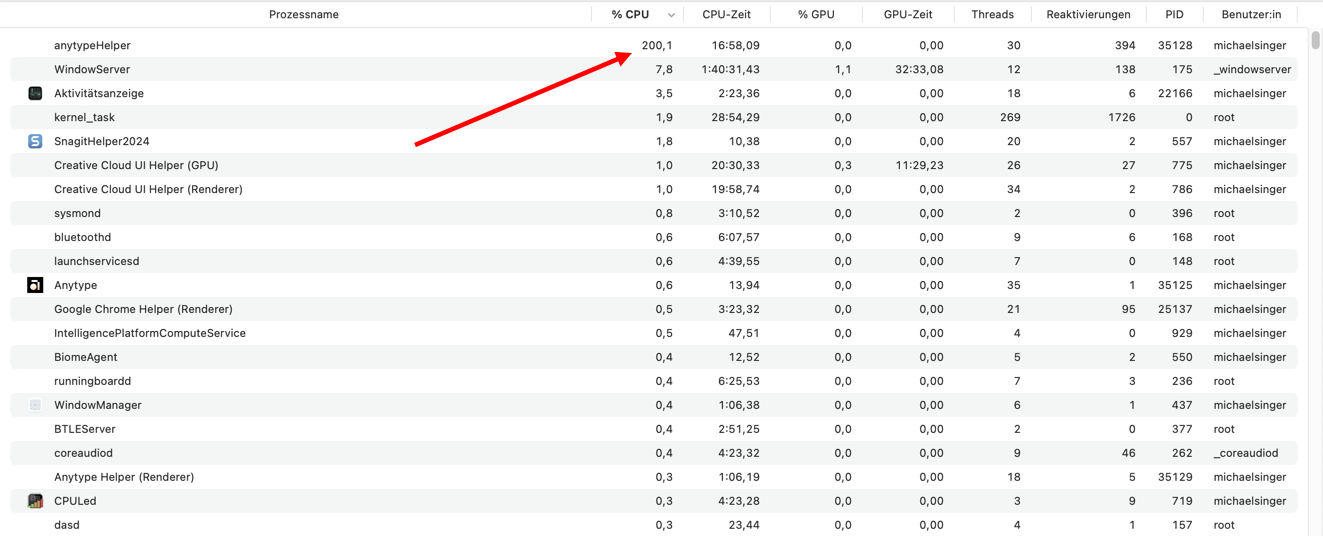
Anytype helper eats a lot of memory, CPU usage of 12.6%. This process cannot be terminated by closing the app. If I create a new account (new vault) the problem disappears. As soon as I log back into my usual vault, the problem starts again, high CPU usage with a cooler that gets over its revs.
I use Linux Zorin at home and Windows 11 at work. It started this morning on the Windows device. Here there was a problem causing the Windows environment to be completely refreshed. Probably that compromised Anytype.
I have tried everything, new installation of AnyType. Erased all .config files from my computer. Nothing helps.
I have one crash log. When I tried to create a new vault anytype helper crashed.
How To Reproduce It
Go to your system monitor
Search for anytype helper
See the high cpu usage: about 12.50%
The Expected Behavior
Anytype helper has normal CPU usage and does not crash.
I just started noticing this also. It can take up to 2 minutes for Anytype to close after selecting Quit. I’m on a M1 Max, MacBook Pro, Sonoma 14.6.1, Anytype Ver 0.42.3, Any Sync Mode.
In the last few days, I used Anytype by repeating the following sequence:
Open Anytype
Access whatever data I needed.
Immediately close Anytype.
kill anytypeHelper
Surprisingly, today after several kills of anytypeHelper, during the step 2., the CPU usage was still over 100 %, but suddenly anytypeHelper lowered its CPU usage and the problem discussed here disappeared entirely. I can now even close Anytype together with anytypeHelper without having to kill it. And the CPU usage remains normal. Using Anytype 0.42.9-alpha, but not sure what caused this return to normal, though.
In my case, the issue stopped while I still am a member of the public space. Although, I have been a viewer of said space up until recently when I have been made an editor. I wonder whether that has something to do with it. The times check out.
Aha. Found it. Thank you for the info. That explains it. Not sure why the bug fixed itself without me having to remove the data folder, but I will not complain
Version 0.42.4, which has just been released, seems to have solved the problem.
By the way, the update process from 0.42.3 to 0.42.4 takes quite a long time and during this time nothing happens visibly, so that you think the update won’t work. You really have to be patient this time.
I’ve still had the issue with the high or very high current need in task manager.
It helped temporarily to reboot the whole PC, but after some working with Anytype, the current need increased again to “very high” and stayed there “forever” (till the next reboot).
Today I did what @Angelo did and leaved the Local-First Lovers Space.
After a simple window reload (Ctrl + R) was the current need “very low”.
– Excellent tip, @Angelo!
WTF does this jinxed Space do, that its mere presence in the Spaces bar sucks so much current out of the PC’s power supply???