yes, although smaller indie projects don’t need to fear much usually.
but if Signal threatens to leave the EU when they decide to force backdoors in chat apps, Anytype also has to think about how they handle the situation
I have two problems, how do I close the app or minimize it and get the menu bar? And how to make the side bar to move to the chat’s items/pinned list, in regular spaces when I click on a space, the spaces list changes to space’s widget list, how to make it like that too for chat space?
Also I noticied that a pinned Tasks widget doesn’t show a list of View’s tasks amymore.
I didn’t expect such a big step and I’m happy to try out something new. It’s very common for me to tag others or leave comments on documents to notify them so I’m thrilled to try out the chat feature for collaboration!
The sidebar and widgets feels a bit strange but I’m happy to drop some more concrete feedback once I used it for a while.
Tbh the custom sorting of property options might be my most exciting pick out of all of these changes haha
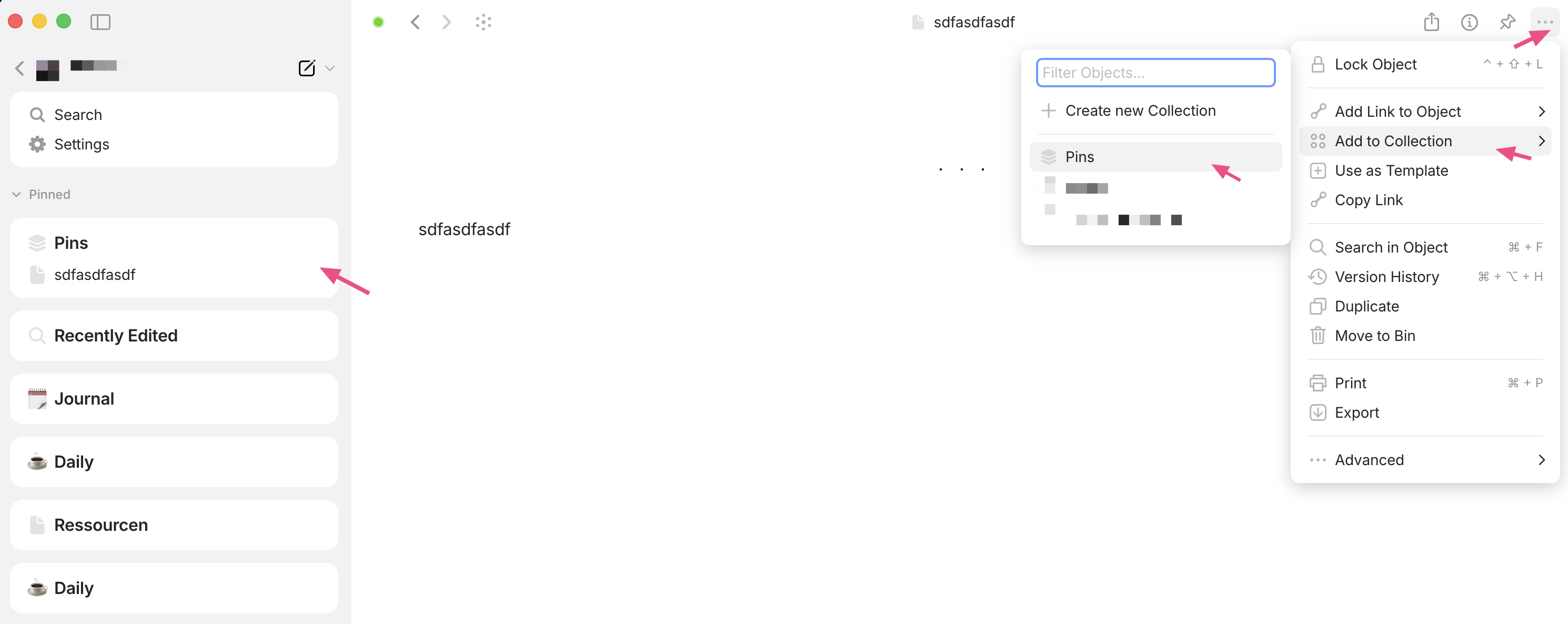
 I was wondering if I missed that we can pin an object from another space! Then I realized you meant pin the actual space.
For anyone else that was confused, just right-click a space and you get a menu with the option to Pin, Mute and Space Settings.
It’s morning for me, and coffee hasn’t kicked in yet…
Asking the question I was afraid to ask for years…
Continuing the Tips and Tricks:
- You can then drag the pinned spaces to order them
- You can switch spaces by Ctrl+1/Ctrl+2, etc (based on the order)
we plan to realize android on Monday and you will get full synced experience with chats there
it’s coming. This is an intermediate step.
I updated to version 50.0.1 and can no longer find the “Add Widget” button; where did it go?
I’m using Windows 10.0.19045
you now just pin an object you like to see as a widget
Thank you 
What I don’t understand is why the good old top menu was replaced by a new design that is simply more cumbersome to use?
According to the announcement, it’s supposed to have a mysterious benefit in dark mode, but I can’t see any benefit.
I was always (and still be) a fan of a classical top menu!
In my opinion it’s the most intuitive and fluid way to use a program on desktop PCs.
Hmm, something strange happened after I updated Anytype to this version. Now I see both pinned objects and other objects, but I’d really prefer not to have the other ones show up underneath. Only the new pinned ones…

Also, one really important feature that doesn’t seem to work anymore is viewing lists, like to-dos. I relied on that a lot.
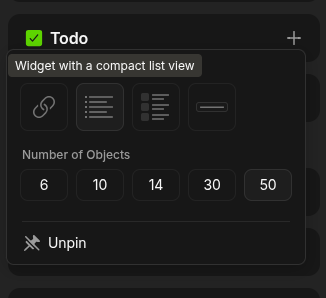
You can simply collapse the Objects section. The status (collapsed/expanded) is remembered.
Slightly late for the party.  Thanks for v.0.50.1.
A quick feedback on UI:
It feels a little strange when widgets locate on the left sidebar for spaces, but then they locate on the right sidebar for chats… not really consistent.. Maybe this would feel better: across spaces and chats, on left sidebar, widgets open/collapse under space/chat name. When the space/chat is being used, widgets open; when space/chat is not in use, display names as minimal texts and hide widgets.
(Although, preferably, I still want to chat on left sidebar, alongside my working objects at the same time, this will need a different UI design, perhaps with tabs.)
Out of curiosity, for the principle behind this UI design, it seems we are leaning towards chat based applications and further away from website designs; I wonder where this blueprint will lead us in terms of web3..
I am so Happy for the AnyType Team! Great work!
I understand the fight it takes to push through the unknown and keep going when things don’t go the way you thought.
All the difficulties and hardships of this process are what make AnyType so special.
I am testing everything out now. I have a lot of use-cases for Anytype.
Yea I’ve noticed the arrow xD
Not to be that guy… but I really miss the old pinned items layout. I had quite a few pins. Having all of them as their own individual widgets wastes a lot of space. I kind of wish I hadn’t deleted the ‘Old Pinned’ widget now.
It would be good if there was some way of nesting pinned pages within a widget. Right now if a pinned item has child pages and you expand, it will show them in the order they appear on that page. If you could instead choose pages to ‘pin’ within the widget, I think that would be tidier.
Hi Anytype team,
I really appreciate how consistently you’ve been rolling out updates. One of my favorite parts of using Anytype as a PKM has always been the ability to quickly switch/navigate between spaces (the panel on the left side) - it made context switching smooth and effective in ways other platforms don’t offer.
I was quite disappointed to see this feature removed in the latest version. Could you consider bringing it back? I switch contexts regularly, and that option was genuinely valuable for my workflow.
Best,
Joe
I agree with the others on wanting the side bar for quick space switching.
I was expecting comments on pages before a chat but the underlying system is pretty much the same. Can we be expecting comments on pages in the near future? They would be very useful to talk about a specific element without mixing things up, and that seemed to be what you were heading for in the townhalls. (Also, there is no search feature for the chat which would be very useful in such a setting.)
I checked the roadmap and was disappointed to see it isn’t listed. And neither are API/plugins where marked as done and you seem to have moved on. API’s sure but how about plugins, when can we expect to plugin support? It seems to be a trend with each update, a new feature is added but the first state it’s presented in is it’s final form and you move on to the next thing without developing it enough to be a real fully fledged thing that would have real use.