AnyTwo -- first impressions

Not really.
I’ve just read that thread again. And most arguments there for globals are weak and don’t survive a second view.
But I admit that both attempts (globals vs. locals) have their own benefits – and pitfalls.
I would say, that the benefits of local restricted Properties clearly overweight.

Hoping you don’t feel offended, I would call it a “dirty workaround” that’s full of pitfalls.

It’s so: I see that there are problems with locals only.
But globals cause more, and also more complex, problems.

What I could imagine, is that SOME Properties could easily work global.
Creation date is such an example.
I believe nothing can go wrong if this Property’s scope remains global (I can be wrong, the devs will know it better).

But my already given example:
Temperature: 50
Temperature: 50
is a trouble maker if one of these Properties comes from a Space of an USA guy who means the values in Fahrenheit, while the other (but identical named) Property comes from a Space of a Europaen who means them in Celsius.

Either you hold them somehow separate, but then you can’t show them in one single column (then you have no benefit from their global scope), or you merge them into one single Property with global scope and you’ll get problems.

This is only one example.
And it doesn’t help to do what you’ve suggested (embracing one Property’s name), because in this moment, you have de facto made two separate Properties with slightly different names, so that they cant become shown in one column of a View (except you use a Mini app that merges them). So, no benefit from the global scope.

No matter what we do we, will always have this or that problem.
But it’s meanwhile clear for me, that globals are the much bigger trouble makers.

If you have encapsulated data, you have much more possibilities to do whatever you want with them. In case that’s necessary, a Mini App can help a lot.
But if you merge them deep down in the data structure (globals), you spill beer into spilled milk and you have a hard time to get the beer into the fridge.

As long as the beer remains in its bottle and also the milk remains in its container, you have way more freedom to make with them whatever you want.
You can hold them separate, or you can mix them in a highly controlled way.

– Nevertheless, I appreciate that you put your thoughts into the community!
You’re always very welcome and I like your input!

We all have our opinions. And I was once in your fraction (pro globals). But meanwhile, I’ve changed my mind completely and I believe I’ve understood the principles, that I did not even saw before.
And honestly: now, where I’ve understood the principles, I could bite myself that I’ve never seen it before!

Yes, there remain some problems (no matter what we do).
And that’s the reason why a hard migration is necessary, even if it hurts.
We must get rid of the nasty globals and all the other ballast from stone age. Only then we’re free and can finally enjoy a zippy, lively App that simply works without frictions and without issues if it comes to import/export, backup/restore and so on.
You also wouldn’t want to run a Windows 3.1 computer today.

Btw.:

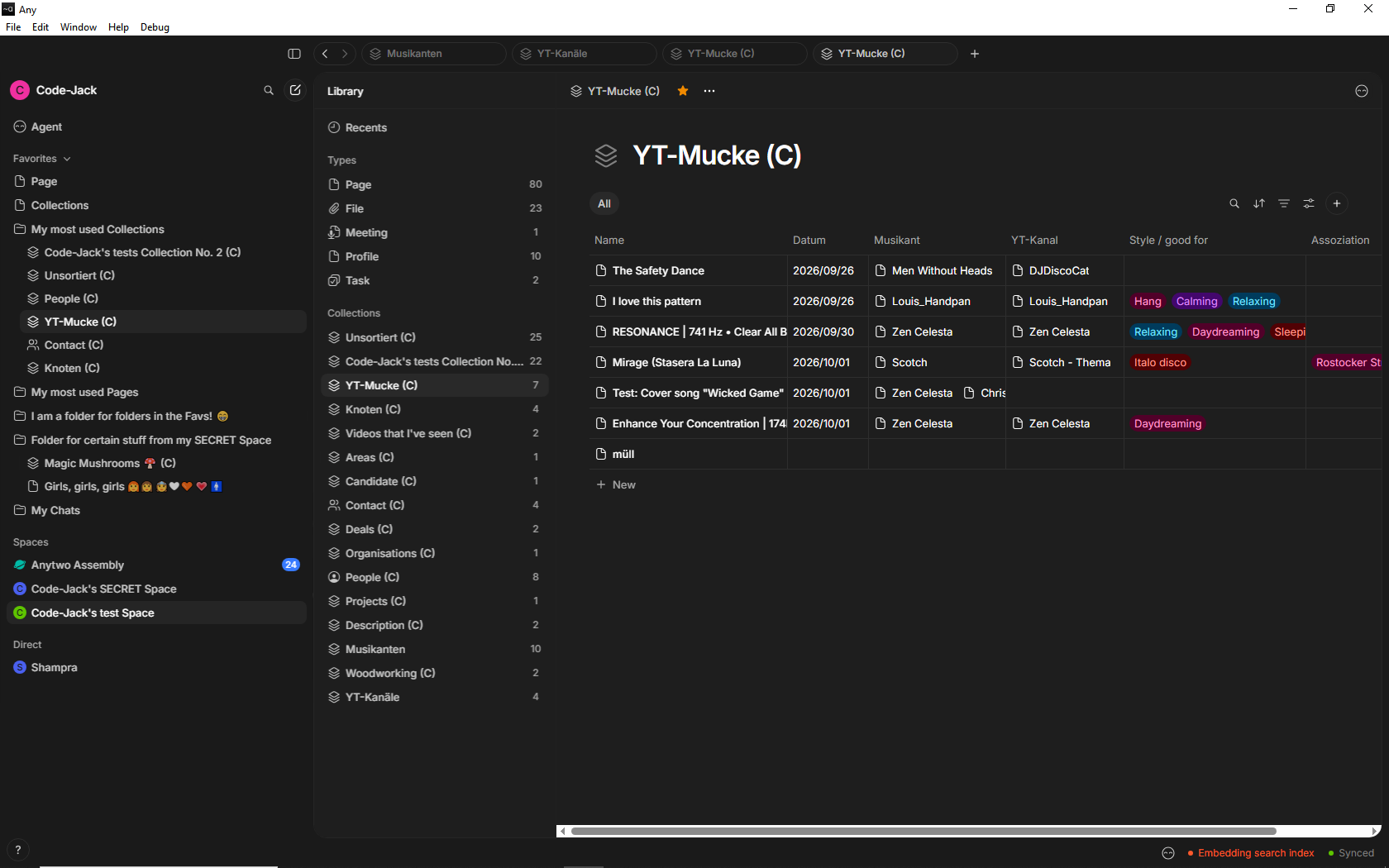
Actually I try to put more or less “real” data into AnyTwo, that are connected to each other, similar to my real Anytype space.
At the moment, I try that with my music Collection.

Each song has an artist. In some cases even more the one (cover versions).
And because most of my music comes from YouTube, each song is also connected to an YT-Channel.
To manage that, was never really convincing in Anytype.
But in AnyTwo, by using a new principle that I haven’t shown in a video yet, I was able to improve the old functionality without having more effort to manage everything.
AnyTwo solves here some problems that I’ve always had.
There are still two flaws (unfinished functions), but I’ve already reported them so that they become solved quicker.

As you already know, just today came version 0.1.5 and it was a HUGE update where so many things became improved!
Even scrolling thorough the long list is a little exhausting. Unbelievable how fast the devs work!
And it was a pure joy to see how many of my own reports and request have become done!

And the work flow now:
Things that have been for me always a 15 seconds slow task in Anytype, are now a quick and frictionless feeling “click, click, click, ready” -thing in AnyTwo!

Still things to do for the devs, but the target line is not only in sight, it’s already half in reach.

Sorry, but I can’t help.
I have no real experience with collaboration.
Once, we Bug Detectives tested it a little, long ago in Anytype.
And actually, @Shampra has Editor rights in my AnyTwo test Space. Maybe he can tell more?

But what we are supposed to say?
He’s able to edit my Objects, or to reorganize things.
If he does that, it is as if I myself would have done it.

In Anytype, we once have tested to edit the same Object at the same time. That has felt chaotic.
We didn’t test that in AnyTwo, but I would expect the same strange feeling.
I mean, imagine you just write in an open Page and suddenly appears in another place of the same Page something out of thin air on its own, because the other person just does there something.

Group Chat works, also personal Chat. But bott haven’t full feature parity with Anytype yet.
Today came improvements, but we haven’t tested them.
It’s too much to do for us all and I suffer from sleep deprivation since I’m a tester (can well imagine what Kaye feels; it looks impossible what an amount of work he does every day!).

But does it really matter much for you?
The release is expected within two months. Then you can see it all with your own eyes.
I can’t know what your exact needs are and what you expect.

Dear @Code-Jack,

No hard feelings, I love straight and honest speech.

However, I (and please excuse me here for being persistent) do still not really understand why

makes a difference because of being a global Property.

Doesn’t the same problem arise with two local properties with your scenario?

If there is a difference, you have to mark the difference as such. If there is not, maybe you can solve it by a ‘combining-option’ that make it possible, to show two or more properties in the same collumn?

Thanks a lot! And the same to you. I appreciate very much your work and all the time you invest in explaining AT and A2 to everybody and share your passion for any.
Thank you for that, also!

OK, I try to explain it as clear as I can:

Global vs local Properties:

Imagine you want to combine the Spaces of four family members into a shared “Family Space”.
Father, mother and daughter lived all their life in Europe, while the son has lived in the USA for a year and is back now.

Each of these four family members have a Property “Temperature” in their own Space.
Three of the family members store values that are meant in Celsius, while the son comes with values that are meant in Fahrenheit.

What is the App supposed to do during the import?
– There are two possible ways how it could handle these four “Temperature” Properties:

  1. The App could combine these four identical named Properties into only one single global Property that still has the name “Temperature”.
    But now we have a big problem: values with unitis in Celsius and values in Fahrenheit are mixed with each other in one long list where it isn’t clear at all which value is meant in Celsius and which in Fahrenheit.
    Big problem!
    .
  2. The App could do a different attempt: It could change the name of the three imported Properties a little, for example by adding a number at the end of the name.
    We end up with having these four temperature Properties in our Space:
    Temperature
    Temperature (2)
    Temperature (3)
    Temperature (4)

The second of these two listed possible ways means:
In principle remain the four Properties separated, so as if they would be restricted to local. They have name that are a little different, therefore they are separate Properties that have nothing to do with each other.
Their scope would still be global.
Only thing is, that we have no benefit from having their scope global.

But we have a pitfall:
Our lists of global Properties has become unnecessary long.
We have now four slightly different named “Temperature” Properties, all work global, but a Query wouldn’t be able to show all temperature values in one single column of a View, because they are four separate Properties!
– So, no benefit at all from this attempt!

Now imagine again that import situation, there is another aspect:
You import three large Spaces into the already existing Space.
Each Space comes with a hundred Properties.
You’ll end up with having now overwhelming 400 global Properties in that Space! – Without having benefits from their global scope.

In that overwhelming long list of 400 global Properties, do four global “temperature” Properties confuse the user.
All have global scope, without any benefit for the user that global scope.

The better attempt: local Properties

Properties with scopes that are restricted local to the Collection.
Benefit 1:
There is no endless long list of 400 global Properties in which four are for the temperature.
In fact, there is nowhere such a list, because there is nowhere a global Property; all Properties are restricted to local scope.

You may ask:
“But what if I want to see the temperature values from everywhere in a Query?”
– In such a case, a Mini app could enter the game.
You’ve given the AI buddy the prompt for writing such a “Query” Mini app, that merges all four Properties together into one single View column, that lists all values from all four Collections in one column, but all values are shown in Celsius!
Yes, the values from the one Collection that stored values in Fahrenheit becomes (for the purpose to display them) converted into Celsius so that they can become displayed together with the original Celsius values that come from the other three family members!

Again: the list (column) in that “Query” only diplays all available temperatures in Celsius, although these that come from the USA guy are originally stored in Fahrenheit and remain stored in that format!
So, if the USA guy is used to put Fahrenheit values into his Collections, he can continue to work so.
It doesn’t affect the data of the other family members.

All Collections are encapsulated and have local restricted Property scopes.
Every family member has still his own Collections.
Everyone can continue to work as he always did.
But there are Mini apps possible, that can deal with values that come from different Collections in a complex way.
You simply give the AI the prompt to write the needed Mini app for you, that does these complex things.

But this is only possible if the data aren’t mixed with each other at the deepest level!
They must remain separated (local scope), so that each of them can continue to posses the original meaning.

Even a single person in this family can have multiple Collection with different meanings of “temperature”.
If the father works in a laboratory, he is maybe used to protocol physical test results in Grad Kelvin.
So, he has a Collection for the experiments where “Temperature” is meant in Kelvin.
But if je journals his private trip to Africa, he will note in the Journal Collection the daily temperature in Grad Celsius, as everyone in Europe does.
That all doesn’t affect the son who came back from the USA.
He can continue to use note temperature Values in his Collections in the unit Fahrenheit.

There is now long list of 400 Properties with confusing multiple “Temperature” Properties that sometimes have different meanings. There is no global Property at all, not even a single one!
But a Mini app is able to give us a “Query” that displays all temperature values from all Collections in one combined column, and all values are shown in the unit that we want!

– Hope now it has become very clear what the benefits of encapsulation and local restricted scopes are!
Parabel:
You store all your drinks in separate bottles. And you can mix them on demand in any imaginable way to any imaginable drink, at any time you want!
– That wouldn’t be possible if you would have poured the different liquids into one big bucket from start on!

Unfortunately, not really.
I work collaboratively at my job (Notion, Google Drive, etc.), and I also do a bit of that on Anytype (and Notion) for personal projects.
So I have high hopes for Anytwo, which is supposed to replace and surpass all of that!
But right now, we need to test the editing features, and on the multiplayer side, there’s still way too much missing to really dive into testing that yet. It’s not for lack of enthusiasm, and I hope it’ll come—like so many other features to test once we get there (widgets :squinting_face_with_tongue:, collections—which will be the next focus even though we’re already working on them—web publishing, formulas when they arrive, inline collections—which are one of the big features I’m eagerly awaiting—the overall look and feel, and collection views, which are currently limited to the bare minimum, …).

If Code Jack leaves a “sandbox” area in his yard, I’ll check it out if and when I have time. For starters, there aren’t any strict rules about what I can do there—I can wreak havoc all over his place (all the more reason for me to hold back, or set aside a specific area for it).

Test, rate, submit a clean request, test, and so on—then realize you have 30 notifications on the site to read so you can ideally respond or verify that a fix is working properly… They’ve slowed things down (only 5 notifications today, and no “Done” marks)—phew, I wouldn’t have lasted much longer, but it feels like a weird lull :joy:.

Dear mate, simply add a Collection “Shampra and Code-Jack collaborating”.
Make what you want in it. Add Pages, etc. etc.

As you know, one can see who’s the creator of an Object and filter a View for that, so it wouldn’t be a problem for me to clean up the mess of your added Stuff later.

This Space is for testing purposes.
Of course I would perfer it if you don’t modify my own Collections and Objects.
But if you add something that’s intended for testing collaboration nothing can gor wrong.

Oh, btw.
As you know from my videos, I have in my Favorites the Folder that contains stuff from my so called “SECRET Space”, about Magic Mushrooms and “Girls, girls girls …” – al these nonsense about “sex, drugs and crime”.
– I strongly suppose that you have your own Favorites and you can’t see the content of that folder?

Could you please expand the Folders in the Favorites section and post a scrrenshot?

Here is what it actually looks for me:

I have my own favorites.
And of course I can see only the shared space, not the secret :frowning: :smile:

Otherwise, I was planning to suggest a shared space with several testers, dedicated to that. But I’ve got a personal project I need to finish first ^^.

Thanks.
It’s half good and half bad that everyone has his own Favorites.

If I configure an ingenious well made Favorites section that’s made for efficient team work, and then proudly invite some guys, I would like that they can benefit from the well configured side menu from start on.
(But of course without the private stuff from the SECRET Space in it!).

– That every new invited user needs to built the Favorites section from scratch on new, is not wanted in such a situation.
I think it would be better if they already have the same state as the Space owner has in the moment when he confirms the new user.
From that moment on, the new user should of course be able to modify his own version of the side menu.

Baaah, but if I think about all the details of the workflow, like for example an option to transfer a favorites section to a new invited member, everything gets a new kind of complexity that then also feels a little overwhelming for everyone.

I’m not a collaboration guy, therefore I better don’t think too much about all that and don’t request anything about that.
These who really need collaboration should do it. They know better what they need, then I do.

I end this thread now and continue in a new one.

Because the new version v0.1.5 came out yesterday, and because I want to give you a less messy thread, I continue in a new thread for that new version.

There is an index in the start post that lets you jump direct to the interesting section, without the need to scroll through an endless long an messy thread:

This new thread shows more concrete and real work examples “from real life with real data”, instead of only showing relative random aspects of the GUI with messy test data from fantasy.
No more “bbllahblubb this is an example blablah” in the new thread!
– Real work situations!

This was already helpful, thank you. I was just interested in your first impression for this. That these features are already here and working is a good indication for the launch in two months.