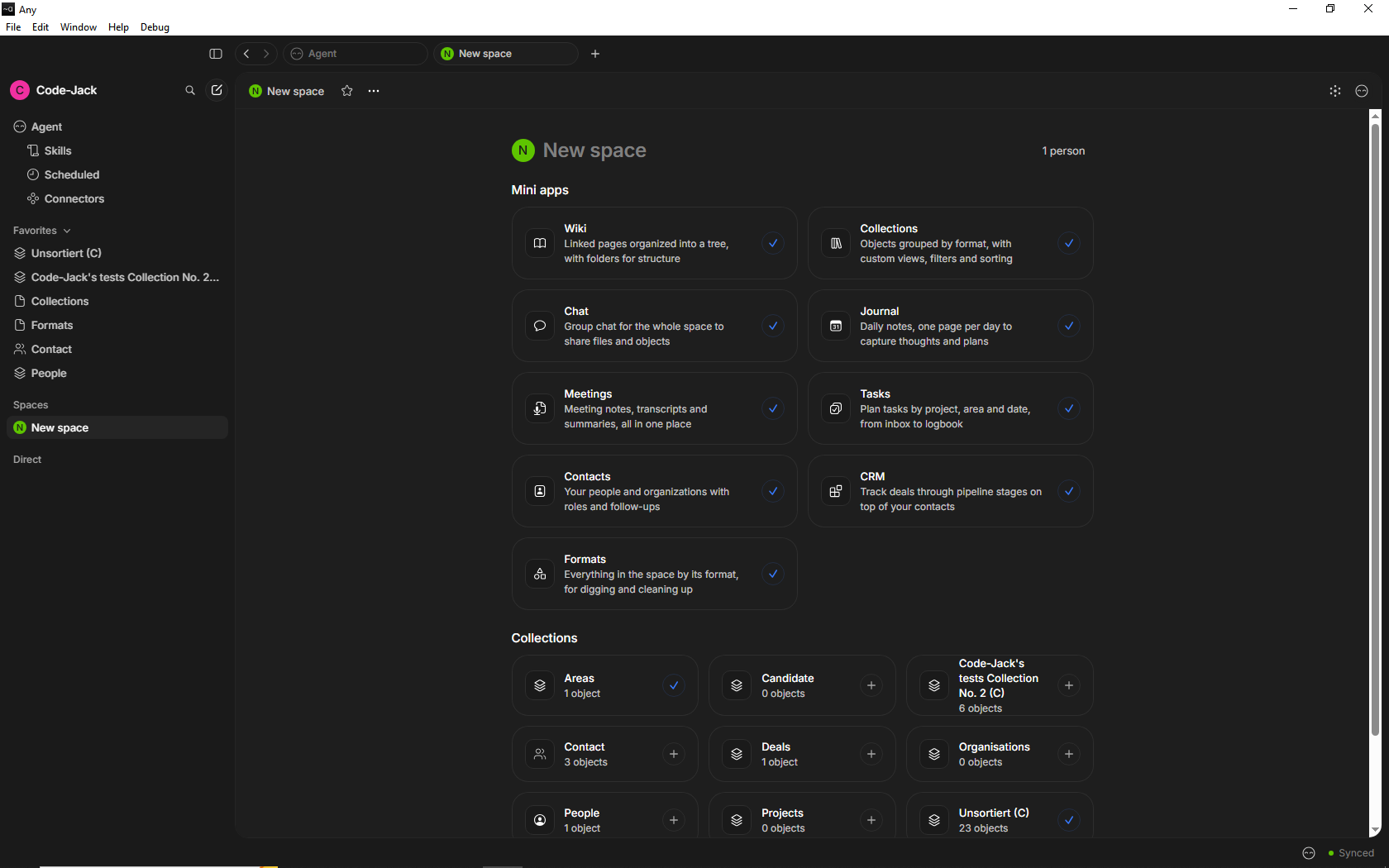
AnyTwo -- first impressions

I know, all of you are curious, so I want to give you some food.

The installation on Windows was mostly smooth.
Although I didn’t feel “home” in an instant, already after an hour it felt better.

Many features we know are still missing. But on the other side, there are already lots of nice details and small little improvements, that are really tasty!
Some examples:

Editor:

  1. You can change or modify Properties direct in the open Page.
    There’s no longer need to do it in the properties menu on the right side.
    In fact, there doesn’t exist a Properties menu anymore. It’s not needed anymore – nice!
  2. There is a new kind of Property.
    You can add a “money” Property, not only a number Property.
    At the moment, it shows USD as the only available currency, but it is a start!

Collections:

  1. You see always how many entries the Grid has (that’s now called “Table”).
  2. If you scroll down in the Table, the whole header remains accessible on top, not only the column headers, but also the Views and so on. – I’ve missed that nice feature for long!
  3. You can select/deselect single entries of the Table, or toggle them all together at once.
  4. Very nice: you can wrap the content of single columns.
    That’s a huge improvement compared to Anytype where the wrap feature affected all columns, also the not important ones.
    That avoids in many cases unnecessary expansion into more then one line. As result, there is now less need to scroll so much in large Collections.

Gnaah, while I was writing this post, suddenly an automatically update occurred and caused an error that threw me out of AnyTwo.
Sorry, I must stop here and continue later, in a separate post. Seems that I now need to restart my computer …

:smile:
So, same bug.
(and less positive first impression, I think)

Now I’m in again (after some trouble, though).
There are bugs, yes.
But I must say, that the impression at this early stage is still good.

Bugs are normal at such an early stage. They will manage that.
But what shines are the many good ideas that have already found their way into AnyTwo.

There’s no doubt on my side that this product will be ready to use this year, with lots of benefits compared to Anytype.
It will soon be so good, that the competitors must already get sleepless nights!

Test continued:

Editor:

  1. YouTube Embed already works. That was very important for me!
    It has even a little more features, then the YT Embed in Anytype.
  2. The Simple Table can now calculate!
    We have seen it in the Town Hall and it really works!
    At the moment, I have a Page open in that an YT Embed plays a video, while I edit in the same Page a Simple Table and enjoy how the calculations updates immediately if I change a value in an other cell.

Contacts:

  1. Anytype was never good for managing contacts. This has become WAY better!
    I would need to write a lot to describe it, even videos that show the features would become long, simply believe me, it’s a whole new dimension!
    If a person has a wife and two children, a boss and some co-workers, as well as friends and colleagues, you can easily connect them in a meaningful way, without overloading the person’s profile.
    – This is the magic of the dynamic headers that show the actual needed context.
    You can, for example, add Views to a person as we know it from a Collection or Query.
    In some sense, the strict division between a Page and a Collection has become blurred.
    Even without the need to add something like an Inline Collection, the Page aka Contact behaves somehow like a Collection.
    You can add Properties to each View as you want.
    And to say it again: we speak here about a kind of Page, a Contact. A Page that in itself behaves like a Collection, that’s so mind-blowing!

To be continued …

Test continued:

I know, you all have seen it in the Town Hall, but now where I test it by myself, it blows me away!

Editor and the “Simple Table”:

  1. Complex nesting of different Blocks:
    You can now deeply nest Blocks in a complex way.
    For example, you can put Headings and numbered lists etc. into a table cell.
    Yes, a single cell can now contain a whole list with multiple lines, and also Headings and more, even images from the clipboard, that you paste direct into the table cell!
    – But you can go even further then that: now move the whole table into a Quote Block, that’s already mixed with some other content.
    And go further again: now move this whole Callout (that already contains a Table with a numbered list in its cells, as well as Headings, as well as images) into a Callout Block, that’s already mixed with some other nested elements.
    The possibilities seem to be endless!
    .
    What alone the “Simple Table” can do now, is already fantastic. How long have we longed and begged again and again for each single of this bundle of features that has now suddenly become real?
    (Remember: the table can now calculate!)
    But that you can put such a complex table even into other Blocks, to increase the nesting further and further, is really impressive!
    This all doesn’t feel only like “some more features”. It feels like a whole new level of freedom!
    Only restriction that I’ve found at the moment: You can’t put a whole Embed into a table cell.
    .
  2. Synced Blocks:
    A long wanted feature has finally become real!
    Create a Synced Block, put your content into it (again: it can be complex and nested content) and insert the link to that Block into another Page. → an identical copy appears there.
    Now edit in one of these Pages the content of that Block and you’ll find the exact same content in the other Page. It works back and forth.
    – NICE! How often did I need this exact feature? – Very often!

Thank you very much for taking time to put in your experiences! Felt like as if I did it all myself! It seems really good progress and way much features (especially the old table features that I hit a roadblock on to seems gone)!

Awaiting to get my hands on to the new product, but until then, thanks for all of you who have a chance to shape the product!

Cheers.

If you want to see how much the devs work, simply look here:
https://say.any.org/changelog

The list of entries, even for a single day, is impressive.

New update this morning :sweat_smile:

Thanks a lot for that @Code-Jack!

Good idea, this will be my new morning routine instead of the newspaper. :slight_smile:

Continued:

Navigation and contacts:

Recently I already gave this example in another thread:


Imagine, you get a telephone call from an angry customer and you need to find a bunch of somehow related Objects as quick as possible. For example to see all the recent conversations with that person.
– I know this unpleasant situation only too well!
Anytype was always painful slow in such “emergencies”.
“Where do I have these data? How can I quickly see them all together?”.


And this has indeed totally changed!
Although it needs some time to wrap the brain around the new navigation concept, it’s already absolutely clear that the described situation is no longer a problem, it’s history.

It’s hard to describe, because there are so many more and different, but much better ways to navigate and to see related Objects.
In Anytype, I barely used manual connections between Objects. Because, in practice, it was too cumbersome to use on a daily base.
Instead, I used Queries and Tags as my main concept for managing related Objects.
But this concept was restricted. It was never good suitable for building a management system for contacts and the conversations with them.

AnyTwo does here everything way better and it does a lot things on its own (without AI btw.).
I really don’t know how to describe it in short.
Connect some Objects (that has become as easy as tagging them) and there are suddenly kinds of “Collections” (that not always have this name) where you can see them all together. And such a “Collection” is in direct reach as soon as you have one of these Objects.
But you can also find them on different ways.

You have all needed Objects together in an instant. Earlier conversations, invoices & contracts, images or other files, whatever.
I see that there are placeholders for functions that are disabled at the moment, that indicates that there is even more to expect soon. But what already works is impressive on its own, even now.

I know, I describe it very badly (need sleep!), simply get the impression from my words, that the navigation works quicker and better and frees you a lot from thinking.

In our good old Anytype, some highly advanced guys have found Incredible smart workarounds in the attempt to ease the pain. They found ways to make Queries that automatically generate links, similar as a Collection does (really: Queries that show links to the Objects in the Graph!). But even astonishing acrobatic like that didn’t help enough, also it was again cumbersome in a different way – as well as very hard to understand what’s going on.

AnyTwo solves it really. Without dirty tricks. And no, no AI involved! Simply very well made homework.
In my three years here, I’ve so often thought: “why don’t they see the obvious?”
But now they show us, that they DID see!
Something has blocked them all the time. But that’s now over.

– This was my first day of testing AnyTwo.
I can’t say that I understand everything, especially the navigation has still its secrets.
But I hope my descriptions can ease the burning curiosity of those who didn’t got the chance to try it.
Believe me, it’s worth to wait for the the thing that they cook here!

It’s fantastic that you’re sharing the good and bad experiences with the community. Love it! :slight_smile:

Yes, this was kind of hard to explain during the Town Hall. The editor is fundamentally rebuilt, which means that it’s just much more capable across the board. It’s impossible to list every small feature/benefit. But when you add them up on the whole, it feels like a huge upgrade.

Although I use both Anytype and Anytwo in parallel, I really much prefer being in Anytwo today—even though it has less features.

There’s a lot more work to be done, but I’m glad that you’re able to see the fundamental different with mini apps in Anytwo. As you described well, Anytype is amazing for people who understand the system because they can manipulate the tools in specific ways to get exactly what they want out of it. But most people are not like that. With mini apps, we erase the need to learn the tools to build what you need — we should just build you what you need.

But I want to be clear to readers, there’s a lot more work to be done. The information architecture problems to resolve are incredibly complex. And to build it into an experience that’s easy to understand…well that’s a whole different challenge on top.

We’re excited by the challenge, but we want to be transparent that there’s a lot to improve.

As a general principle, we want to avoid gating any capability behind an AI agent—even if you’re running local models. That’s not always possible because AI can do unique things that would be very tedious for humans to do (as demonstrated during the Town Hall demo). Regardless, you shouldn’t need to rely on AI to perform actions part of the core. But we do believe those who use AI will have an additive experience, because you have more tools at your disposal.

Yes, apologies to the Windows users. :stuck_out_tongue:

Great write-ups! I was so happy about calculations in tables on a page, woohoo!
And I haven’t gotten around to testing Contacts, so this is very encouraging.

Continued:

Yesterday, I used the Nightly Built.
According to @kaye , this could explain the issue that I’ve described in my first post, where an automatic update kicked me out.
He suggested to me to deinstal the Nightly and to switch to the Alpha version, what I did today.
Since then, such a problem did not happen anymore.

But: switching from Nightly to Alpha affected my left side menu, all my settings there became lost.
But the data was still there and functional. I’ll report that to the team later, in our Feedback Board.

But Now I want to say something about the topic “feature parity” and the actual state in general:

Feature parity … for some of us already now

The thing with the feature parity is hard to compare. For me, personal, would AnyTwo already be an acceptable replacement for Anytype.
I know, my dear fellow @Shampra showed himself yesterday much less impressed then me. But this could have two reasons:

  1. Maybe he didn’t test it as much as I did, so that he still didn’t discover certain things.
    – That could well be the case; I myself have needed some hours to discover certain things for the first time. Only after that, things became suddenly clear and enjoyable.
  2. Or it could be, that he needs missing features that I don’t need at all.
    For example the Kanban, or the Calendar.

It is so:

Editor:

The editor has in principle not only already feature parity, but already yet a huge lot of benefits and additional features, compared to Anytype.
What is still not there, are the Embeds.
Bui, luckily, the IMHO most important YouTube Embed is already there and it works great.
– I myself used the other Embeds only very little, so I would say that all the other benefits of the new editor outwight the missing Embeds. They will come later, I’m convinced.

Conclusion for the editor
For users like me, the editor is already well capable to replace Anytype.
All what we know is already there and it works well (if you don’t need other Embeds then YouTube).
I would even say, AnyTwo’s editor has already less bugs, then the one from Anytype.
More features, less bugs – good deal!

Navigation:

The navigation is hard to compare. It is different.
It has benefits, compared to Anytype, even lots of them.
But it also needs time to become familiar with it.
If you expect, you could find or rebuilt your own settings (for example for the widgets menu) in AnyTwo, then I’m afraid I’ll have to disappoint you.
You’ll need your time to configure everything so that it fits to your personal preferences.
But, on the other hand, the new concept is so much mightier, that it may be that you suddenly no longer want your old preferences. That you want enjoy the new concept better then the old widgets etc., even if it costs you two days or whatever, to become familiar with it.

Conclusion for the navigation:
If you mentally are ready for that new concept, I would say, AnyTwo could already today replace Anytype.
The navigation works, it even works well, but it is very different.

Kanban & Calendar:

  1. At the moment, there is no Kanban.
    – For someone like me, it doesn’t matter, because I never used it.
    .
  2. There is also no Calendar.
    But, on the other hand, there is the new “Journal”.
    – That’s not a direct 1 to 1 replacement, it’s a whole new thing. But it can be a kind of replacement for some of us. It is a very different thing, what should I say?
    I didn’t use Anytype’s Calendar. I somehow didn’t like it very much.
    And I believe that I will also never really use the Journal, at least at the moment it looks so.
    I prefer it, to write my journal in separate Pages for every day and to hold that all together in a Collection.

Conclusion for Views as Kanban and Calendar:
– They don’t exist at the moment. If you don’t need them, it doesn’t matter.
But if you need them, you’ll need to wait til it becomes implemented.

Bugs:

I was astonished, how little bugs there was.
Yes, there was some and I’ve already reported them.
Yesterday, I wrote 17 posts in the Feedback board, most of them was bug reports. But mostly less important stuff.
Now the clou: ca. eight of my yesterday reportet bugs are today already fixed!
I can’t say exactly, how many bugs it really was, because I get bombarded with notifications in the Feedback Board, so I’ve lost the overview.

The point is:
The editor has less bugs then Anytype, I would say.
The navigation gives the impression that there are barely no bugs.
Other bugs that I’ve found yesterday may have had to do with the Nightly version that I’ve used yesterday. You would of course not use a Nightly built, not even an Alpha version, so it doesn’t matter for you.

conclusion for the situation with bugs:
It looks great, guys!
Yes, there are bugs, but the overall situation is definitely not worse then in Anytype, it’s the opposite, it’s already better. At lest, I would say so.
And the speed how they fixed reported bugs, is increadible!

Thanks to the team!

My deep thanks to the team and to @kaye , who manages also the Feedback Board, in addition to this forum and some more work!
He repeated the steps in my reports to confirm them, added own comments and sometimes even own videos to inform the devs as precise as possible.
From yesterday to today, they already fixed a big bunch of them.
It must be an Incredible amount of work what Kaye and the devs do! Thanks guys!

Begging you all for patience!

I beg for patience from all of you who still wait for the invitation to become a tester!
Believe me, we would totally overwhelm the team, if they got suddenly too many testers!
Not even all of us Bug Detectives have received the invitation yet, so please: no one should think: “they don’t want me” if you’re still on the waiting list!
The small team is simply not able to handle that all at once.
I see what happens in the Feedback Board and I can well imagine the stress!

The team makes a highly motivated impression – in my three years, I’ve experienced here nothing like that!
If they hold this speed, most of you could migrate sooner then announced!

First of all, THANK YOU! For the excellent work you’re doing, for keeping us so involved in the evolution of AnyTwo (I’m starting to like that name) and for hearing how the various parts work. I can’t wait to get my hands on this thing. Thanks again!

[Lucky for Google Translate ;)) My apologies as always]

While I appreciate your enthusiasm (and words of appreciation), I still think it’s too early for anybody to migrate over. Give it a few more hours/days of testing and you’ll see that many core functionalities are still missing that we need to develop.

But I do agree with you that for desktop users who do mostly basic things like editing docs, saving stuff from the internet, etc. you may be able to use Anytwo sooner than you think.

Yes, we weren’t exaggerating when we said that we can move considerably faster now thanks to our new infrastructure. But somehow, it still feels like we can’t move as fast as we’d like.

Yes, we would very quickly be overwhelmed and would just end up getting many duplicate bug reports that take more time to ‘manage’ than actually resolve issues.

Time for a first video impression:

The video is without sound, but I display some text in it, that explains it a bit what’s going on.

What I want to show you guys, is a very brief impression of the navigation and the mentioned magic with the headers in Objects, that somemhow make Types outdated and what that all has to do with Collections.


When the video starts, I have only two Contacts.
They are connected in a simple way: one person is the father of the other, what I shortly show.
Nothing special til here.

Then, I create a normal Page (about the weather) in a normal Collection.
– But suddenly, I remember that I’ve met a new guy today who gave me his address, therefore I have suddenly the wish to make a Contact out of this Page!

To make it clear: the Page about the weather should in addition also appear in my Contacts, because it contains data about that guy that I’ve met.

A click in the magic header of that Page does the trick: It adds the needed header in a Tab.
Yes, Page’s headers have now Tabs!
I add the “Contacts” header and everything is already done!

And see the result: now I have THREE Contacts!
The whole Page that still exists in my normal Collection appears now also in the Contacts.
That all was as easy as tagging a Page.

– I’ve hold the video short, without shreddering your time by filling all these Property fields with real data, but you get the idea.

.
You can add more Tabs in the header and you can configure them individually as you want, by adding all your needed Properties to the wanted context.

I hope you got the idea, why Types are no longer needed.
Each Tab in the header represents an own Type. And it is way more comfortable to configure, then the Types in Anytype. You can do it easily direct in each Page. No cumbersome right side men needed.

But a header Tab, aka Type, is automatically also a Collection than bundles all the Objects of this Type, aka the Objects that have this specific Tab added in the header.

And this works also in the opposite direction:
If you create and configure a new Collection, you’ll find that it is automatically available as a Tab that you could add to a Page’s header, if needed. You would find automatically all Properties, that the Collection has, ready to edit fill with data inside of your Page.

That all reduces the need for thinking about the “how” a lot!

So would it in the end make sense to migrate all anytype tags to anytwo collections, when the day comes?

Super nice :slight_smile: Thanks for your patience in such an update…!

Somehow “Assigning a collection to something” is less intuitive than “Assigning a type to something”. “Adding something to a collection” is more intuitive though. In the case that you showed, basically, you add the page that you are creating to the “Contacts” collection (that magically also brings all the properties that the collection “Contacts” has been configured to appear in this page as fields!).

So, while we did away with types, we also now have brought (pleasantly) new way to speak about collections, right?

It depends from your needs.
Normal Tags still exist as we all know them.
The whole feeling with them is the same as it always was.
– If that is enough for you, then there is no need for you to convert to a more advanced management principle.
And I even believe the devs have here still something in the pipe that expands their functionality in the future.

But if you always have had the wish for way more functionality then normal one-dimensional Tags can offer, then you may switch t another approach.
In some sense, what I showed in the video, could be seen as a kind of “tagging”.
Instead of choosing a Tag, I choose a Collection when I added a new Tab to the Page’s header.
This Tab in the header contains all the Properties of the chosen Collection.

It depends from your needs and your mental model how you use it all.
As we all know, already Anytype was often able to do a certain things in different ways.
So you need to find your personal way.

But the good thing is (although I couldn’t test it):
while a wrong approach in Anytype often ended in a dead end after a while, where it then causes an immense manual work to convert everything into a different management principle, we have way increased possibilities in AnyTwo, because of the AI integration.
Although not tested (I use it completely without AI), it’s to expect that AI can a an extremely powerful helper if it comes to complex tasks, as for example converting a Tag based management approach to a Collection/Type/Page-header based approach.

– But it’s in general too early to think about that so much at the moment, because it’s clear that the devs have more in the pipeline then the things we early testers see at the moment.

Although all that what there already is, feels mighty and advanced, compared to Anytype, I somehow have the feeling that all this together is maybe only a third of what will be til the end of year.
And I think here not only about more basic functions, but especially also about the whole new game changer “Mini Apps”.

The video didn’t show that, but there is a whole section for Mini Apps:

You know, there was a huge discussion in the forum about the new name for “Collections 2.0”.
Only now it becomes more clear to me what the point was:
Collection 2.0 is no longer such a stiff thing as we all know it from Anytype.

If you still have the mindset: “this is a Collection and it has this exact functionality” then things have changed.
See Collections 2.0 no longer als “a Collection” with some more features.
In some sense, it is also a Type. And you can add this Type to a Page in the same way as we know it from Tags.
So, the boundaries between that all became blurred.
It’s a new concept behind that all.

Imagine the devs would have choose a very different name for the thing.
For example “Objectmanagement-thingens”, instead of “Collection”.
(Yes, sounds idiotic, I know).
– Suddenly it becomes more easy to release the old mental model that we have in our mind.

If you want, you can see that all as “Super-Tags as Object”. (Sounds confusing, though).
I mean with this, Anytype has “Date as Object”. A click on a date (on the right place) pops up a “Set” (in the sense of set theory), that shows all Objects that have the same date.
And since very long, we wait for “Tag as Object” that does the same but for Tags.

In some sense, this has become real in AnyTwo.
Similar to adding a Tag, you can add a Tab to a Page’s header. But this Tab contains not only a single and simple Tag, nope, it contains a whole bundle of Properties (Tags included): all the Properties of the choosen Collection.
So, in some sense, this all has become melted together.

If you work in a Collection, then it is a Collection for you in that moment.
But if you just add with a single click a whole bundle of Properties to a Page’s header in a separate header Tab, then it is like tagging.
– But with the difference, that you not only choose a single Tag, but even a whole preset of Properties, that can have multiple Tags included.
In that sense: Super-Tags.

You see, if it is a “Collection” or a “Super-Tag” or a “Type” depends from the sitiuation what you do at the moment.

If if causes headache for you to imagine to add a Collection to a Page, simply think different: You add a “Super-Tag” to that Page.
And if you want to configure that “Super-Tag”, you go to it and you’ll find a “Collection” that contains all the Objects that have the same “Super-Tag” aka the same Tab in the Page’s header.

Yes, yes.
To say it again: release the thought what a Collection is and how it behaves in Anytype.
If the new Collection 2.0 would have a totally different name, it would be more easy to release the old mindset, maybe.

A hammer can also serve as a door stopper, or as the wight for the pendulum mechanism of a cuckoo clock.
If you think “a hammer is a hammer, is a hammer”, then better release this stiff mindset. The thing can play also different roles, depending on the situation.

A Super-Tag, a Type, a Collection … somehow all the same – what you see depends from your perspective at a given moment.