After the update applied to my phone and computer, my computer switched to Network Sync (already discussed and addressed in another post), but now my android app is still stuck on Local Only mode and not syncing to my laptop.
I’ve chosen to not revert back to local only mode - but how do I sync my phone to my laptop now? As there is no way to revert it without logging out of Vault am I correct? I’ve added a good few things to my space since my devices last synced so just worried re data loss. Is there anyway I can switch over my Vault so the non local only setting without losing the unsynced data?
I created a new account in local-only mode on Desktop
Logged in on iPhone connected to the same local network
Wrote some text on Desktop → text was synced with an iPhone app
Changed network mode on Desktop to Any-sync
Wrote some text on iPhone
New text appeared on Desktop.
So the two applications operate in different network modes, but they’re still connected via P2P so they should sync without any problems. Please check if your changes were synced from a phone to your desktop. If it’s not the case, try to close a phone app and open it again. You can also do some simple test, like create a new object on your phone and check if it’s appeared on your desktop
Also I conducted a small experiment with changing network mode on iPhone.
I closed a Desktop app to make sure that there is no devices in a P2P network
Create a new page on the phone
Logged out from the phone app
Changed network mode to Any-sync
Logged in
My new page is still here
This is possible because your data is stored locally on a device. But just in case I had to check it before recommending any actions to you.
So try these steps first
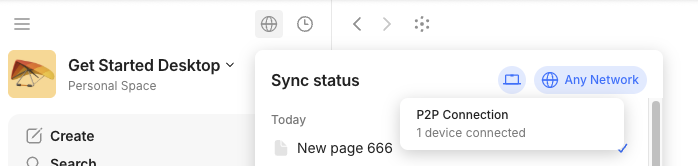
Check if your devices are on the same local network. In each app you should see that your app have connection with other devices. An example from the desktop app: