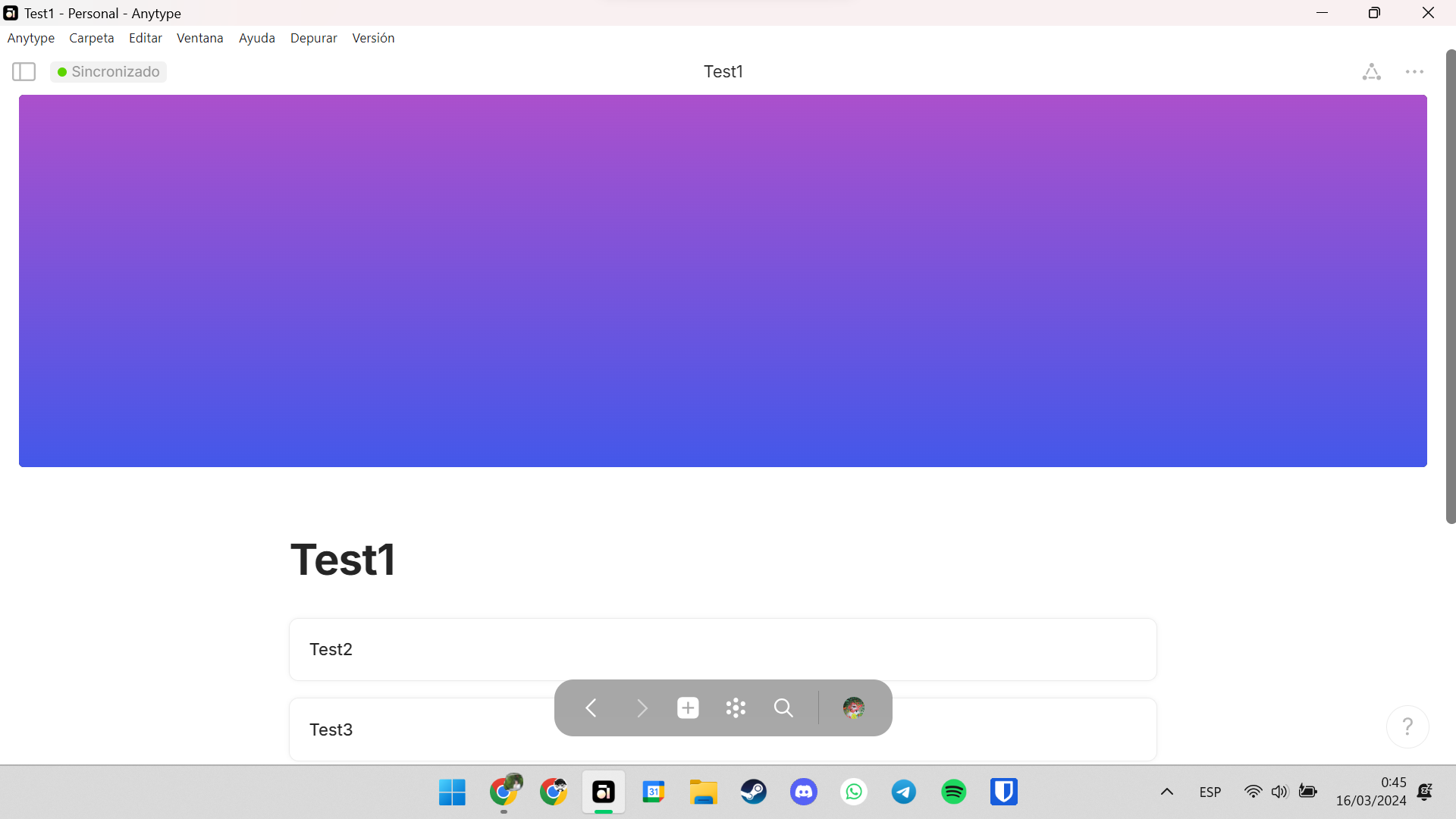
Adding a design option to change size of your cover to small, medium and big.
REAL WORLD USE CASES
I don’t know if it’s the case for others, but for me, the covers occupy half of the window. So, in pages where I have a list of linked pages, I have to scroll down to select the ones I want to enter, therefore slowing my workflow. Being able to set smaller covers in that pages would fix this issue.
RECOMMENDED ALTERNATIVES
Making my UI smaller but then the objects are very small for me.
Maybe that can be accomplished with more ‘Layout Types’, As of now we have Basic, Profile, Action, Note.
Other options like Compact, Multi-Column, Custom, Etc…
I come back to this topic because I have the theory that the cover size has something to do with screen size.
My friend who uses Anytype on a desktop computer has no problem with covers, they are the right size. However, I use Anytype on a laptop, and my pages with covers look like this:
I post this image because maybe devs think this FR is an aesthethic-only thing but that’s far from reality. This is sad because I can’t use a great feature that this app has and I don’t think this size is how it should be, at all.
I eventually decided to remove the cover image altogether… I loved the ability to show it when you link the page on another one & display it as a card … but the nuisance of it on the very page outweighs the pleasure to see a beautiful card on another page.