- First, make sure you have searched for a similar report by checking the Search Index

- ㅤㅤㅤㅤㅤㅤㅤㅤㅤㅤㅤㅤㅤRight-Click, Open Link in New Tab

- ㅤㅤㅤㅤㅤㅤㅤㅤㅤㅤㅤㅤㅤRight-Click, Open Link in New Tab
- Delete all instructions, then fill in each part of the below template clear & concisely*
WHAT IS THE BUG
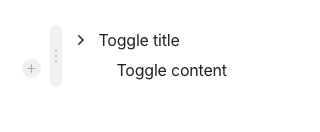
When clicking on a toggle inserted into a Page, the toggle icon (arrow) does not rotate down when it is expanded. The toggle arrow stays pointing right whether the toggle block is expanded or collapsed.
Note: I first noticed this behavior with 0.53.1 and can confirm that it did not exist in any recent previous release. In fact, since I started using Anytype (2 years ago?), the Toggle arrow has never not behaved as expected.
HOW TO REPRODUCE IT
Outline the steps needed to reproduce the behavior in sequence:
- Go to a Page.
- Add a Toggle.
- Click on the Toggle arrow to expand the Toggle.
- ᅟNotice that the Toggle arrow stays pointing right.
- ᅟI was able to provide a video capture (or screen-shot) of the bug, here it is:
THE EXPECTED BEHAVIOR
Clicking on a Toggle arrow to expand the Toggle should rotate the Toggle arrow to point down. Clicking on the Toggle arrow again should rotate the Toggle arrow to return to pointing right.
ADDITIONAL CONTEXT
If further context, people, or related Bug Reports need to be mentioned, do so right here.
TECHNICAL INFORMATION
ᅟProvide your setup info:
Desktop: Top Menu > Help > Tech Info
OS version: darwin arm64 15.7.3
App version: 0.53.1
Build number: build on 2025-12-19 12:23:54 +0000 UTC at #e63221baedd2e83396d1390bac9b46703e6b4157
Library version: v0.44.0-nightly.20251220.1
Anytype Identity: A6usAu8bNdawqqmbyHcoXDF3fi18oitoQJk7yPbu1zhg7Gs1
Analytics ID: e1473d35-0556-4927-bd7b-c10335c6f244
Device ID: 12D3KooWDwnTfGJe2634ajrCp4WeR6jGiSLkMtycG681oxgpJsy8
Ethereum Address: 0x0cb1de706C78A25703C2BA6f090e3BdF7cff47b2