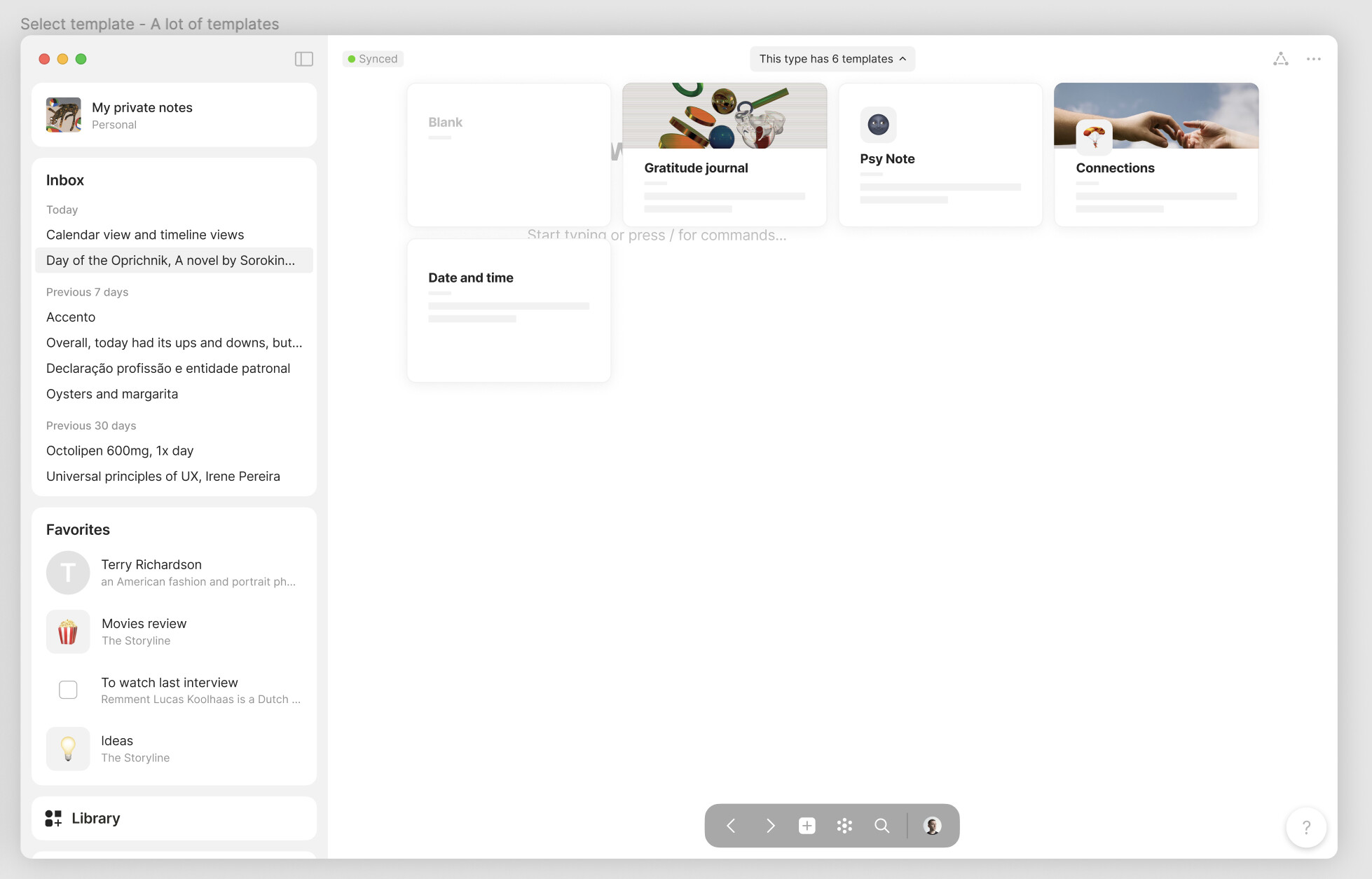
Hi there, we will release updated flow for templates in sets, collections and editor in the next release! Eta end of October / start of November. Beta testers will receive update next week 
This update will give the ability to change templates before you start to edit the object. This is not a direct address of the thread issue but it covers a bunch of scenarios from thread responses 
Sneak peak.
Yes it is!
Absence of this feature is a deal breaker for me. I have been perusing this thread today and astounded that it has been around for more than two years.
Not knowing how Anytype is implemented, I can’t understand why this is a complex requirement to implement. However, implementing a related feature could greatly help: on executing a ‘Duplicate’ of an object, apply the default template to the new object. Any risk of data corruption/loss would not be as severe as applying the current default template to the original object. The user can inspect the duplicated object and decide which one to choose and delete the other (or possibly keeping both).
Can you provide examples of other apps with expected behaviour please?
@ignatovv can’t this be achieved maybe by employing some of the same mechanisms used for conflict resolution when merging two versions of a same object?
Say I have a book Layout with the book cover on top left, a list of relations to its right, then synopsis below that, and at the very bottom my own review
Then let’s say I decide to change the title font size, add a relation in a specific place within the existing ones, change the title for the review area at the bottom, and add a new section between Synopsis and Review, to show screenshots of the movie.
Now pretend you had to merge this new modified version with the original one. Instead of simply replacing it, you’d be going change by change, and applying that to the original layout, until you reach similarity between both.
Couldn’t something like that be done to change the template of objects that have already been populated?
It may be the way but the logic seems a bit convoluted to me. That’s why we’re actively seeking inspiration from products that have successfully implemented similar features and navigated this path before.
It would also be a significant asset if Anytype were a pioneer in this regard.
However, since this is rarely the case, it’s challenging to draw inspiration from competitors …
But I found, PowerPoint does it! 
Okay, it’s not exactly the same type of content. Still, I think it shows a direction, as mentioned earlier: applying a template to an existing object should ‘simply’ adapt recognizable blocks.
PowerPoint simply repositions the “Title,” “Content,” and “Image” blocks, then applies the formatting.
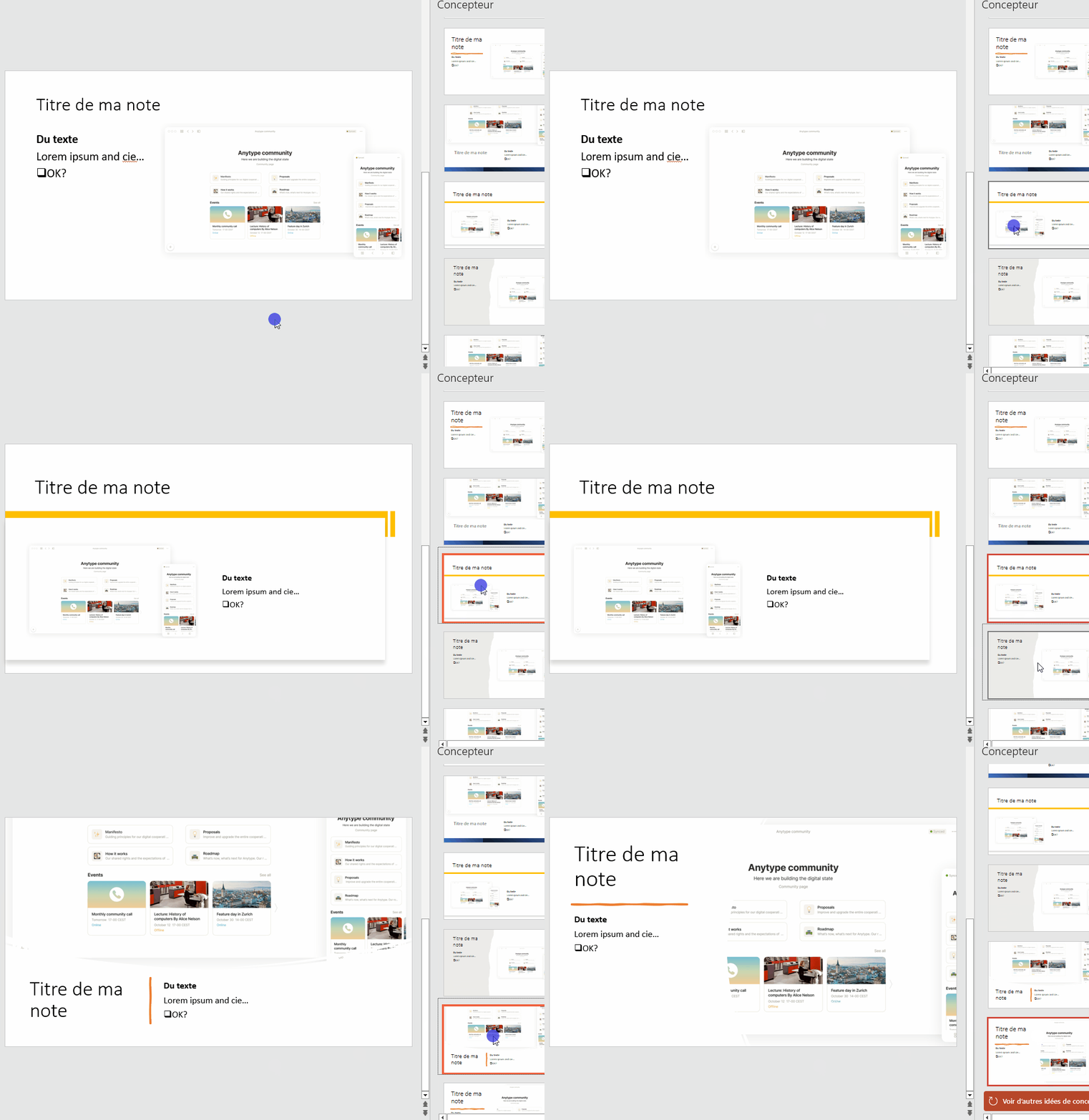
Oh, Wordpress can do it to (apply a page template to an existing page).
On this point, it seems entirely achievable, right?
We can break down the steps…
-
Modification of elements
– Update the object’s relations (at a minimum, addition; removal needs to be studied due to possible impacts)
– Update featured relations (not really a problem)
– Update the cover and icon, only when the template defines them
– More complex: identify included “relation” blocks and add/remove them according to the template (the only question would be their positioning if they are dispersed) -
Formatting
– Adapt formatting (colors, background) on identifiable blocks (title and featured relation, relation)
– Update the layout and layout width (not really a problem)
To simplify things, it may be conceivable to define in a template:
-
The “presentation” content: contains everything applied with the template on existing objects.
Featured relation, relation blocks, image, two-column layout, etc.: it’s easy to map and apply without losing data since the data will not be there (including for relations, which will display the data stored in the relations) -
The “data” content: the body of the object, free part
This part being applied when creating a new object from the template but not when applied to an existing object. I agree, it would be very complicated to manage this correctly, too much risk of having divergent elements.
In my opinion, this greatly limits the issues while addressing a large majority of needs.
Hey 
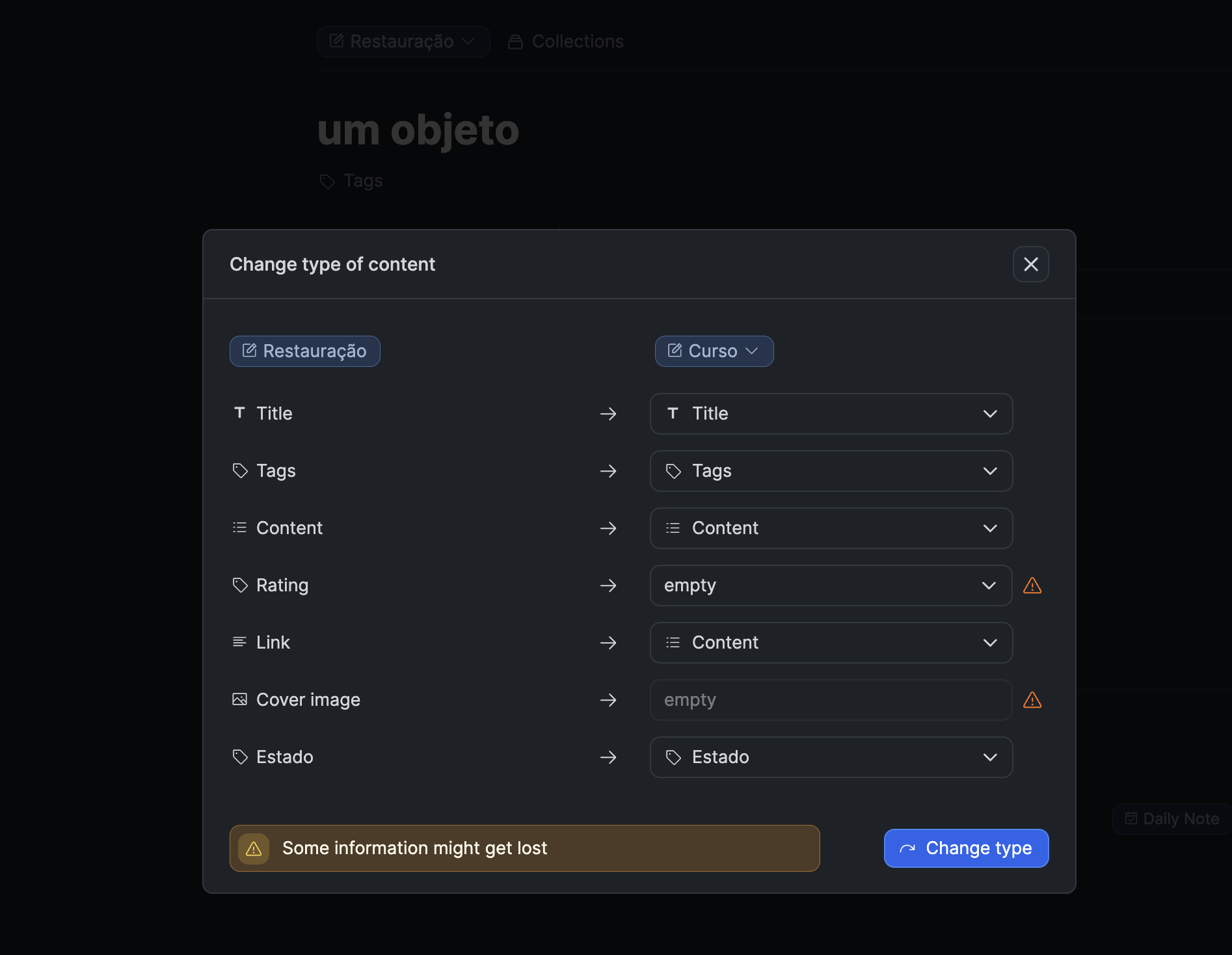
I’d suggest looking at Capacities for this. When changing what would be an object type in Anytype, they sort of “merge” and guess the equivalent relation between objects, and ask the user to adjust and confirm the choices.
Like this:
A temporary solution would be in line with what @ederal.structure suggests. At least being able to append an object’s content or relations to the current one would make the process easier. At the moment I just re-structured my Anytype to avoid being so reliant on templates.
Thank you!
In my humble opinion, more that looking at how comparable apps implement certain features, it is more important to resolve inconsistencies within a product. Resolving inconsistencies is the easiest and most straightforward way to make a product’s design robust, resilient, and extensible.
In this case, I see an inconsistency in Anytype which constitutes a bug which must be fixed:
- Rule: When a ‘New object’ is created, the default template is applied to it.
- Observed behavior: When an object is 'Duplicate’d, the default template is not applied to it.
I believe the ‘Duplicate object’ function is a composite of the ‘Create new object’ function and the copy object function. So a duplicated object must have the default template applied.
Probably I should be discussing this in the ‘Bug Reports’ section, but resolving this bug would greatly minimize - if not complete eliminate - the need for the feature requested in this thread: option to apply template to an existing object.
This example looks like a good way to modify a template and updating all objects using that template. It clearly warns the user, let’s them clearly see what relations might be lost and gives them the opportunity to reattribute them. This looks pretty ideal to me.
No need to break a working feature to create a hack. A duplication is a duplication. It must be the same.
Maybe a suggestion, adding another “type of template”, which behaves more like “forms”, where the template has specific determinated areas for input/text/etc and the display is always evaluated against the current state of the template.
Maybe call it “live templates”. Basically how html web templates work.
I say create a new “type of template”, because this is such a different functionality, that should be separate to make it easily identifiable and explained to the users:
Templates → as it is created is how it stays
Live Templates → always generated according to the current “template” assigned
In terms of software, I am thinking the way Crystal Reports works. Anyway, just an idea… this is a very tricky issue
For some reason, this only seems to be working for objects that were created via the “+” symbol at the bottom of the page. No drop-down menu on objects that were created by linking to inexistent files, even if they are completely empty. Is this intended?
This should not be the case in the latest version. Maybe the type of object you created do not have any templates?
A good example is Capacities. In Capacities, you go to Open Object Settings from the object itself (the 3 dots in the top right corner). Then you can choose which properties to show and the order you want them in. It’s very simple. Once this is done, the same properties will be displayed, in the same order, for all objects of that type
It’s very annoying how Anytype does it atm
I came here and made an account just to find this discussion. I updated a template and noticed that the previous objects didn’t inherit the changes until I re-selected the template. Nor was there a notification (that I noticed) that the template had changed/updated.
My understanding is that this is not yet addressed.
I can’t really imagine committing to AnyType without this feature gap resolved. Just sayin’.
Here is how I would suggest implementing a way to apply a template to the body of a document in a limited way. I think this provides much of the benefit without the confusion of trying to merge template changes, which IMO is infeasible without some kind of programmable template engine.
Use something like a Notion “synced block”.
When I put a synced block in a template, it is added to all objects created with that template.
This way if I create a Set with a bunch of detailed views, then later want to add columns, change filters, add views, etc, all of the objects with that template will also be changed.
If I want to diverge from the template, I simply disable “sync”.
Plus you get the synced block feature, which can then be used more generally.
I think this is even better than just adding a fixed set of relations at the top the way Notion does as it’s endlessly customizable. I can even have a set of “Base Relations” in one template, include that in another template and add subtype specific relations there.
Thinking about this more, for an MVP every template could always have a “synced block” at the top, where one could put a list of relations, maybe some Sets and views, etc. These could be modified in any instance of that template. This would be a good starting point.
Later you can add a more generalized “synced block” feature, which would also allow composition of blocks and re-use.
(Sorry for the spam)
I highly recommend Tana’s Super tag feature. If I adjust a certain Super tag in Tana, all elements created based on it will be consistently adjusted. For instance, last week I created a movie library and added 50 pieces of content to it. Today, I suddenly thought of associating it with a recommender, so I could have better discussions about related content in the future. In Tana, all I need to do is add a recommender field in the Movie Super tag, and then it will be applied to all movies. I just need to select the recommender in the list view. However, in Anytype, I have to manually add this field to each item. And the relations in objects cannot be sorted by dragging.
If you add a feature similar to Super tags, I will definitely switch from Tana to Anytype immediately. BTW, I love your local only mode very much!
I haven’t tried Tana because it’s not offline, however the product looks amazing.
I’m curious how the super-tag works on unstructured pages, or is it basically the same as the “synced block” concept?